
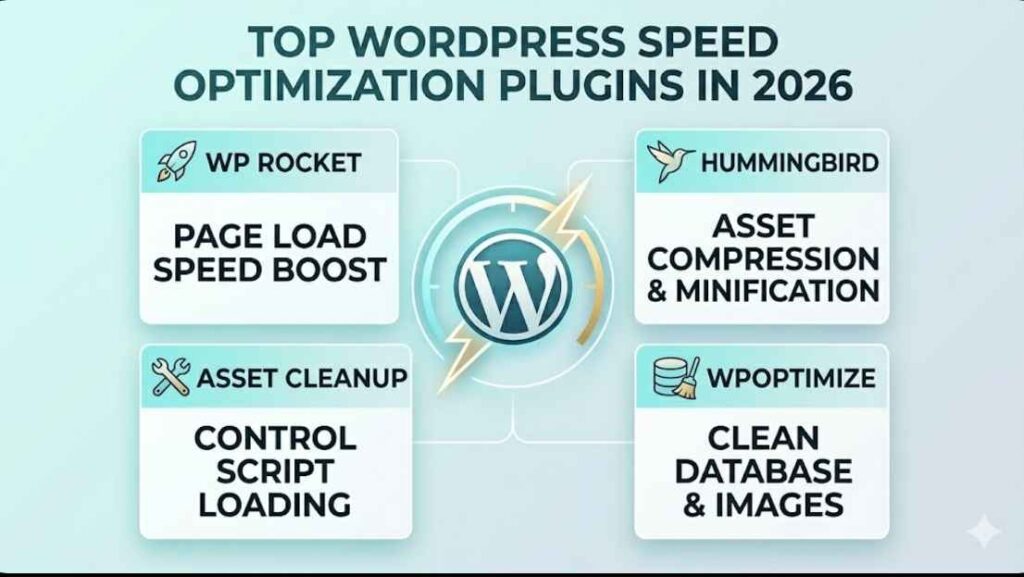
Website speed directly affects SEO rankings, user experience, and conversions.
A slow WordPress website can increase bounce rates, hurt search visibility, and reduce sales. Even a delay of a few seconds can negatively impact engagement and revenue.
That’s why using the right speed optimization plugin is essential for improving performance and delivering a better user experience.
In this guide, we compare the best plugins for WordPress speed optimization, including their features, pricing, pros, and cons so you can choose the right solution for your website.
Why WordPress Speed Optimization Matters
Website performance is no longer optional. Search engines like Google now prioritize speed and user experience as ranking factors.
Fast-loading websites not only rank better in search results but also keep visitors engaged longer and improve conversion rates.
If your website loads slowly, users are more likely to leave before interacting with your content or making a purchase.
Benefits of a Fast WordPress Website
Better Google Rankings
Google considers page speed and Core Web Vitals when ranking websites in search results.
Improved Core Web Vitals
Optimization plugins help improve loading performance, visual stability, and interactivity.
Higher Conversion Rates
Faster websites create a smoother experience that can lead to more leads and sales.
Better Mobile Experience
Mobile users expect fast-loading websites, especially on slower internet connections.
Lower Bounce Rates
Users are more likely to stay on a website that loads quickly and feels responsive.
What to Look for in a WordPress Speed Optimization Plugin
Not all optimization plugins offer the same features.
Some focus mainly on caching, while others include advanced optimization tools like lazy loading, database cleanup, and script management.
Choosing the right plugin depends on your hosting setup, technical knowledge, and website goals.
Essential Performance Features
Page Caching
Caching creates static versions of your pages to reduce server processing time and improve loading speed.
Browser Caching
Browser caching stores website files on a visitor’s device for faster repeat visits.
File Minification
Minification reduces the size of CSS, JavaScript, and HTML files by removing unnecessary code.
Lazy Loading
Lazy loading delays loading images and videos until users scroll to them.
Database Optimization
Database cleanup removes unnecessary data to improve website efficiency.
CDN Integration
Content Delivery Network support helps distribute website content globally for faster loading times.
Image Optimization Support
Image optimization reduces file sizes without significantly lowering image quality.
Best Plugins for WordPress Speed Optimization
There are many WordPress speed optimization plugins available, but only a few consistently deliver strong real-world performance improvements.
Below are some of the best plugins for improving website speed, Core Web Vitals, and overall user experience.
WP Rocket
WP Rocket is one of the most popular premium caching plugins for WordPress.
It focuses heavily on ease of use while offering advanced optimization features without requiring complicated setup or technical knowledge.
Unlike many caching plugins, WP Rocket starts working immediately after activation, making it a favorite among beginners and professionals alike.
Key Features
Page Caching
Automatically creates cached versions of pages to improve loading speed.
Cache Preloading
Preloads cached pages so visitors experience faster loading times immediately.
Lazy Loading
Delays loading images and videos until needed, improving initial page speed.
Database Optimization
Cleans unnecessary database data to improve overall website performance.
CDN Compatibility
Works with most CDN services to deliver content faster worldwide.
Pricing
- Premium only
- Starts around $59/year
WP Rocket does not offer a free version, which may discourage some beginners. However, many users consider the time savings and performance improvements worth the cost.
Pros
Beginner-Friendly
The plugin is easy to configure without advanced technical knowledge.
Excellent Performance Improvements
WP Rocket can significantly improve loading times and Core Web Vitals scores.
Easy Setup
Most optimization features work automatically after activation.
Strong Compatibility
Works well with most WordPress themes, hosting providers, and plugins.
Cons
No Free Version
Users must purchase a premium license to use the plugin.
More Expensive Than Some Alternatives
There are free plugins available that provide similar basic caching features.
Best For
WP Rocket is ideal for users who want powerful optimization with minimal setup and reliable performance improvements.
LiteSpeed Cache
LiteSpeed Cache is a high-performance optimization plugin designed specifically for LiteSpeed servers.
It offers advanced server-level caching and optimization tools completely free, making it one of the most powerful free WordPress speed optimization plugins available.
Because it works directly at the server level, LiteSpeed Cache can deliver exceptional speed improvements when paired with compatible hosting.
Key Features
Server-Level Caching
Uses server-level caching for faster performance and lower server load.
Image Optimization
Compresses and optimizes images to improve loading speed.
Database Cleanup
Removes unnecessary database data to improve efficiency.
CSS and JavaScript Minification
Reduces file sizes for faster page loading.
QUIC.cloud CDN Support
Integrates with QUIC.cloud CDN for global content delivery and optimization.
Pricing
- Free plugin
- Optional paid QUIC.cloud services
Most optimization features are available for free, although some CDN and image optimization services may require additional usage fees.
Pros
Extremely Powerful
Offers advanced optimization features that rival many premium plugins.
Free to Use
One of the most feature-rich free optimization plugins available.
Advanced Optimization Features
Includes caching, image optimization, database cleanup, and more.
Excellent Core Web Vitals Improvements
Can significantly improve Google PageSpeed and Core Web Vitals scores.
Cons
Best Performance Only on LiteSpeed Servers
The plugin performs best when used on LiteSpeed hosting environments.
Can Feel Overwhelming for Beginners
The large number of settings and optimization options may confuse non-technical users.
Perfmatters

Perfmatters focuses on reducing unnecessary scripts and improving frontend performance.
Unlike traditional caching plugins, Perfmatters mainly removes performance bottlenecks that slow down WordPress websites.
It works especially well when combined with a dedicated caching plugin.
Key Features
Script Management
Allows you to disable unnecessary scripts on specific pages.
Disable Unused WordPress Features
Removes features that may slow down your website.
Database Optimization
Cleans up unnecessary database data for better efficiency.
Lazy Loading
Improves loading speed by delaying images and videos until needed.
Local Google Analytics Hosting
Hosts analytics scripts locally for improved performance.
Pricing
- Premium only
- Starts around $25/year
Perfmatters is relatively affordable compared to many premium optimization plugins.
Pros
Lightweight Plugin
Designed to improve performance without adding unnecessary bloat.
Excellent for Reducing Bloat
Helps remove unused WordPress features and scripts.
Works Well Alongside Caching Plugins
Complements plugins like WP Rocket or LiteSpeed Cache effectively.
Cons
No Free Version
Requires a paid license to use.
Not a Complete Caching Solution
Does not replace a traditional caching plugin.
Best For
Perfmatters is best for users looking to fine-tune website performance and reduce unnecessary frontend scripts.
FlyingPress

FlyingPress has gained popularity because of its strong Core Web Vitals optimization features.
It combines caching, optimization, and speed enhancements into a clean and beginner-friendly interface.
Many users choose FlyingPress specifically to improve Google PageSpeed Insights scores and real-world loading performance.
Key Features
Page Caching
Generates cached versions of pages for faster loading times.
CSS Optimization
Optimizes and reduces CSS files to improve rendering speed.
Image Lazy Loading
Delays loading images until users scroll to them.
Font Optimization
Improves loading speed by optimizing web fonts.
Database Cleanup
Removes unnecessary data from the WordPress database.
Pricing
- Premium only
- Starts around $49/year
FlyingPress does not offer a free version but includes advanced optimization features in its premium plans.
Pros
Excellent Core Web Vitals Optimization
Strong focus on improving PageSpeed and user experience metrics.
Easy Setup
Most settings are simple enough for beginners.
Modern Interface
Clean dashboard and user-friendly controls.
Strong Real-World Speed Improvements
Can significantly reduce loading times on content-heavy websites.
Cons
No Free Version
Requires a premium subscription.
Smaller Ecosystem Compared to Older Plugins
Has fewer tutorials and third-party integrations than older caching plugins.
Best For
FlyingPress is ideal for website owners focused heavily on Google PageSpeed scores, Core Web Vitals, and modern performance optimization.
Free vs Premium Speed Optimization Plugins
Choosing between free and premium WordPress speed optimization plugins depends on your website goals, technical knowledge, and performance requirements.
For smaller websites, free plugins may provide enough optimization. However, growing websites and business stores often benefit from the advanced automation and support included in premium solutions.
Free Plugins
Free plugins are ideal for beginners, bloggers, and smaller websites looking to improve speed without spending money.
Many free plugins still offer powerful caching and optimization features, especially when combined with good hosting.
Advantages
No Upfront Cost
Free plugins allow website owners to improve performance without additional expenses.
Basic Speed Improvements
Most free plugins include caching, minification, and basic optimization tools.
Suitable for Blogs and Small Websites
Free solutions are often enough for low-traffic or personal websites.
Limitations
Limited Advanced Features
Some advanced optimization tools may only be available in paid versions.
Less Support
Free plugins typically offer limited customer support or slower response times.
More Manual Configuration
Users may need to configure settings manually for the best results.
Premium Plugins
Premium plugins are designed for users who want better automation, advanced optimization, and professional support.
They are especially useful for business websites, eCommerce stores, and high-traffic blogs.
Advantages
Better Performance Optimization
Premium plugins usually include more advanced caching and frontend optimization tools.
Easier Setup
Many premium plugins work effectively with minimal configuration.
Priority Support
Paid users receive faster support and troubleshooting assistance.
Improved Compatibility
Premium plugins are generally tested more thoroughly with themes, plugins, and hosting environments.
Limitations
Recurring Yearly Costs
Most premium plugins require annual subscriptions for updates and support.
Some Features May Overlap with Hosting Optimization
Certain hosting providers already include built-in caching and optimization tools.
Which WordPress Speed Optimization Plugin Is Best
The best WordPress speed optimization plugin depends on your hosting environment, technical skill level, and website goals.
Some plugins focus on simplicity, while others offer advanced controls for developers and power users.
Best Overall
WP Rocket
WP Rocket delivers an excellent balance of performance, simplicity, and compatibility, making it one of the best all-around speed optimization plugins.
Best Free Plugin
LiteSpeed Cache
LiteSpeed Cache offers powerful optimization features completely free, especially for websites hosted on LiteSpeed servers.
Best Lightweight Optimization Plugin
Perfmatters
Perfmatters is ideal for reducing unnecessary scripts and optimizing frontend performance without adding extra bloat.
Best for Core Web Vitals
FlyingPress
FlyingPress is highly focused on improving Google PageSpeed scores and Core Web Vitals performance.
Common WordPress Speed Optimization Mistakes to Avoid
Even with the right plugin installed, certain mistakes can still hurt website performance.
Installing Multiple Caching Plugins Together
Using multiple caching plugins at the same time can create conflicts and actually slow down your website.
Using Oversized Images
Large image files are one of the biggest causes of slow-loading websites.
Ignoring Hosting Performance
A poor hosting provider can limit the effectiveness of any optimization plugin.
Overusing Animations and Scripts
Too many visual effects and external scripts increase loading times.
Installing Too Many Plugins
Excessive plugins can increase server load and reduce overall performance.
Frequently Asked Questions
What is the best plugin for WordPress speed optimization?
WP Rocket is widely considered one of the best overall speed optimization plugins because of its ease of use and strong performance improvements.
Are free caching plugins good enough?
Yes, free plugins like LiteSpeed Cache can provide excellent performance improvements for many websites.
Can speed optimization plugins improve SEO?
Yes, faster websites improve user experience and Core Web Vitals, which can positively impact SEO rankings.
Should I use more than one speed optimization plugin?
Usually no. Running multiple caching plugins together can create conflicts and performance issues.
Final Verdict: Best Plugins for WordPress Speed Optimization
Choosing the right plugin depends on your website’s hosting setup, traffic level, and optimization goals.
Best Overall
Best Free Option
Best Lightweight Optimization
Best for Core Web Vitals
👉 The best plugin ultimately depends on your hosting setup, website size, and performance goals.


 Reach us on WhatsApp