
If you’ve ever visited a website that took forever to load, jumped around while scrolling, or froze when you clicked a button, you already know what a bad user experience feels like.
Google knows it too. That’s why they created Core Web Vitals a set of performance metrics designed to measure exactly how real users experience a webpage.
If you’ve been searching for core web vitals explained in simple terms, you’re in the right place. This guide will walk you through what Core Web Vitals are, why they matter for SEO, and how they directly impact your website’s success.
Whether you run a business website, an online store, or a blog, understanding these metrics is the first step toward building a faster, smoother, and more user-friendly website.
What Are Core Web Vitals?
Core Web Vitals are a set of specific performance metrics introduced by Google to measure the real-world user experience of a webpage.
Rather than focusing only on technical performance numbers, Core Web Vitals measure how actual visitors experience your website how fast it loads, how quickly it responds, and how stable it looks while loading.
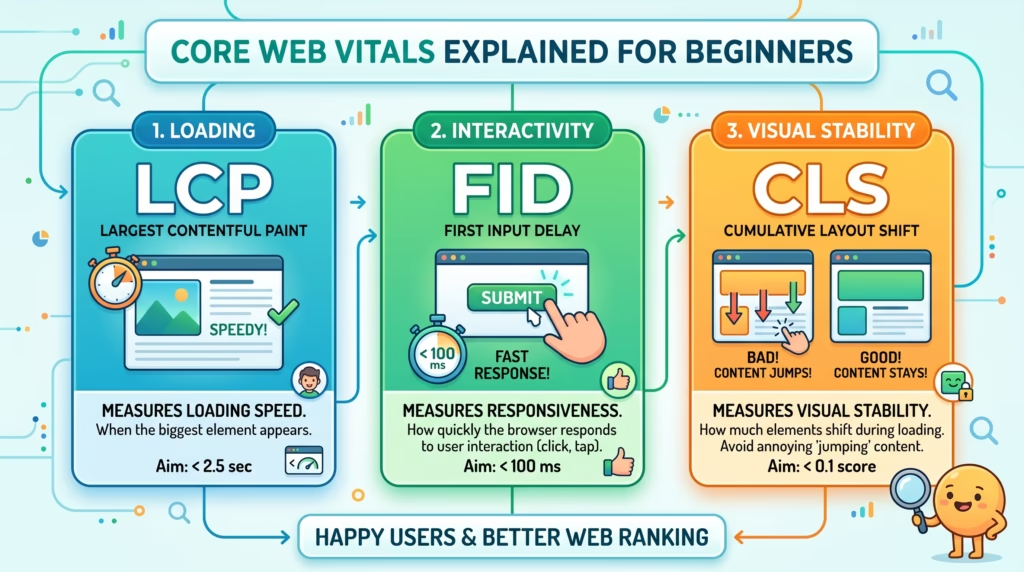
Google currently focuses on three key areas:
- Loading speed
- Interactivity and responsiveness
- Visual stability
These three areas directly reflect what users care about most when visiting any website. A page that loads fast, responds instantly, and doesn’t shift around unexpectedly is a page that users trust and engage with.
Core Web Vitals are also an official part of Google’s page experience signals, which means they play a role in how your website ranks in search results.
Why Core Web Vitals Matter for SEO and User Experience
A slow or poorly optimized website doesn’t just frustrate visitors it costs you rankings, leads, and revenue.
When a page fails Core Web Vitals, users are more likely to leave before taking any action. They don’t wait for slow pages. They don’t tolerate layouts that jump around. And they don’t come back to websites that feel broken.
From an SEO perspective, Google uses Core Web Vitals as part of its ranking systems. While content quality remains the most important ranking factor, page experience signals help Google decide between two similarly relevant pages and the faster, smoother website wins.
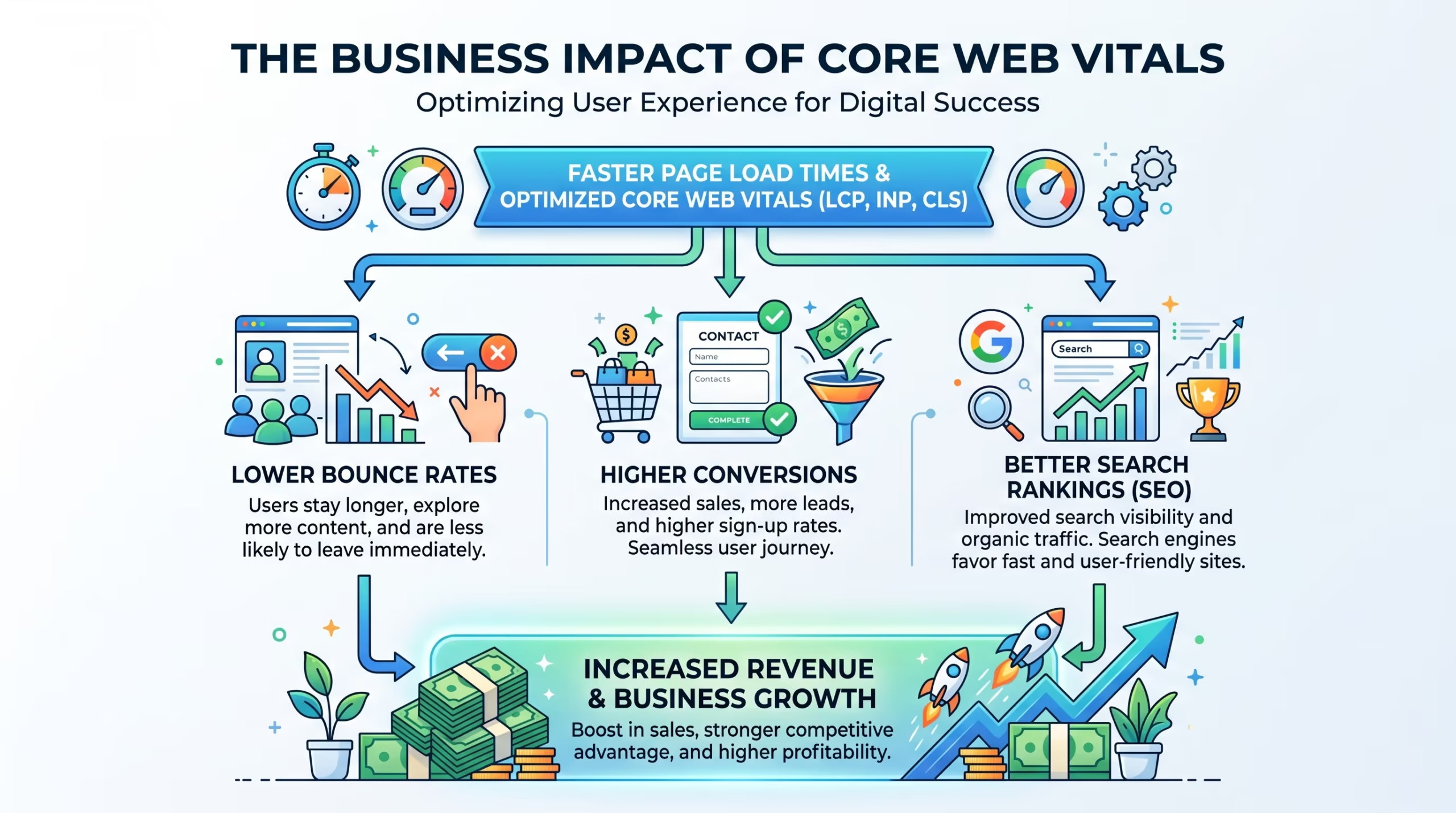
Strong Core Web Vitals can lead to:
- Better search engine rankings
- Lower bounce rates
- Higher user engagement
- Improved conversion rates
- Stronger trust and credibility with visitors
For businesses relying on online traffic whether through SEO & Growth Optimization, eCommerce, or lead generation Core Web Vitals are not just a technical concern. They are a business priority.
The Three Core Web Vitals Explained
Google measures three Core Web Vitals, each focusing on a different part of the user experience. Here is each one of the core web vitals explained clearly.
Largest Contentful Paint (LCP)
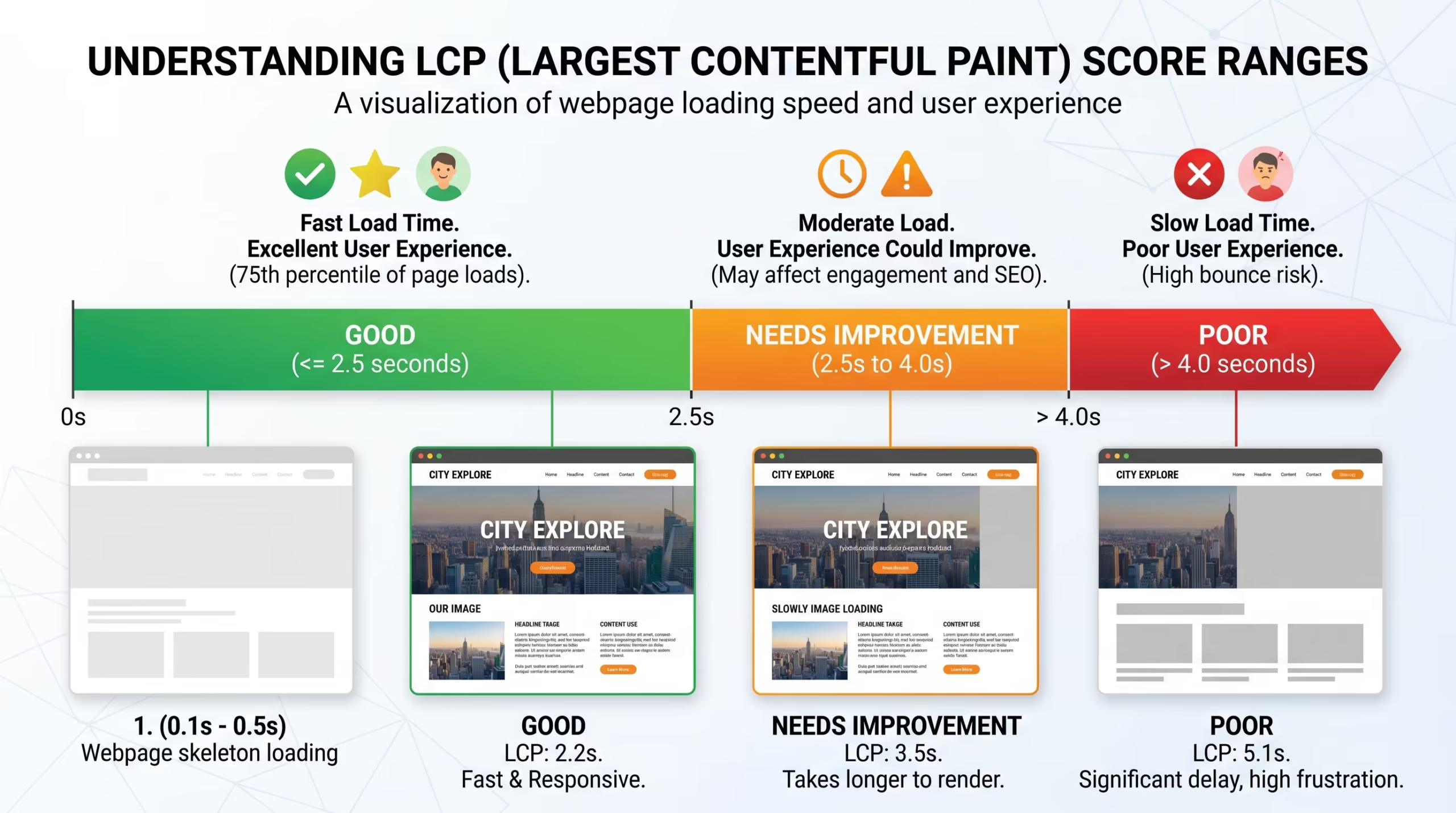
Largest Contentful Paint measures how quickly the main content of a page becomes visible to users. This is usually the largest element above the fold a hero image, a banner, a heading, or a large block of text.
In simple terms, LCP tells you how fast your page looks loaded to a visitor.
Score benchmarks:
- ✅ Good: Under 2.5 seconds
- ⚠️ Needs Improvement: 2.5 – 4 seconds
- ❌ Poor: Over 4 seconds
Common causes of poor LCP:
- Large, unoptimized image files
- Slow web hosting or server response times
- Render-blocking JavaScript and CSS
- Missing caching configuration
Interaction to Next Paint (INP)
Interaction to Next Paint measures how quickly your website responds when a user interacts with it. This includes actions like:
- Clicking a button
- Opening a navigation menu
- Submitting a contact form
- Adding a product to a cart
INP replaced the older First Input Delay (FID) metric in 2024. Unlike FID, which only measured the first interaction, INP tracks responsiveness throughout the entire page visit making it a much more accurate measure of real user experience.
Score benchmarks:
- ✅ Good: Under 200 milliseconds
- ⚠️ Needs Improvement: 200 – 500 milliseconds
- ❌ Poor: Over 500 milliseconds
Common causes of poor INP:
- Heavy JavaScript running on the main thread
- Too many third-party scripts and tracking tools
- Resource-heavy plugins or page builders
- Excessive animations and effects
Cumulative Layout Shift (CLS)
Cumulative Layout Shift measures the visual stability of your page. It tracks how much page content unexpectedly moves around while the page is loading.
If you’ve ever tried to click a button and the page shifted at the last second causing you to click something else that’s a layout shift. CLS measures how often that happens and how severe it is.
Score benchmarks:
- ✅ Good: Under 0.1
- ⚠️ Needs Improvement: 0.1 – 0.25
- ❌ Poor: Over 0.25
Common causes of poor CLS:
- Images uploaded without defined dimensions
- Ads or banners loading dynamically
- Web fonts swapping in after the page renders
- Embedded videos or iframes without reserved space
A stable, predictable layout builds trust with visitors and reduces accidental clicks especially on mobile devices.
Poor Core Web Vitals scores can quietly hurt your search rankings, increase bounce rates, and cost you conversions without you even realizing it.
Our Website Speed Optimization and SEO & Growth Optimization services are designed to identify exactly what’s holding your website back and fix it properly.
Get in touch with TecHippo today and let’s improve your website performance.
How Core Web Vitals Affect Google Rankings
Core Web Vitals are an official Google ranking signal but understanding how much weight they carry is important.
Content quality and relevance remain the most important ranking factors. However, when two pages are similarly relevant and authoritative, page experience becomes the deciding factor. In competitive search results, a website that passes Core Web Vitals has a clear advantage over one that doesn’t.
In practical terms, failing Core Web Vitals when your competitors are passing them means:
- Losing ranking positions to slower but better-optimized competitors
- Higher bounce rates that send negative engagement signals to Google
- Lower click-through rates as users learn your site is slow
- Reduced chances of appearing in Google’s Top Stories or featured results
The impact is especially significant for eCommerce stores, service-based businesses, and WordPress websites competing in crowded niches where small ranking differences directly affect traffic and revenue.
A fast, stable, and responsive website doesn’t just rank better. It earns more trust from both Google and the visitors who land on it.
How to Check Your Core Web Vitals
You don’t need to be a developer to check your Core Web Vitals. Google provides several free tools that make it straightforward for any website owner.
Google Search Console: The most important place to start. The Page Experience report inside Google Search Console shows your real-user Core Web Vitals data collected over the past 28 days. It segments results by desktop and mobile, flags underperforming URLs, and gives you a site-wide overview of where issues exist. This is the data Google actually uses for rankings.
Google PageSpeed Insights: Run any individual URL through PageSpeed Insights to see both real-user field data and simulated lab data. The field data matches what Search Console reports. The lab data helps identify specific issues to fix. Always prioritize field data when assessing ranking impact.
Google Lighthouse (Chrome DevTools) Built directly into the Chrome browser, Lighthouse provides a detailed performance audit of any page. It breaks down exactly where time is being spent during load and highlights what needs to be fixed. Best suited for developers or technically confident site owners.
GTmetrix is a third-party tool that offers additional performance insights, waterfall charts, and loading breakdowns. Useful for cross-referencing findings from PageSpeed Insights.
Start with Google Search Console for a site-wide view, then use PageSpeed Insights to dig into specific pages that need attention.
Common Reasons WordPress Websites Fail Core Web Vitals
WordPress powers over 40% of the web, but many WordPress websites struggle with Core Web Vitals not because of the platform itself, but because of how they are set up and managed.
The most common reasons include:
- Large, uncompressed images uploaded without optimization
- Cheap or oversold shared hosting with slow server response times
- Too many installed plugins adding unnecessary scripts and weight
- Heavy page builders that generate bloated HTML, CSS, and JavaScript
- Missing caching configuration causing every page load to hit the server fresh
- Unoptimized JavaScript and CSS files that block page rendering
- Excessive third-party scripts such as ad trackers, chat widgets, and analytics tools loaded without delay
- Images without defined dimensions causing layout shifts during load
The good news is that most of these issues can be resolved without rebuilding your website from scratch. Proper optimization, the right hosting environment, and ongoing WordPress Bug Fixing & Support can resolve the majority of Core Web Vitals failures on most WordPress websites.
How to Improve Core Web Vitals on WordPress
Improving Core Web Vitals on a WordPress website is achievable with the right combination of technical fixes and ongoing maintenance. Here is what to focus on.
Optimize Images
Images are the single most common cause of poor LCP scores on WordPress websites.
- Compress all images before uploading using tools like ShortPixel or Imagify
- Convert images to modern WebP format for smaller file sizes without quality loss
- Always define explicit width and height dimensions on every image to prevent layout shifts
- Use lazy loading for images below the fold so they don’t delay initial page load
- Avoid uploading images larger than they will actually display on screen
Use Better Hosting
Your hosting environment directly determines your server response time, which affects every Core Web Vitals metric.
- Choose a hosting provider that specializes in WordPress performance
- Avoid heavily oversold cheap shared hosting where resources are stretched thin
- Look for hosting that includes server-level caching and PHP 8+ support
- Consider managed WordPress hosting for sites that need consistent speed and reliability
No amount of plugin optimization can fully compensate for a slow server. Good hosting is the foundation everything else builds on.
Enable Caching
Caching reduces the load on your server and dramatically speeds up page delivery for returning visitors.
- Install a reliable WordPress caching plugin such as WP Rocket, W3 Total Cache, or LiteSpeed Cache
- Enable browser caching so repeat visitors load your pages faster from their local storage
- Use server-side page caching if your hosting provider supports it
- Clear your cache after making website updates to avoid serving outdated content
Proper caching setup is included in our Monthly Website Management Plans to keep your website consistently fast.
Reduce Plugin Bloat
Every plugin installed on a WordPress website adds code that needs to load. Too many plugins especially poorly coded ones significantly slow down your website.
- Audit your installed plugins and remove anything you are not actively using
- Replace heavy multi-purpose plugins with lightweight alternatives that do one job well
- Avoid installing multiple plugins that perform overlapping functions
- Check plugin performance impact using tools like Query Monitor or Asset CleanUp
A lean plugin setup keeps your website fast, secure, and easier to maintain.
Optimize JavaScript & CSS
Unoptimized JavaScript and CSS files can block your page from rendering quickly, hurting both LCP and INP scores.
- Minify all CSS and JavaScript files to reduce their file size
- Defer or delay non-critical JavaScript so it doesn’t block the initial page load
- Remove unused CSS that is being loaded but not needed on a given page
- Load third-party scripts asynchronously where possible
- Audit and limit the number of tracking pixels and external scripts running on each page
Use a CDN
A Content Delivery Network (CDN) stores copies of your website’s static assets images, CSS, JavaScript on servers located around the world. When a visitor loads your page, assets are delivered from the server closest to them geographically.
- A CDN reduces the physical distance between your server and your visitor
- It lowers server load during traffic spikes
- It improves the loading speed for international visitors significantly
- Popular options include Cloudflare, BunnyCDN, and KeyCDN
For websites with traffic from multiple countries, a CDN is one of the highest-impact improvements you can make for Core Web Vitals scores.
Your Competitors Are Already Optimizing. Are You?
Every day your WordPress website runs slow, you are losing visitors to faster competitors ranking above you in search results.
Our Website Speed Optimization, Monthly Website Management Plans, and WordPress Bug Fixing & Support services give your website the performance edge it needs to rank higher, load faster, and convert better.
Talk to TecHippo today — your first month is free on any maintenance plan.
Core Web Vitals Mistakes to Avoid
Even website owners who are actively trying to improve performance often make mistakes that hold their scores back. Here are the most common ones to watch out for.
- Uploading large uncompressed images directly to WordPress without optimization
- Installing too many plugins without checking their performance impact
- Using cheap shared hosting and expecting good server response times
- Only checking lab data in PageSpeed Insights instead of real-user field data in Search Console
- Ignoring mobile performance when most visitors are browsing on smartphones
- Not testing after updates — new plugins, theme changes, or page edits can break previously good scores
- Loading third-party scripts without delay such as chat widgets, ad pixels, and social media embeds
- Skipping caching setup after launching or redesigning a website
- Using images without defined dimensions which directly causes CLS layout shift issues
Avoiding these mistakes alone can put your website significantly ahead of competitors who are not paying attention to performance at all.
Benefits of Passing Core Web Vitals
Meeting Google’s Core Web Vitals thresholds is not just about rankings — it has real, measurable benefits for your website and your business.
- Faster loading pages that keep visitors engaged from the first second
- Better search engine rankings in competitive results where page experience is a tiebreaker
- Lower bounce rates as users are less likely to leave a fast and stable website
- Higher conversion rates because a smooth experience builds trust and reduces friction
- Improved mobile performance where speed and stability matter even more
- Stronger user engagement with more pages visited per session
- Increased credibility as a fast website signals professionalism and reliability
- Better ad performance as faster pages improve Quality Scores in Google Ads campaigns
A website that passes Core Web Vitals does not just rank better — it earns more from every visitor that lands on it.
Core Web Vitals and Business Growth
Core Web Vitals are not just a technical metric. They are directly connected to how your business performs online.
Every second of delay in page load time increases the likelihood that a visitor leaves before taking action. Every layout shift causes mis-clicks and frustration. Every slow interaction makes your website feel unreliable. These are not abstract problems — they translate into lost leads, abandoned carts, and missed revenue.
On the other hand, a website that passes Core Web Vitals consistently delivers:
- More qualified leads from organic search traffic
- Higher sales and conversion rates from eCommerce stores
- Stronger trust from first-time visitors who judge your business by your website’s speed
- Better ROI from SEO efforts since rankings improve and traffic grows
- Lower paid advertising costs as faster pages perform better in Google Ads
This is why businesses that are serious about growth invest in ongoing Website Speed Optimization, SEO & Growth Optimization, and Monthly Website Management Plans not as a one-time fix, but as a continuous part of their digital strategy.
Core web vitals explained simply: a fast website makes you more money. A slow one costs you.
Frequently Asked Questions
What is the difference between lab data and field data in PageSpeed Insights?
Lab data is generated by simulating a page load in controlled conditions — useful for diagnosing specific issues. Field data is collected from real Chrome users who visited your page over the past 28 days and is what Google actually uses for rankings. When the two differ, always prioritize field data to understand your real-world ranking impact.
Which Core Web Vital should I fix first?
Start with LCP. It has the most direct impact on perceived loading speed and is usually the easiest to improve through image optimization and hosting upgrades. Fix CLS second, as layout shifts directly cause mis-clicks and lost conversions especially on mobile. Address INP third, as it typically requires more technical work but is critical for interactive pages like checkout flows and product pages.
Can WordPress websites pass Core Web Vitals?
Absolutely. WordPress websites can achieve excellent Core Web Vitals scores with the right combination of good hosting, image optimization, caching, and code cleanup. The platform itself is not the limitation poor setup and optimization are. Our WordPress Bug Fixing & Support and Website Speed Optimization services are specifically designed to help WordPress websites reach and maintain passing scores.
Are Core Web Vitals a direct Google ranking factor?
Yes. Core Web Vitals are an official part of Google’s page experience signals and directly influence search rankings. They carry the most weight in competitive niches where multiple pages have similar content quality and authority. In those situations, the website with better Core Web Vitals scores will typically rank higher.
How long does it take to see improvements after fixing Core Web Vitals?
Lab data in PageSpeed Insights updates immediately after fixes are applied. However, field data in Google Search Console is based on a rolling 28-day window of real user data, so it can take up to four weeks to fully reflect improvements. Don’t judge your fixes by lab scores alone — wait for field data to update before drawing conclusions.
How often should I check my Core Web Vitals?
Check your Core Web Vitals at least once a month, and always after making significant changes to your website — such as installing new plugins, updating your theme, redesigning pages, or adding new scripts. Performance can degrade silently over time, which is why ongoing monitoring is a key part of our Monthly Website Management Plans.
Conclusion
Core Web Vitals are one of the most important aspects of modern SEO and website performance. They measure what actually matters to real users how fast your page loads, how quickly it responds to interactions, and how stable it looks while loading.
Understanding core web vitals explained in simple terms is the first step. The next step is taking action.
By optimizing your images, choosing better hosting, enabling caching, cleaning up plugins, and staying on top of performance regularly, you can build a WordPress website that ranks better, converts more visitors, and delivers a genuinely great user experience.
A fast website is not a luxury it is a competitive advantage. And in today’s search landscape, it is one you cannot afford to ignore.



 Reach us on WhatsApp