Affiliate disclosure: some links may earn TecHippo a commission at no extra cost to you. Check current prices and terms with the provider.
Last updated: 13 November 2026. Prices were checked on each provider’s own pricing page.
A VPN hides your internet traffic from people on the same Wi-Fi and from your internet provider. It also changes the location websites see. It is useful, but it is not magic, and the price you see on day one is rarely the price you pay later. This guide compares five VPN services with real prices from their own websites.
VPN services compared at a glance
Prices are in US dollars. The intro price is for the longest plan shown on the pricing page. Look at the renewal column before you buy.
| VPN | Intro price | Renews at | Money-back or trial | Best for |
|---|---|---|---|---|
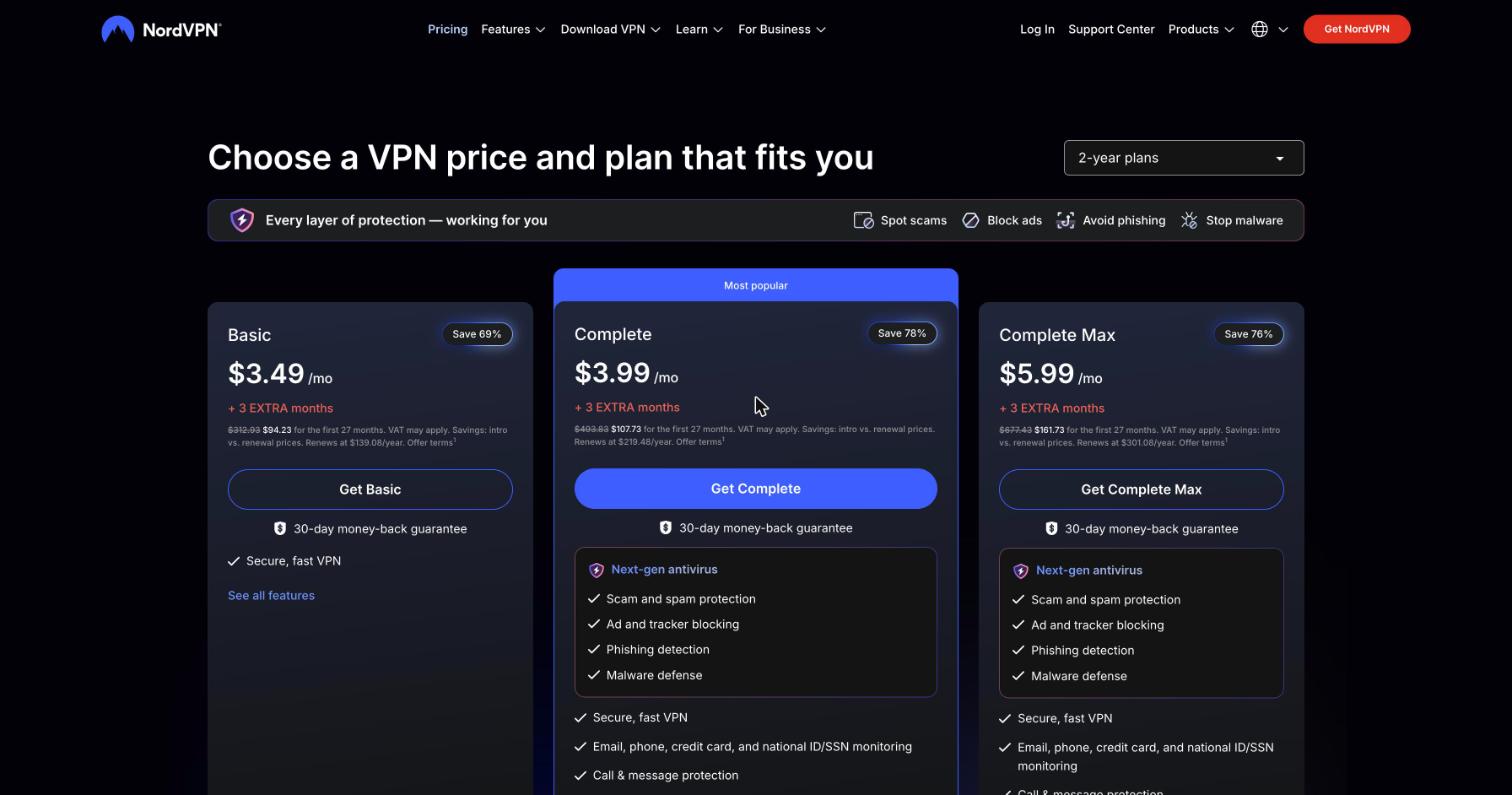
| NordVPN | $3.49/mo (Basic, $94.23 for 27 months) | $139.08/year | 30-day money-back | Best all-round |
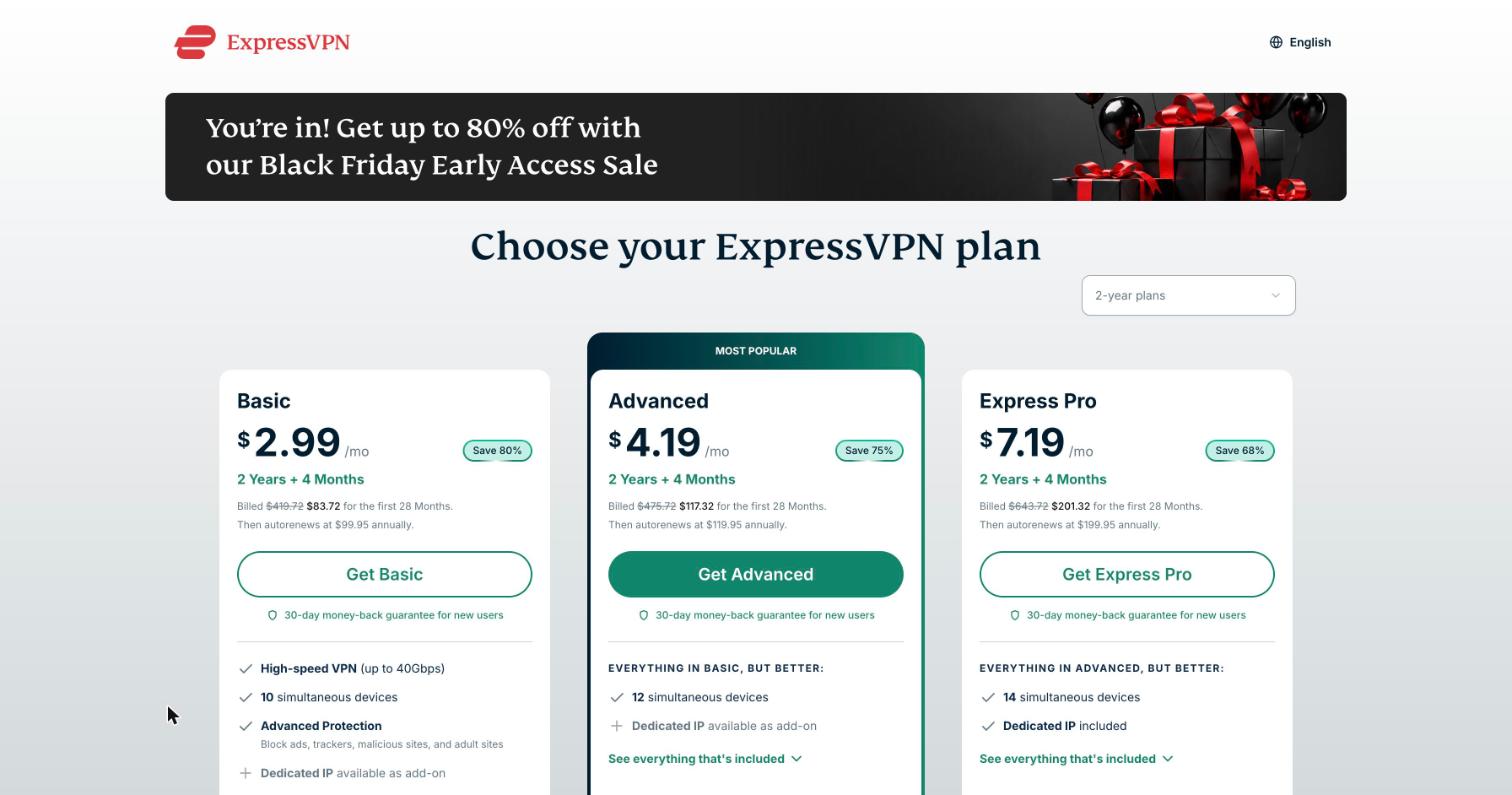
| ExpressVPN | $2.99/mo (Basic, $83.72 for 28 months) | $99.95/year | 30-day money-back | Easy to use |
| Proton VPN | Free plan available | See Proton pricing page | Free plan, 30-day money-back on paid | Free and private |
| X-VPN | $2.99/mo ($69.99 for 24 months) | $71.99/year | Free plan available | Low price |
| FastVPN (Namecheap) | $1.00/mo for year one ($12.00) | $34.56/year | 30-day free trial | Tight budgets |
Intro price vs renewal price
The chart shows the monthly price during the intro deal and the monthly price after renewal. Nord and Express rise the most.
VPN reviews
1. NordVPN: best all-round VPN
NordVPN is a strong all-rounder. The Basic plan is a VPN. The Complete plan adds antivirus, scam protection and monitoring tools. On 13 November 2026 the two-year Basic plan was $3.49 a month, billed as $94.23 for the first 27 months. It then renews at $139.08 a year. Every plan has a 30-day money-back guarantee.
What we like
- undefined30-day money-back guarantee
- undefinedPlans with extra protection against scams, ads and malware
- undefinedAccepts card, crypto and PayPal
What to watch out for
- undefinedRenewal is more than three times the intro price
- undefinedBasic is just a VPN. Extra tools need a higher plan
2. ExpressVPN: simplest to use
ExpressVPN focuses on being easy. One tap connects you. On 13 November 2026 its Black Friday early sale showed Basic at $2.99 a month for two years and four months, billed as $83.72, then $99.95 a year. Advanced costs more but covers 12 devices, and Express Pro covers 14.
What we like
- undefinedVery easy apps for phone and computer
- undefined30-day money-back guarantee for new users
- undefined10 devices on the Basic plan
What to watch out for
- undefinedHigher renewal price than most rivals
- undefinedSale prices may end soon, so check the page before you buy
3. Proton VPN: best free plan
Proton VPN is a good choice if you want to try a VPN without paying. Its free plan covers one device at a time, with servers in 10 countries chosen for you and medium speed. The paid VPN Plus plan covers 10 devices and offers a much larger server list. Check the Proton VPN pricing page for today’s price.
What we like
- undefinedA free plan from a well-known privacy brand
- undefinedPaid plan has a 30-day money-back guarantee
- undefinedBlock ads, trackers and malware on paid plans
What to watch out for
- undefinedFree plan has slower speeds and fewer locations
- undefinedYou cannot pick the country on the free plan
4. X-VPN: low price and a free option
X-VPN costs $2.99 a month on its best plan. That is $69.99 for the first 24 months, then $71.99 every 12 months. It also offers a free plan and says its new Talaria protocol is free for everyone. It is a fair pick if price matters most.
What we like
- undefinedLow price and a free option
- undefinedClear pricing page with a trust center and audit reports
What to watch out for
- undefinedSmaller brand than Nord, Express or Proton
- undefinedRenewal is more than double the monthly intro price
5. FastVPN by Namecheap: tightest budget
FastVPN is the cheapest way to start. Namecheap showed a one-year plan at $1.00 a month ($12.00), renewing at $34.56 a year. A one-month plan was $7.88, and there was a 30-day free trial. It is simple and fine for casual use like public Wi-Fi.
What we like
- undefinedVery low price in the first year
- undefined30-day free trial
- undefinedEasy to buy together with a domain from Namecheap
What to watch out for
- undefinedFewer extras than Nord or Express
- undefinedRenewal triples the first-year monthly price
What a VPN can and cannot do
- It does not stop viruses or phishing. Use antivirus and think before you click.
- It does not replace strong passwords and two-step login.
- Websites can still know who you are if you log in.
- VPN rules are different in each country. Check your local law before you use one.
- Some freelance and banking sites flag logins from changing locations. Use the same location when you sign in to client accounts.
If you run a WordPress site, a VPN protects your login on public Wi-Fi, but it does not secure the site itself. Updates, backups and malware scans do that. Our WordPress website care plan covers those.
How to choose a VPN
- Check the renewal price. Intro deals are for the first term only.
- Look for a money-back guarantee. Thirty days lets you test speed on your own connection.
- Count your devices. Make sure one plan covers your phone, laptop and family.
- Read the privacy policy. A good VPN says clearly that it does not keep logs of your activity.
- Avoid unknown free VPN apps. Some make money by selling your data.
How to set up a VPN in 5 steps
- Choose a plan and pay on the provider’s official website.
- Create your account and verify your email.
- Download the app for your phone or computer from the provider’s site or your app store.
- Sign in and tap connect. Pick the fastest server first.
- Turn on the kill switch in settings. It cuts the internet if the VPN drops, so your real traffic never leaks.
Frequently asked questions
What is the best VPN service in 2026?
NordVPN is the best all-round choice for most people. ExpressVPN is the easiest to use. Proton VPN is best if you want a free plan from a trusted brand.
Are free VPNs safe?
Some are. A free plan from a known brand like Proton VPN is a reasonable start. Many unknown free VPN apps earn money by selling data or showing ads, so avoid them.
Does a VPN make me anonymous?
No. It hides your traffic from the local network and your internet provider and changes your visible location. Websites can still identify you if you sign in.
Is a VPN legal?
In many countries yes, but rules differ. Check the law where you live before you use one.
Will a VPN slow down my internet?
A little. A nearby server on a good VPN usually has a small effect. Far servers and free plans are slower.
What happened to Atlas VPN?
Atlas VPN shut down and moved its users to NordVPN.
Which VPN has the best money-back guarantee?
NordVPN, ExpressVPN and Proton VPN paid plans each show a 30-day money-back guarantee on their pricing pages.
Sources and how we checked
- Provider pricing pages, checked 13 November 2026: NordVPN, ExpressVPN, Proton VPN, X-VPN, Namecheap FastVPN.
- Atlas VPN shutdown: NordVPN announcement.
- Sale prices change often. Confirm the total on the provider’s checkout page. Some links on this page are affiliate links. We may earn a commission at no extra cost to you.