
If your eBay Developer Production keyset is showing Non Compliant, you are likely being blocked from making Production API calls before you have even started.
The most common reason is an incomplete Marketplace Account Deletion configuration. eBay requires every application that uses or stores eBay user data to either subscribe to Marketplace Account Deletion notifications or qualify for a specific exemption — and until that requirement is satisfied, your Production keyset remains disabled.
What makes this especially frustrating is when you do everything correctly — configure your notification endpoint, set up your verification token, test the challenge response — and the eBay Developer Portal still throws back a generic error:
Something went wrong. If the problem persists contact eBay Developer Technical Support for assistance.
This guide documents exactly what happened when we encountered this issue, how we diagnosed it, and the complete step-by-step process for getting an eBay Production keyset Non Compliant issue resolved — including the less obvious way to create an eBay Developer Support ticket when the Create Ticket button is nowhere to be found.
Why Your eBay Production Keyset Shows Non Compliant
Understanding why the eBay Production keyset Non Compliant status appears is the first step toward resolving it correctly.
eBay introduced the Marketplace Account Deletion requirement to ensure that applications handling eBay user data comply with data privacy regulations. When a buyer or seller closes their eBay account, your application must be capable of receiving a deletion notification from eBay and permanently removing or de-identifying that user’s data from your system.
According to eBay’s official documentation, new Production applications must complete this requirement before their Production API credentials are activated. Until the Marketplace Account Deletion configuration is saved and verified by eBay, your Production keyset will remain in a Non Compliant state — meaning your application cannot make live Production API calls regardless of how complete the rest of your setup is.
There are two paths available to resolve the eBay Production keyset Non Compliant status:
- Subscribe to Marketplace Account Deletion notifications — the correct path for applications that use or store eBay user data including orders, seller information, buyer information, or any other user-related eBay data
- Claim an exemption — only available for applications that genuinely do not persist any eBay user data at all
For the vast majority of real marketplace integrations and eCommerce applications, subscribing to the notification workflow is the appropriate path. Claiming an exemption when your application actually stores eBay user data creates a compliance risk that can cause serious problems later.
What eBay Requires for Marketplace Account Deletion
Before attempting to fix an eBay Production keyset Non Compliant status, it helps to fully understand what eBay is actually asking you to configure. There are four core components.
Notification Email
The notification email address is used by eBay to alert you if your notification endpoint becomes unavailable or stops responding correctly. This is a straightforward field but it must be a genuine monitored email address — not a placeholder — because eBay will use it to contact you about endpoint failures that could affect your compliance status.
- Enter a monitored email address that your team actively checks
- Ensure the email address is associated with a real inbox rather than a no-reply or unmonitored alias
- This email is separate from your eBay Developer account email and can be a dedicated technical contact address
HTTPS Endpoint
Your notification endpoint is the publicly accessible URL on your server that eBay will send both challenge verification requests and live account deletion notifications to.
- The endpoint must use HTTPS — HTTP endpoints are not accepted
- The URL must be publicly accessible without any authentication layer blocking eBay’s requests
- A typical endpoint URL format looks like:
https://yourdomain.com/api/ebay/account-deletion - The endpoint must support both GET requests for challenge verification and POST requests for live deletion notifications
- The exact URL you enter in the eBay Developer Portal must precisely match the URL your server uses when generating the challenge response hash — even a trailing slash difference will cause validation to fail
Verification Token
The verification token is a secret string that your server uses alongside the challenge code and endpoint URL to generate the challenge response hash that proves your endpoint is legitimate.
- eBay currently requires the verification token to be between 32 and 80 characters in length
- Only letters, numbers, underscores and hyphens are permitted — no spaces or special characters
- Generate a random string of sufficient length and store it securely on your server
- Never share your verification token publicly or include it in an eBay Developer Support ticket
- The token entered in the eBay Developer Portal must exactly match the token stored on your server — any mismatch will produce an incorrect challenge response
Challenge Response Logic
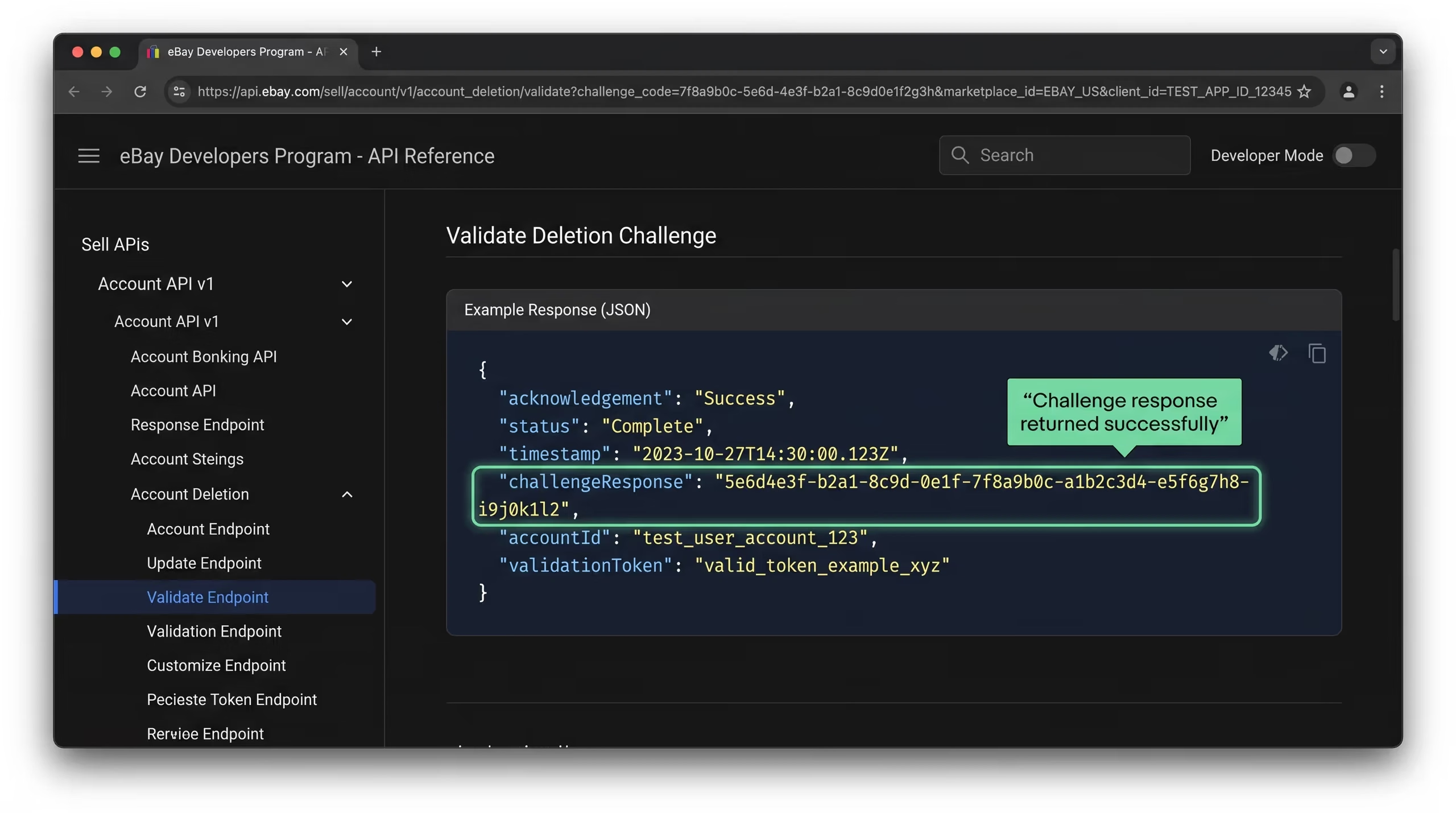
When eBay sends a GET request to your endpoint with a challenge_code parameter, your server must return a JSON response containing a challengeResponse value. This is how eBay verifies that your endpoint is legitimate before activating the notification subscription.
The challenge response is generated using a SHA-256 hash of three values concatenated in this exact order:
- The
challenge_codevalue from the GET request parameter - Your verification token
- Your endpoint URL — exactly as entered in the eBay Developer Portal
The resulting 64-character hexadecimal SHA-256 hash must be returned as the value of challengeResponse in a valid JSON object:
json
{
  "challengeResponse": "your-64-character-sha256-hash-here"
}
Important technical requirements for the challenge response:
- The response must return HTTP 200
- The JSON must be valid with no syntax errors
- There must be no Byte Order Mark or any characters before the opening brace of the JSON
- The Content-Type header should be
application/json - The endpoint URL used in the hash calculation must be identical to the URL entered in the eBay Developer Portal — including the protocol, path, and any trailing slash or lack thereof
eBay specifically warns that a BOM or malformed JSON will cause endpoint validation to fail even when the hash calculation itself is correct — making these easy-to-miss technical details worth double-checking before assuming there is a portal-side problem.
How to Test Your Challenge Endpoint Before Anything Else
Before assuming the eBay Developer Portal has a problem, manually testing your challenge endpoint is an essential diagnostic step for any eBay Production keyset Non Compliant investigation.
Testing your endpoint manually is straightforward and can be done directly in a browser or using a tool like Postman or cURL.
Browser test:
Open a browser and navigate to your endpoint URL with a test challenge code appended as a query parameter:
https://yourdomain.com/api/ebay/account-deletion?challenge_code=test123A correctly working endpoint should return a JSON response similar to:
json
{
  "challengeResponse": "64charactersha256hashvalue..."
}
What to verify during testing:
- The response returns HTTP 200
- The JSON is valid and contains only the
challengeResponsekey and value - There is no text, whitespace, or BOM before the opening brace
- The hash value is exactly 64 characters long
- The endpoint URL used in your server’s hash calculation exactly matches the URL entered in the eBay Developer Portal
- The endpoint responds correctly to POST requests as well as GET requests
Additional verification steps:
- Test from a different network or device to confirm the endpoint is genuinely publicly accessible and not just accessible from your own IP or network
- Check your server logs to confirm eBay’s actual validation requests are arriving and receiving the correct response
- Use an online SHA-256 tool to independently verify that your server is generating the correct hash from the challenge code, verification token, and endpoint URL in the right order
If your endpoint passes all of these checks, you have confirmed that the technical configuration on your server side is correct. If the eBay Developer Portal still refuses to save the configuration after a confirmed working endpoint test, the problem is almost certainly on eBay’s side — which is exactly the scenario the rest of this guide addresses.
Complex API integrations, developer portal errors, and platform configuration problems can consume significant development time — especially when the issue is on the third-party platform’s side rather than your own code.
At TecHippo our WordPress Bug Fixing & Support and eCommerce Store Development services are built to help business owners and developers resolve technical integration challenges efficiently — so you can focus on building your business rather than debugging portal errors.
Get in touch with TecHippo today and let’s help you resolve your technical integration challenge.
The Strange Error — Everything Works but eBay Still Says Something Went Wrong
This is the scenario that prompted this guide — and it is the most frustrating version of the eBay Production keyset Non Compliant problem because all the obvious troubleshooting steps have already been completed successfully.
- The scenario looks like this:
- Your endpoint is publicly accessible
- GET requests with
challenge_codereturn HTTP 200 and the correctchallengeResponseJSON - Your verification token is the correct length and format
- Your endpoint URL exactly matches what is entered in the eBay Developer Portal
- Your endpoint supports POST requests
- There is no BOM in your JSON response
And yet — every time you try to save the Marketplace Account Deletion configuration in the eBay Developer Portal, you see:
Something went wrong. If the problem persists contact eBay Developer Technical Support for assistance.
At this point, the natural instinct is to keep tweaking your endpoint configuration — changing the token, adjusting the URL, regenerating the hash. But if you have verified all of the technical requirements above, further changes to your working endpoint are unlikely to resolve the issue.
The next diagnostic step is to look at what is actually happening between the eBay Developer Portal and eBay’s servers when you click Save.
How to Inspect the eBay Developer Portal Request in Chrome
Chrome DevTools provides a way to see exactly what network request the eBay Developer Portal sends when you click the Save button — and what response it receives. This diagnostic step is critical for understanding whether the eBay Production keyset Non Compliant problem is on your side or eBay’s.
What to Look for in the Network Tab
Open Chrome DevTools by pressing F12 and navigate to the Network tab. Make sure the Network tab is recording before proceeding.
With DevTools open and recording, return to the eBay Developer Portal’s Marketplace Account Deletion configuration page and click the blue Save button next to your notification email.
In the Network tab, look for a request named:
create_notification_appconfigClick on this request to inspect its details. The information you need is in the Headers tab and the Payload tab of the request details panel.
What to check in the request details:
- Request Method — should show POST
- Status Code — note the exact status code returned
- Request Payload — should contain your Production App ID (
app_key),env=production, and your notification email address (marketplace_account_deletion_email_id)
Confirm that the payload contains the correct Production App ID and that the environment is set to production rather than sandbox. If the payload looks correct, note the status code carefully.
What create_notification_appconfig Returning HTTP 200 Means
In our specific case, the Network tab showed something very revealing:
Request Method: POST
Status Code: 200 OK
The eBay Developer Portal successfully sent the create_notification_appconfig request to eBay’s servers. eBay’s servers received it and returned HTTP 200 — indicating that the request was processed without a server-side error.
Yet the eBay Developer Portal interface continued displaying the generic “Something went wrong” error message.
This is a significant finding because it demonstrates that:
- The request is reaching eBay’s servers correctly
- eBay’s servers are processing the request and returning a success status
- The error message being displayed in the eBay Developer Portal UI does not accurately reflect the underlying server response
- The problem is either a frontend rendering issue in the eBay Developer Portal or an application-level configuration issue on eBay’s backend that is returning HTTP 200 while still failing to complete the configuration
This HTTP 200 plus UI error combination is strong evidence that the problem is on eBay’s side rather than in your endpoint configuration — and it is exactly the kind of documented evidence that makes an eBay Developer Support ticket both necessary and credible.
This May Be an eBay Developer Portal Problem
If your endpoint is verified, your challenge response is correct, and the create_notification_appconfig request is returning HTTP 200 while the portal UI still shows an error — the evidence strongly suggests the problem is within the eBay Developer Portal itself or in the backend configuration of your specific Production application on eBay’s side.
This is not an isolated case. Other developers have reported Production applications stuck in a Non Compliant state despite apparently correct Marketplace Account Deletion configuration. eBay community threads confirm that completing the Marketplace Account Deletion requirement is what activates a new Production keyset — meaning a portal-side failure to register the configuration correctly will keep your keyset permanently disabled regardless of how many times you attempt to re-save it.
At this point, continuing to modify a working endpoint configuration is unlikely to help. The correct next step is to contact eBay Developer Technical Support with documented evidence of the problem — specifically the HTTP 200 response from create_notification_appconfig alongside confirmation that your endpoint is working correctly.
Key evidence to gather before contacting support:
- Screenshot of your Production keyset showing the Non Compliant status
- Screenshot of the Marketplace Account Deletion page showing the “Something went wrong” error
- Screenshot of the Chrome DevTools Network tab showing
create_notification_appconfigreturning HTTP 200 - Screenshot of the request payload confirming the correct Production App ID, environment, and email
- Optional screenshot of your endpoint returning the correct
challengeResponsein a browser test
This documentation package demonstrates that you have completed thorough troubleshooting and that the problem is on eBay’s side — which makes it significantly easier for eBay Developer Support to understand and escalate your case correctly.
Developer portal errors, API compliance requirements, and platform-specific technical problems are time-consuming to resolve — particularly when the issue is on the third-party platform’s side and requires waiting for support responses.
Our WordPress Bug Fixing & Support and eCommerce Store Development services help business owners and development teams resolve technical platform challenges efficiently — so your projects stay on track without getting derailed by integration roadblocks.
Reach out to TecHippo today and let’s keep your technical project moving forward.
How to Create an eBay Developer Support Ticket
Creating an eBay Developer Support ticket for an eBay Production keyset Non Compliant issue is more complicated than it should be — because the normal ticket creation path is not always visible in the eBay Developer Support interface.
Here is the complete workflow that successfully reached the ticket submission form.
Enable Developer Support on Your Profile First
Before attempting to create a support ticket, verify that your eBay Developer profile is fully completed and that Developer Support is enabled on your account.
- Log into the eBay Developer Portal and navigate to your profile settings
- Complete all required Primary Contact information fields
- Save your profile and ensure Developer Support access is enabled or activated where the option appears
- Without a complete profile and active Developer Support access, the support ticket workflow may not appear correctly or at all in the support interface
This step is easy to overlook but can be the reason the Create Ticket option is missing from the support interface — incomplete profile information sometimes prevents the full support workflow from being displayed.
Use AI Assisted Support to Find the Ticket Form
Once your profile is complete, navigate to Developer Technical Support and select the AI-Assisted Support option.
The key insight here is that there may not be a visible Create Ticket button anywhere in the normal Developer Technical Support interface. The ticket creation workflow can be hidden behind the AI-Assisted Support flow — and you may need to explicitly ask the AI to help you create a technical support ticket.
When the AI-Assisted Support interface opens, explain your situation clearly. For example:
I have a technical problem with my Production application and I cannot find any option to create a Developer Support ticket. Please help me create a new technical support ticket.
In our experience, after specifically asking the AI about the missing ticket creation option and explaining that the standard Create Ticket button was not visible, the AI-Assisted Support system presented the route that opened the actual Technical Support ticket form.
This is the detail that most developers miss — the ticket creation workflow is not always directly accessible and may need to be triggered through the AI-Assisted Support interface rather than found as a standalone button in the support navigation.
What to Select in the Support Ticket Form
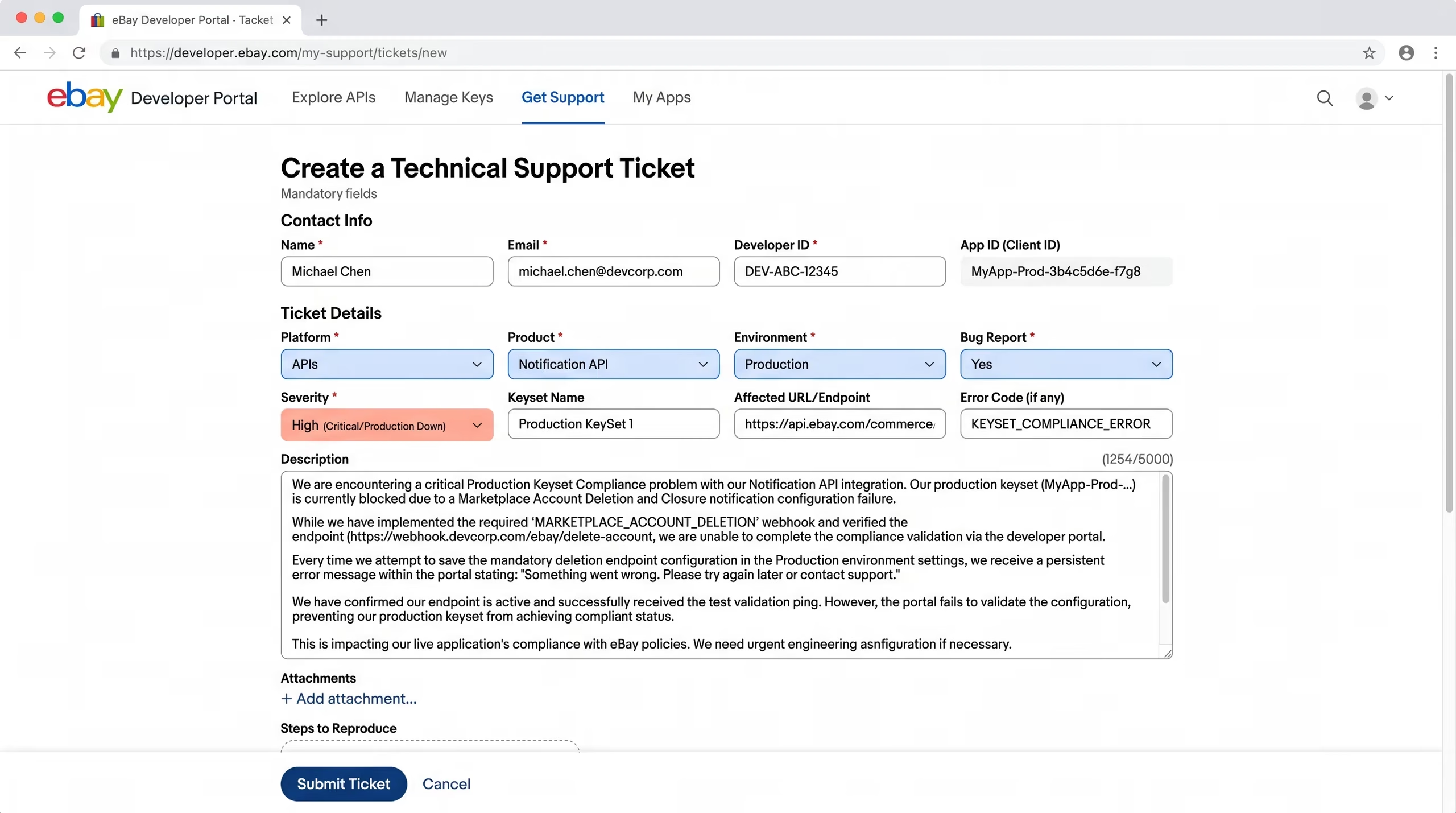
Once the Technical Support ticket form is accessible, the following selections are appropriate for a Marketplace Account Deletion configuration problem causing an eBay Production keyset Non Compliant status:
- Platform: APIs
- Product: Notification API
- Bug Report: Yes
- Environment: Production
- Severity: High — particularly if the Non Compliant status is preventing Production key activation entirely
Selecting the correct product category and marking it as a bug report with High severity ensures your ticket is routed to the appropriate eBay Developer Support team rather than general account support.
What to Write in Your Ticket Description
A clear and specific ticket description significantly improves the speed and quality of the response from eBay Developer Support. Here is a template that worked effectively for our eBay Production keyset Non Compliant case:
Subject:
Production Marketplace Account Deletion configuration will not saveDescription:
My Production application is marked Non Compliant because Marketplace
Account Deletion settings cannot be saved.

When I save the notification email, the Developer Portal shows
"Something went wrong."

I have inspected the browser network request using Chrome DevTools.
The request to create_notification_appconfig returns HTTP 200 and
contains the correct Production App ID, environment=production,
and email address.

My Marketplace Account Deletion endpoint is publicly accessible
and has been independently tested. A GET request with challenge_code
returns HTTP 200 and the expected JSON challengeResponse with no BOM
and valid JSON formatting.

Please review the Production application configuration on eBay's side
and help enable Marketplace Account Deletion compliance so the
Production keyset can be activated.
Important: Do not include your verification token, Client Secret, OAuth credentials, or any sensitive authentication information in the ticket description or attachments.
Useful Attachments to Include With Your Ticket
Screenshots attached to your ticket replace the need for lengthy written explanations and make it immediately clear to eBay Developer Support that you have completed thorough troubleshooting. The most useful attachments for an eBay Production keyset Non Compliant ticket are:
- Screenshot of your Production keyset showing the Non Compliant status
- Screenshot of the Marketplace Account Deletion configuration page showing the “Something went wrong” error
- Screenshot of Chrome DevTools Network tab showing
create_notification_appconfigreturning HTTP 200 - Screenshot of the request payload showing
env=production, your Production App ID, and notification email - Optional screenshot of your endpoint returning the correct
challengeResponsein a browser test
This set of attachments demonstrates the full diagnostic picture — confirming that your endpoint works correctly, that the portal request reaches eBay’s servers successfully, and that the problem is in eBay’s backend configuration rather than your endpoint setup.
Do Not Choose the Exemption Just to Activate Your Keys
When facing a persistent eBay Production keyset Non Compliant issue, the Exempted from Marketplace Account Deletion option can look tempting as a quick fix. It is important to understand why this shortcut carries real compliance risk.
eBay’s exemption is specifically intended for applications that genuinely do not persist any eBay user data. If your application stores any of the following, it does not qualify for the exemption:
- Buyer information including names, addresses, or contact details
- Seller account information or seller performance data
- Order data including order IDs, purchase histories, or transaction records
- Any other information that can be linked to a specific eBay user account
Selecting the exemption when your application actually stores eBay user data means falsely declaring to eBay that no user data is being persisted. This creates a compliance vulnerability that could result in eBay disabling your Production access or taking other enforcement action when the discrepancy is discovered.
For any real marketplace management application, eCommerce integration, or seller tool — which represents the vast majority of cases where an eBay Production keyset Non Compliant error appears — implementing the full Marketplace Account Deletion notification workflow is the correct and compliant path. The exemption is not a workaround. It is a specific provision for a genuinely different category of application.
What Happens After the Configuration Works
Once eBay Developer Support resolves the backend configuration issue and your Marketplace Account Deletion setup is successfully saved, your Production keyset will be activated and your application can begin making live Production API calls.
After the configuration is working, your application has ongoing responsibilities related to the Marketplace Account Deletion notification workflow:
- Acknowledge incoming notifications — respond to POST requests from eBay with an appropriate success HTTP status code (200, 201, 202, or 204 are all accepted by eBay)
- Verify notification authenticity — validate the notification signature to confirm the request genuinely came from eBay and not a third party attempting to trigger unauthorized deletions
- Identify matching user records — search your database for records associated with the eBay user account referenced in the deletion notification
- Permanently delete or de-identify user data — remove or anonymize the required user data within eBay’s specified timeframe
- Retain data only where legally required — if you have a legitimate legal obligation to retain specific data, ensure you have documented justification for any retention beyond eBay’s deletion requirement
eBay provides guidance, SDK support, and signature validation documentation to help implement these ongoing notification handling responsibilities correctly.
Final Checklist Before Contacting eBay Support
If you are experiencing an eBay Production keyset Non Compliant status combined with a Marketplace Account Deletion “Something went wrong” error, work through this complete checklist before opening a support ticket:
- ✅ Verification token is between 32 and 80 characters using only letters, numbers, underscores, and hyphens
- ✅ Endpoint uses HTTPSH2: Final Checklist Before Contacting eBay Support
- ✅ Endpoint is publicly accessible without authentication from any network
- ✅ GET request with
challenge_codereturns HTTP 200 - ✅ Challenge response JSON is valid with no BOM or characters before the opening brace
- ✅
challengeResponsehash is exactly 64 characters - ✅ Endpoint URL used in hash calculation exactly matches the URL entered in the eBay Developer Portal
- ✅ Endpoint supports POST requests as well as GET
- ✅ Notification email has been entered in the configuration form
- ✅ Chrome DevTools Network tab has been used to inspect the
create_notification_appconfigrequest - ✅
create_notification_appconfigrequest payload contains the correct Production App ID andenv=production - ✅ Status code returned by
create_notification_appconfighas been noted - ✅ Screenshots of all relevant error states and network requests have been captured
- ✅ If Create Ticket is missing — Developer profile is complete and Developer Support is enabled, then AI-Assisted Support has been used to locate the ticket creation workflow
If all items above are confirmed and the eBay Developer Portal still will not save the Marketplace Account Deletion configuration, the problem is on eBay’s side and a Developer Technical Support ticket is the correct next step..
API compliance requirements, developer portal errors, and platform integration issues are time-consuming and technically demanding — particularly when the root cause is on a third-party platform’s side and resolution depends on their support team’s response.
At TecHippo our WordPress Bug Fixing & Support, eCommerce Store Development, and Monthly Website Management Plans are built to help business owners and development teams stay focused on growth while technical challenges are handled by people who deal with them every day.
Book a free consultation with TecHippo today and let’s help you move your technical project forward without the roadblocks.
Conclusion
An eBay Production keyset Non Compliant status caused by a Marketplace Account Deletion “Something went wrong” error is one of the more frustrating developer portal issues to diagnose — because the standard troubleshooting steps of verifying your endpoint and challenge response lead to a dead end when everything is working correctly on your side.
The key diagnostic breakthrough is inspecting the create_notification_appconfig request in Chrome DevTools. When this request returns HTTP 200 while the portal UI still displays an error, the evidence is clear — the problem is on eBay’s side and requires a Developer Technical Support ticket rather than further endpoint adjustments.
The ticket creation process itself has an additional complication when the Create Ticket button is not visible — but completing your Developer profile and using the AI-Assisted Support workflow to surface the ticket form resolves that obstacle.
Document everything with screenshots before contacting support, describe the issue clearly with the HTTP 200 evidence front and center, and avoid selecting the exemption as a shortcut if your application genuinely handles eBay user data. With the right documentation and the correct support ticket path, eBay Developer Support can resolve the backend configuration issue and get your Production keyset activated.



 Reach us on WhatsApp