
Images play a vital role in creating an engaging website, but they can also be one of the biggest reasons your WordPress site loads slowly. Large, unoptimized images increase page load times, hurt user experience, and can negatively impact your search engine rankings.
Fortunately, the right image optimization plugin can automatically compress images, convert them into modern formats like WebP, and improve your website’s overall performance. In this guide, we’ll compare the best WordPress image optimization plugins, explain their key features, and help you choose the right solution for your website.
Why Image Optimization Matters for WordPress Websites
Images often account for the largest portion of a webpage’s size. If they aren’t properly optimized, they can significantly slow down your website and create a poor browsing experience.
Image optimization reduces file sizes without noticeably affecting quality, allowing your pages to load faster while consuming less bandwidth. This benefits both visitors and search engines, making image optimization an essential part of every WordPress website.
A well-optimized website not only performs better but also keeps visitors engaged, increases conversions, and supports long-term SEO success.
How Image Optimization Improves SEO and Website Speed
Google considers page speed and user experience when ranking websites. Since images are often the largest files on a webpage, optimizing them can have a significant impact on your website’s performance.
Proper image optimization helps:
- Reduce page load times.
- Improve Core Web Vitals.
- Lower bounce rates.
- Enhance mobile performance.
- Save server storage and bandwidth.
- Improve user experience.
- Increase the likelihood of higher search rankings.
Faster websites encourage visitors to stay longer, explore more pages, and complete desired actions such as making a purchase or contacting your business.
What to Look for in an Image Optimization Plugin
Not every image optimization plugin offers the same features. Choosing the right one depends on your website’s size, traffic, and performance goals.
When comparing plugins, consider features such as:
- Automatic image compression.
- Lossless and lossy optimization options.
- WebP and AVIF image conversion.
- Bulk optimization for existing media libraries.
- Lazy loading support.
- CDN integration.
- WooCommerce compatibility.
- Ease of use and automation.
Selecting a plugin with the right combination of features will help you maintain excellent image quality while maximizing website speed.
Best WordPress Image Optimization Plugins
These plugins are among the most trusted solutions for improving website performance through efficient image optimization.
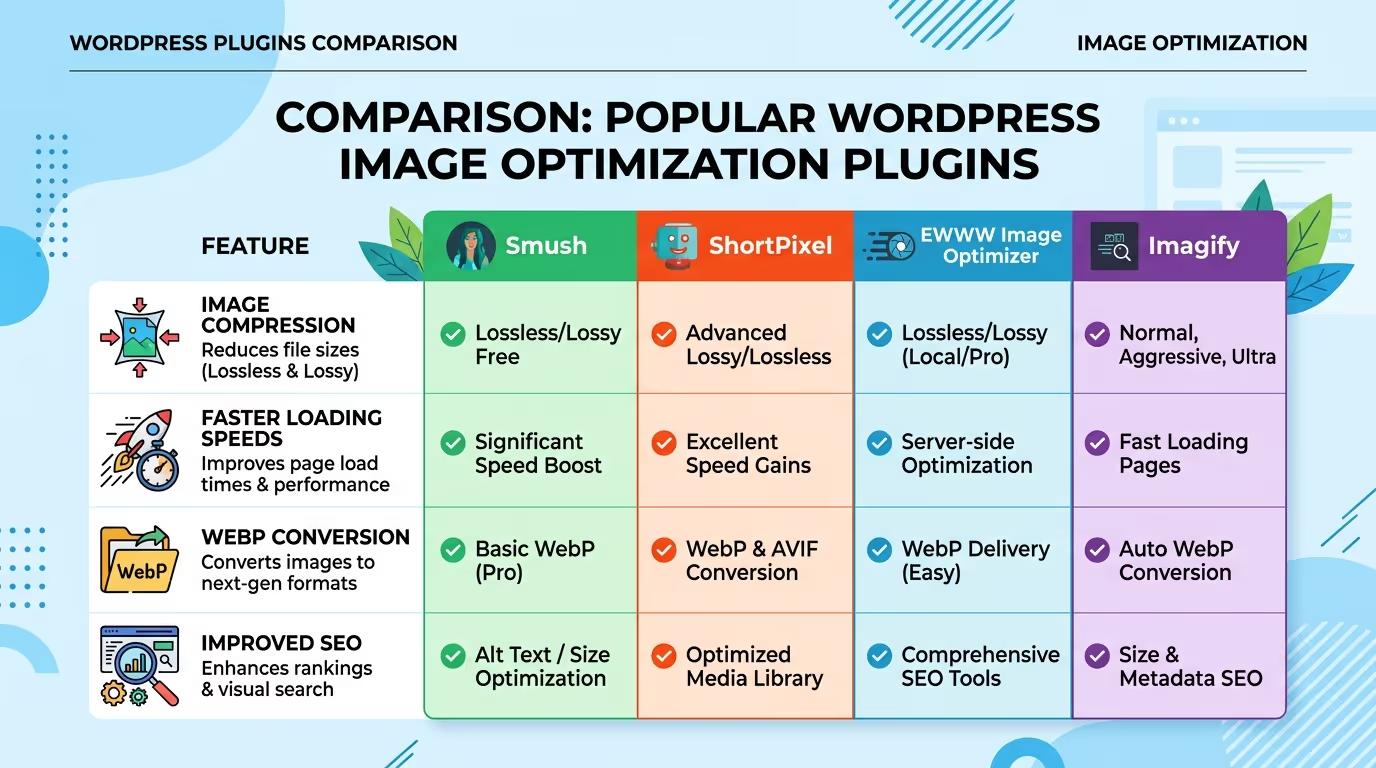
ShortPixel Image Optimizer
ShortPixel is one of the most popular image optimization plugins for WordPress. It supports lossy, glossy, and lossless compression while automatically converting images to WebP and AVIF formats.
It’s an excellent choice for websites that want maximum compression without sacrificing image quality.
Imagify
Imagify offers a simple interface with powerful optimization features, making it ideal for beginners and growing businesses.
It supports automatic image compression, WebP conversion, bulk optimization, and multiple compression levels to balance quality and performance.
Smush
Smush is widely used because of its ease of use and generous free version.
It includes automatic image optimization, lazy loading, image resizing, and bulk compression, making it suitable for small to medium-sized WordPress websites.
EWWW Image Optimizer
EWWW Image Optimizer gives users greater control over image optimization by allowing compression directly on their own server.
It supports WebP conversion, unlimited image optimization, and advanced customization options for users who need more flexibility.
Optimole
Optimole combines image optimization with a global CDN, automatically serving optimized images based on each visitor’s device and screen size.
This cloud-based approach helps improve loading times while reducing server workload.
TinyPNG (Compress JPEG & PNG Images)
TinyPNG is known for delivering excellent image compression while maintaining visual quality.
It automatically compresses JPEG and PNG images during upload and supports bulk optimization, making it a reliable option for content-heavy websites.
Quick Comparison Table
| Plugin | Best For | WebP Support | Bulk Optimization | Free Version |
|---|---|---|---|---|
| ShortPixel | Maximum compression | ✅ | ✅ | ✅ |
| Imagify | Beginners | ✅ | ✅ | ✅ |
| Smush | General WordPress users | ✅ | ✅ | ✅ |
| EWWW Image Optimizer | Advanced users | ✅ | ✅ | ✅ |
| Optimole | CDN & automation | ✅ | Cloud-based | ✅ |
| TinyPNG | Simple image compression | ✅ | ✅ | ✅ |
Optimizing images is one of the fastest ways to improve your website’s performance. Our Website Speed Optimization, SEO & Growth Optimization, and Monthly Website Management Plans help businesses build faster, more efficient WordPress websites that deliver a better user experience and stronger search rankings.Get in touch with TecHippo today for a free consultation and let’s find the best WordPress theme for your SEO goals.
Which Image Optimization Plugin Is Best for Beginners?
If you’re new to WordPress, you’ll want a plugin that’s easy to configure and works automatically in the background.
Imagify and Smush are excellent choices for beginners because they offer simple dashboards, automatic image compression, and one-click optimization. These plugins require minimal setup while still delivering noticeable improvements in website speed and performance.
For users who want more advanced features without a steep learning curve, ShortPixel is another excellent option.
Which Plugin Is Best for WooCommerce Stores?
WooCommerce stores often contain hundreds or even thousands of product images, making image optimization essential for fast-loading product pages.
ShortPixel and Optimole are particularly well-suited for WooCommerce because they efficiently compress large image libraries while supporting modern formats like WebP and AVIF. Optimole also serves images through its built-in CDN, helping improve loading speeds for customers worldwide.
Choosing the right plugin ensures your online store remains fast, responsive, and capable of delivering a better shopping experience.
Free vs Premium Image Optimization Plugins
Most image optimization plugins offer free versions with essential features, making them suitable for personal websites, blogs, and smaller businesses.
Premium plans typically unlock additional benefits such as:
- Higher monthly optimization limits.
- Better compression algorithms.
- Automatic WebP and AVIF conversion.
- CDN integration.
- Priority support.
- Advanced optimization settings.
If your website relies heavily on images or receives significant traffic, upgrading to a premium plan can provide worthwhile performance improvements.
How to Choose the Right Plugin for Your Website
The best plugin depends on your website’s size, goals, and technical requirements.
When making your decision, consider:
- Your monthly image uploads.
- Desired compression quality.
- Support for WebP and AVIF.
- Ease of use.
- CDN availability.
- WooCommerce compatibility.
- Pricing and optimization limits.
Selecting a plugin that matches your needs helps you maintain excellent website performance without unnecessary complexity.
Best Practices for Optimizing Images in WordPress
Installing a plugin is only part of the optimization process. Following image optimization best practices will maximize your website’s speed and overall performance.
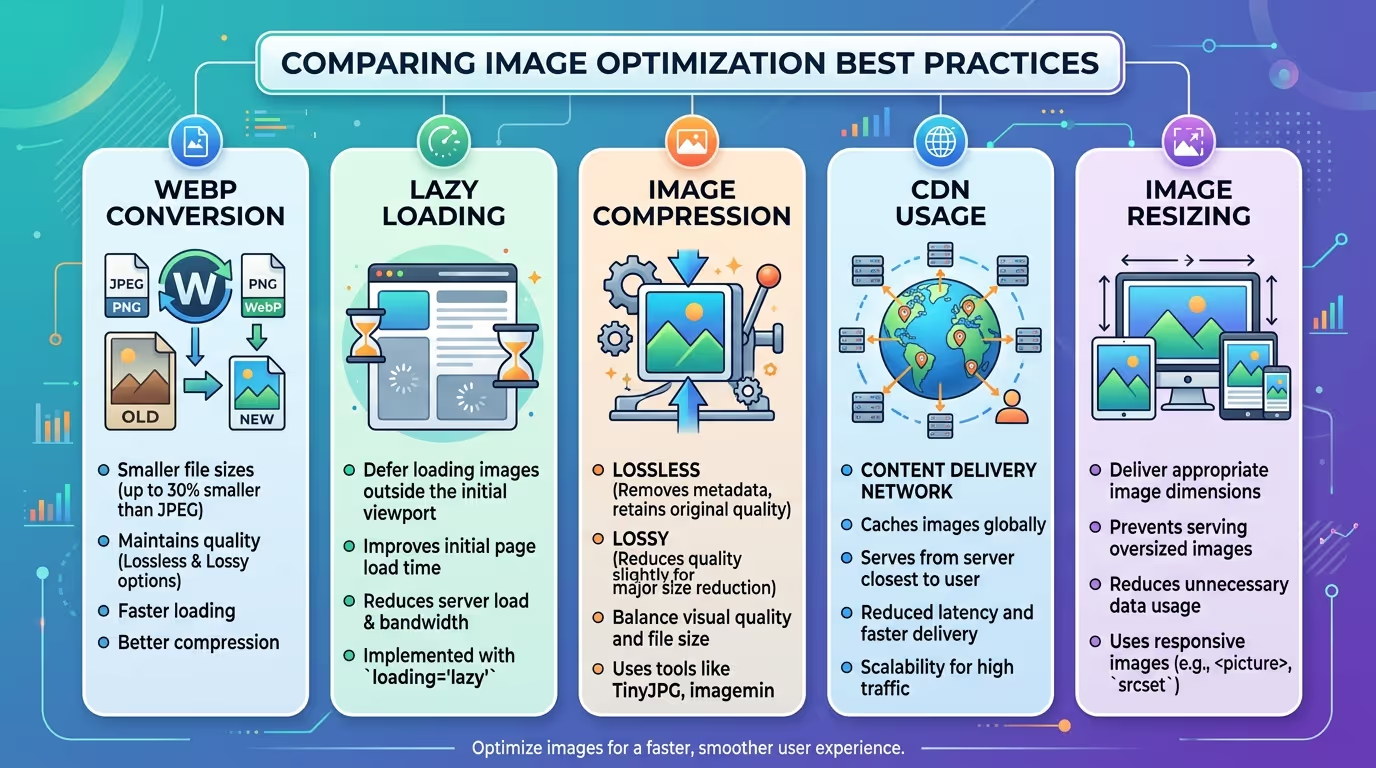
Choose the Right Image Format
Different image formats serve different purposes.
Use JPEG for photographs, PNG for transparent graphics, SVG for icons and logos, and modern formats like WebP or AVIF whenever possible to reduce file sizes.
Resize Images Before Uploading
Uploading oversized images wastes storage space and increases page load times.
Resize images to match the maximum dimensions required on your website before uploading them to WordPress.
Enable Lazy Loading
Lazy loading delays image loading until visitors scroll to that section of the page.
This significantly reduces initial page load times and improves Core Web Vitals.
Use WebP or AVIF Images
Modern image formats provide better compression while maintaining excellent visual quality.
Many image optimization plugins automatically generate WebP and AVIF versions for supported browsers.
Optimize Existing Images
If your website already contains hundreds of images, don’t overlook them.
Most plugins offer bulk optimization tools that compress your entire media library without requiring manual uploads.
Use a Content Delivery Network (CDN)
A CDN stores copies of your images on servers around the world.
Visitors receive images from the nearest server, reducing latency and improving loading speeds regardless of location.
The right plugin is only one part of a fast website. Our Website Speed Optimization, SEO & Growth Optimization, and Monthly Website Management Plans help optimize every aspect of your WordPress website for maximum performance and better search rankings.Get in touch with TecHippo today for a free consultation and let’s find the best WordPress theme for your SEO goals.
Common Image Optimization Mistakes to Avoid
Even with an optimization plugin installed, certain mistakes can still slow down your website.
Avoid these common issues:
- Uploading oversized images.
- Skipping image compression.
- Using outdated image formats.
- Forgetting to optimize older images.
- Not enabling lazy loading.
- Ignoring image alt text.
- Serving images without a CDN on high-traffic websites.
Avoiding these mistakes helps maintain a fast, efficient, and SEO-friendly website.
Do You Need More Than an Image Optimization Plugin?
Image optimization is an important part of website performance, but it’s only one piece of the puzzle.
To achieve the best results, combine image optimization with:
- Reliable web hosting.
- Browser caching.
- CSS and JavaScript optimization.
- Database optimization.
- CDN implementation.
- Regular website maintenance.
A complete performance strategy delivers faster loading times and a better overall user experience.
Image Optimization and Core Web Vitals
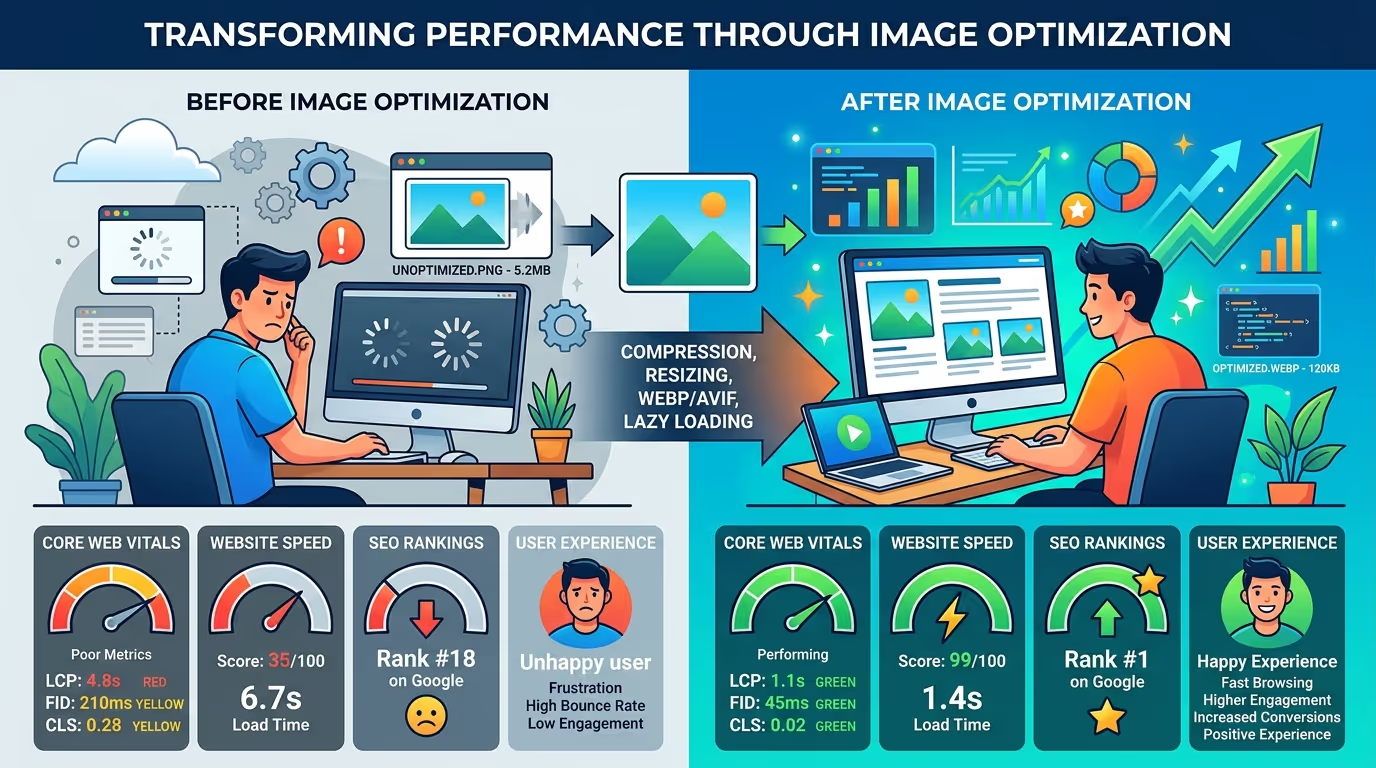
Image optimization plays a direct role in improving Google’s Core Web Vitals.
Properly optimized images help:
- Improve Largest Contentful Paint (LCP) by reducing image loading times.
- Reduce Cumulative Layout Shift (CLS) by reserving image dimensions.
- Improve overall page responsiveness through faster loading.
Optimizing your images is one of the simplest ways to improve Core Web Vitals while creating a smoother browsing experience for your visitors.
A fast website improves user experience, boosts search rankings, and increases conversions. Whether you need Website Speed Optimization, SEO & Growth Optimization, or ongoing Monthly Website Management Plans, TecHippo can help you optimize your WordPress website for long-term success.Get in touch with TecHippo today for a free consultation and let’s find the best WordPress theme for your SEO goals.
Conclusion
Choosing one of the best WordPress image optimization plugins is a smart investment for improving your website’s speed, SEO, and overall user experience. Whether you prefer the simplicity of Smush, the advanced compression offered by ShortPixel, or the cloud-based performance of Optimole, the right plugin can make a noticeable difference.
Remember, image optimization works best as part of a complete website performance strategy. By combining the right plugin with best practices like lazy loading, modern image formats, and ongoing website optimization, you’ll create a faster WordPress website that ranks better, keeps visitors engaged, and supports long-term business growth.


 Reach us on WhatsApp