
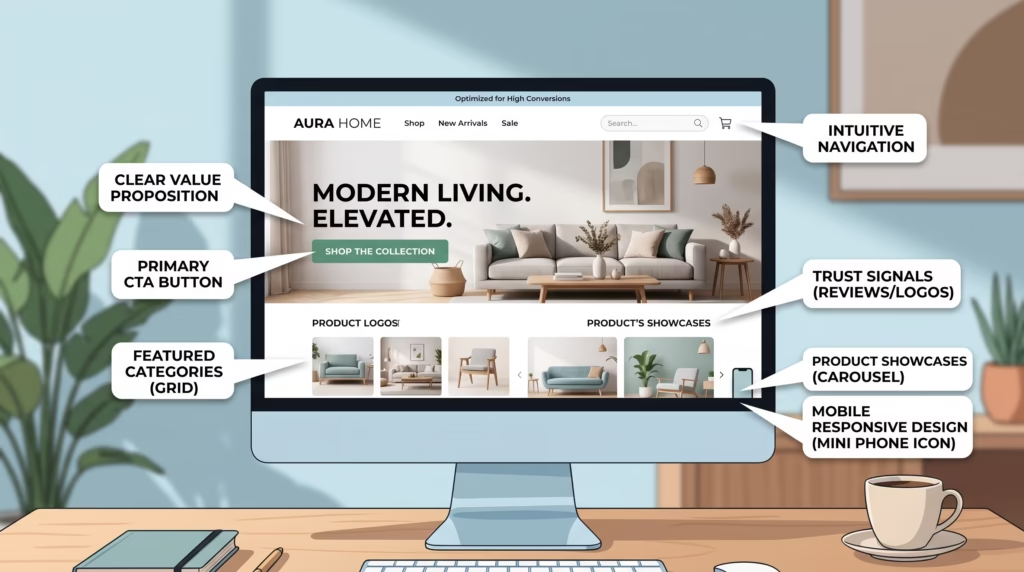
Your ecommerce homepage is often the first place potential customers interact with your online store. If the design is confusing, slow, or difficult to navigate, visitors may leave before they ever explore your products.
A well-planned ecommerce website homepage design should immediately communicate what your store offers, guide visitors toward relevant products, and make the shopping experience simple. From your hero section and navigation to product recommendations and trust signals, every element should have a clear purpose.
In this guide, we’ll cover the essential elements and best practices for creating an ecommerce homepage designed to attract visitors and encourage more conversions.
Why Ecommerce Homepage Design Matters
Your homepage creates the first impression of your online store. Visitors quickly decide whether your website looks trustworthy, relevant, and easy to use.
A strong homepage can help customers understand your brand, discover products, find important information, and move toward making a purchase.
Effective ecommerce homepage design can help you:
- Create a strong first impression.
- Make products easier to discover.
- Build trust with new customers.
- Improve navigation and usability.
- Highlight promotions and best-selling products.
- Encourage visitors to explore your store.
- Increase conversions and sales.
Your homepage doesn’t need to contain everything your store offers. Instead, it should provide a clear path toward the products and information customers are most likely to need.
Essential Elements of a High-Converting Ecommerce Homepage
A successful ecommerce homepage combines design, usability, content, and conversion-focused elements. Each section should help visitors understand your store and take the next step.
Clear Value Proposition
Your value proposition should quickly explain what makes your store worth choosing.
Visitors should be able to understand what you sell and what makes your business different without having to search through multiple pages.
Keep the message short and focus on a meaningful benefit, such as product quality, competitive pricing, fast delivery, or a unique selection.
Attention-Grabbing Hero Section
The hero section is usually one of the first things visitors see. Use it to highlight your most important offer, product collection, or current campaign.
A strong hero section typically includes:
- A clear headline.
- Short supporting text.
- A relevant image or visual.
- A prominent call-to-action.
Avoid filling the hero section with too many messages. One focused offer is generally easier for visitors to understand.
Strong Call-to-Action Buttons
Calls to action guide visitors toward the next step. Examples include Shop Now, Explore Collection, View Products, or Get the Offer.
Use clear, action-oriented language and make important buttons visually easy to find.
Simple and Intuitive Navigation
Customers should be able to find products without struggling through complicated menus.
Organize your navigation around logical categories and include important elements such as:
- Product categories.
- Search.
- Cart.
- Account access.
- Contact or support options.
A simple navigation structure reduces friction and helps visitors reach the products they want faster.
Featured Products and Best Sellers
Highlighting popular products can help visitors discover items that other customers are already purchasing.
You can feature best sellers, new arrivals, seasonal products, or products connected to current promotions.
Avoid displaying too many products at once. Select a focused group that supports your current business goals.
Product Categories
Clear category sections allow customers to quickly explore different parts of your store.
Use descriptive category names and high-quality visuals to make the sections easy to understand. Organize categories based on how your customers naturally shop rather than how your internal inventory is organized.
Customer Reviews and Social Proof
Customers may hesitate to purchase from an unfamiliar store. Reviews and other forms of social proof can help reduce that uncertainty
Consider displaying:
- Customer reviews.
- Product ratings.
- Testimonials.
- Number of customers served.
- User-generated content.
Make sure any reviews or claims displayed on your website are genuine and accurate.
Trust Signals and Security Badges
Trust is especially important when customers are entering payment and personal information.
Your homepage can communicate trust through elements such as secure payment information, clear return policies, shipping details, contact information, and recognizable payment methods.
Avoid adding unnecessary security badges simply for decoration. Trust signals should provide useful reassurance rather than clutter the design.
Special Offers and Promotions
Promotions can attract attention and encourage visitors to explore your products.
You might highlight:
- Seasonal sales.
- Limited-time discounts.
- Free shipping.
- New customer offers.
- Bundle deals.
Make promotional messages clear and avoid overwhelming visitors with multiple competing offers.
Mobile-Friendly Design
A large portion of ecommerce traffic comes from mobile devices. Your homepage should therefore work smoothly across smartphones, tablets, and desktops.
Buttons should be easy to tap, text should remain readable, images should display correctly, and navigation should be simple on smaller screens.
Ecommerce Homepage Design Best Practices
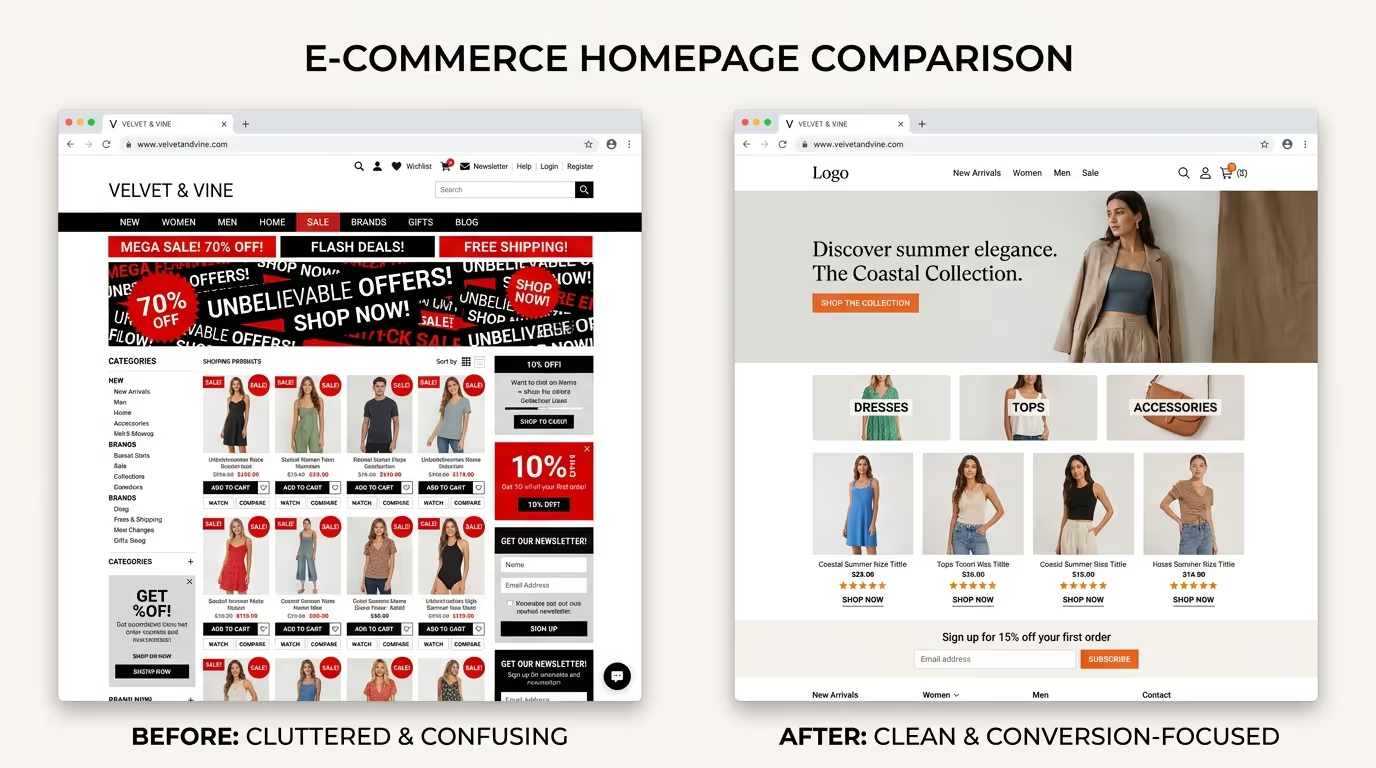
Keep the Layout Simple
A clean layout makes it easier for visitors to understand your website and find what they need.
Use whitespace to separate sections and avoid filling every available space with products, banners, buttons, or promotional messages.
Use High-Quality Product Images
Product photography plays an important role in ecommerce. Customers cannot physically examine products online, so images need to communicate appearance and quality clearly.
Use sharp, properly sized images and maintain a consistent visual style across your store.
Make Search Easy to Find
Visitors who already know what they want shouldn’t have to browse through several categories to find it.
Place the search function somewhere noticeable and make sure it provides relevant results.
Optimize Page Loading Speed
Slow pages can frustrate visitors and increase the likelihood that they leave before interacting with your store.
Optimize images, reduce unnecessary scripts and plugins, use caching, and choose reliable hosting to improve performance.
Use Consistent Branding
Your colors, typography, imagery, logo, and messaging should create a consistent brand experience.
Consistency makes your store look more professional and helps customers recognize your brand across different pages and marketing channels.
Create Clear Visual Hierarchy
Not every element on your homepage should receive equal attention.
Use size, spacing, typography, and positioning to guide visitors toward the most important information and actions.
Reduce Distractions
Too many pop-ups, banners, animations, promotional messages, and competing calls to action can make your homepage difficult to use.
Every element should have a purpose. If something doesn’t help visitors understand, navigate, or purchase, consider removing it.
Quick Ecommerce Homepage Checklist
| Homepage Element | What to Check |
|---|---|
| Value Proposition | Is your main benefit immediately clear? |
| Hero Section | Does it communicate one focused message? |
| CTA | Are important actions easy to find? |
| Navigation | Can visitors quickly find products? |
| Product Sections | Are best sellers or important products highlighted? |
| Reviews | Is genuine social proof visible? |
| Trust Signals | Are payment, shipping, and return details clear? |
| Mobile Design | Does the homepage work well on mobile? |
| Speed | Does the page load quickly? |
| Branding | Is the visual identity consistent? |
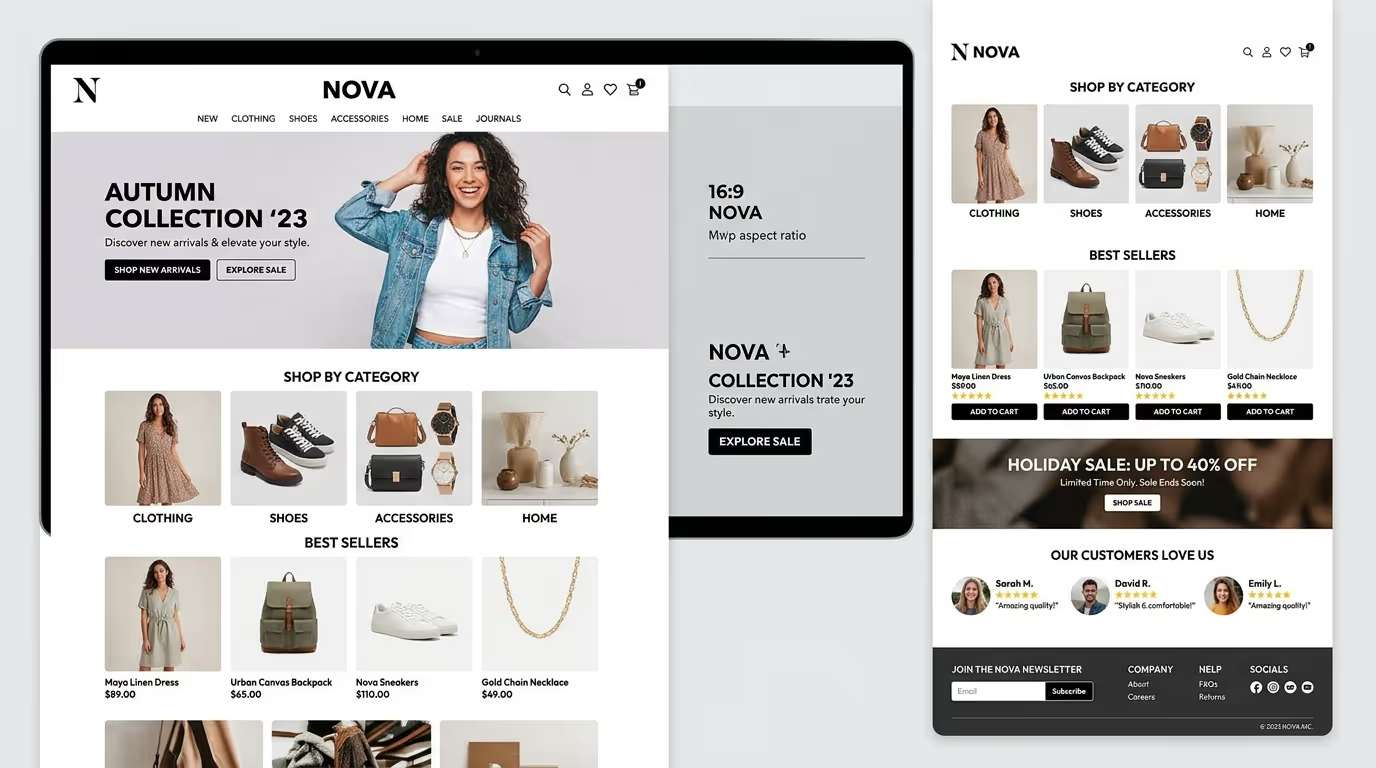
A professional ecommerce homepage should do more than look attractive—it should make it easy for visitors to find products and take action. Our Custom WordPress Website Development and eCommerce Store Development services are built to create fast, user-friendly online stores with conversion-focused layouts and seamless shopping experiences.
Get in touch with TecHippo today for a free consultation and let’s build an ecommerce website that turns more visitors into customers.
How to Design an Ecommerce Homepage That Converts
Creating a high-converting homepage requires more than choosing an attractive template. Every section should support the customer’s journey from their first visit toward product discovery and purchase.
Understand Your Target Customers
Before designing your homepage, understand who you’re targeting and what those customers need.
Consider their shopping habits, common questions, concerns, preferences, and reasons for choosing one store over another.
This information can help determine which products, messages, offers, and trust signals deserve the most attention.
Plan Your Homepage Structure
Create a clear structure before adding individual design elements.
A typical ecommerce homepage might include:
- Navigation.
- Hero section.
- Featured offer or CTA.
- Product categories.
- Best sellers.
- Benefits or value propositions.
- Customer reviews.
- Promotional sections.
- Trust signals.
- Footer navigation.
The exact structure should depend on your business and customers.
Create a Strong Hero Section
Your hero section should communicate your primary message immediately.
Use a strong headline, concise supporting copy, relevant imagery, and a clear CTA. Make sure visitors understand what they can do next.
Highlight Your Best Products
Use your homepage to showcase products that are important to your business.
Best sellers, new products, seasonal collections, and products with strong customer reviews can all be useful choices.
Add Trust-Building Elements
Customers want to know that they can trust your business before making a purchase.
Display useful information about shipping, returns, payments, customer service, and reviews where appropriate.
Optimize the Checkout Journey
Your homepage is only one part of the customer journey. Once visitors decide to purchase, the rest of the process should be straightforward.
Make sure product pages, cart pages, and checkout are easy to understand and don’t contain unnecessary steps.
Test and Improve Your Homepage
Your first design doesn’t have to be your final design.
Use analytics, conversion tracking, user feedback, and A/B testing to understand how visitors interact with your homepage. Test important elements such as headlines, CTAs, layouts, and promotional messages to identify what performs better.
Common Ecommerce Homepage Design Mistakes to Avoid
Too Much Information
Trying to show every product, promotion, benefit, and message on the homepage can overwhelm visitors.
Prioritize the information that is most useful to your target customers.
Weak Calls to Action
A vague CTA can leave visitors unsure about what to do next.
Use specific and action-oriented language that clearly communicates the next step.
Poor Product Photography
Low-quality or inconsistent product images can make an online store look unprofessional and reduce customer confidence.
Complicated Navigation
If visitors can’t quickly find categories or products, they may leave your website.
Keep navigation simple and organize products logically.
Ignoring Mobile Users
A homepage that looks great on desktop but performs poorly on mobile can lose a significant portion of potential customers.
Always test your website on different screen sizes.
Slow Page Speed
Large images, unnecessary scripts, excessive plugins, and poor hosting can negatively affect page speed.
Optimize your homepage so visitors can access important content quickly.
Lack of Trust Signals
Without clear information about payments, shipping, returns, and customer support, visitors may hesitate to purchase.
Make important trust-building information easy to find.
Ecommerce Homepage Design and SEO
Your homepage design can influence how both users and search engines interact with your website.
A well-structured homepage can make important content easier to discover while providing clear navigation to product categories and other important pages.
Basic SEO considerations include:
- Using descriptive page titles.
- Creating clear headings.
- Optimizing images.
- Maintaining a logical internal linking structure.
- Making the website mobile-friendly.
- Improving page speed.
- Using descriptive URLs.
- Providing useful, original content.
SEO should work alongside conversion optimization rather than being treated as a completely separate process.
How Homepage Design Affects Conversion Rates
Design can directly influence how easily visitors move through your website.
A clear homepage helps visitors understand your offer, discover relevant products, and identify the next step. A confusing homepage can create friction and cause visitors to leave.
Elements such as CTA placement, page structure, product visibility, trust signals, mobile usability, and page speed can all influence the overall shopping experience.
Rather than assuming which design works best, use analytics and testing to understand how your actual visitors respond.
Ecommerce Homepage Design for Mobile Users
Mobile users often interact with websites differently from desktop visitors. Your ecommerce homepage should therefore be designed with smaller screens in mind rather than simply shrinking the desktop version.
Make sure:
- Buttons are large enough to tap comfortably.
- Text remains readable.
- Navigation is simple.
- Product images load properly.
- Important CTAs remain visible.
- Forms are easy to complete.
- Pop-ups don’t block important content.
- Pages load quickly.
Test the homepage across multiple devices and screen sizes to identify usability problems.
How to Improve Ecommerce Homepage Performance
Optimize Images
Compress images and use modern formats where appropriate. Properly sized images can reduce unnecessary page weight while maintaining visual quality.
Use Caching
Caching allows frequently requested website resources to be served more efficiently, helping reduce loading times for returning visitors.
Minimize Unnecessary Plugins
Every additional plugin can potentially add scripts, styles, or other resources to your website. Review your plugins regularly and remove ones you no longer need.
Use a CDN
A Content Delivery Network can help deliver static website content from servers closer to your visitors, potentially improving loading times for users in different geographic locations.
Monitor Core Web Vitals
Core Web Vitals provide useful performance metrics related to loading performance, responsiveness, and visual stability.
Monitoring them can help identify performance issues that may affect the user experience.
When Should You Redesign Your Ecommerce Homepage?
A homepage redesign isn’t necessary simply because your website looks a few years old. However, there are situations where redesigning can provide meaningful benefits.
Consider a redesign if:
- Your homepage is difficult to navigate.
- The design isn’t mobile-friendly.
- Your branding has changed.
- Your website is consistently slow.
- Conversion rates are declining.
- Visitors struggle to find products.
- Your homepage doesn’t reflect your current products or business.
- Your competitors provide a significantly better shopping experience.
Before redesigning, analyze your current website data to identify the problems you actually need to solve.
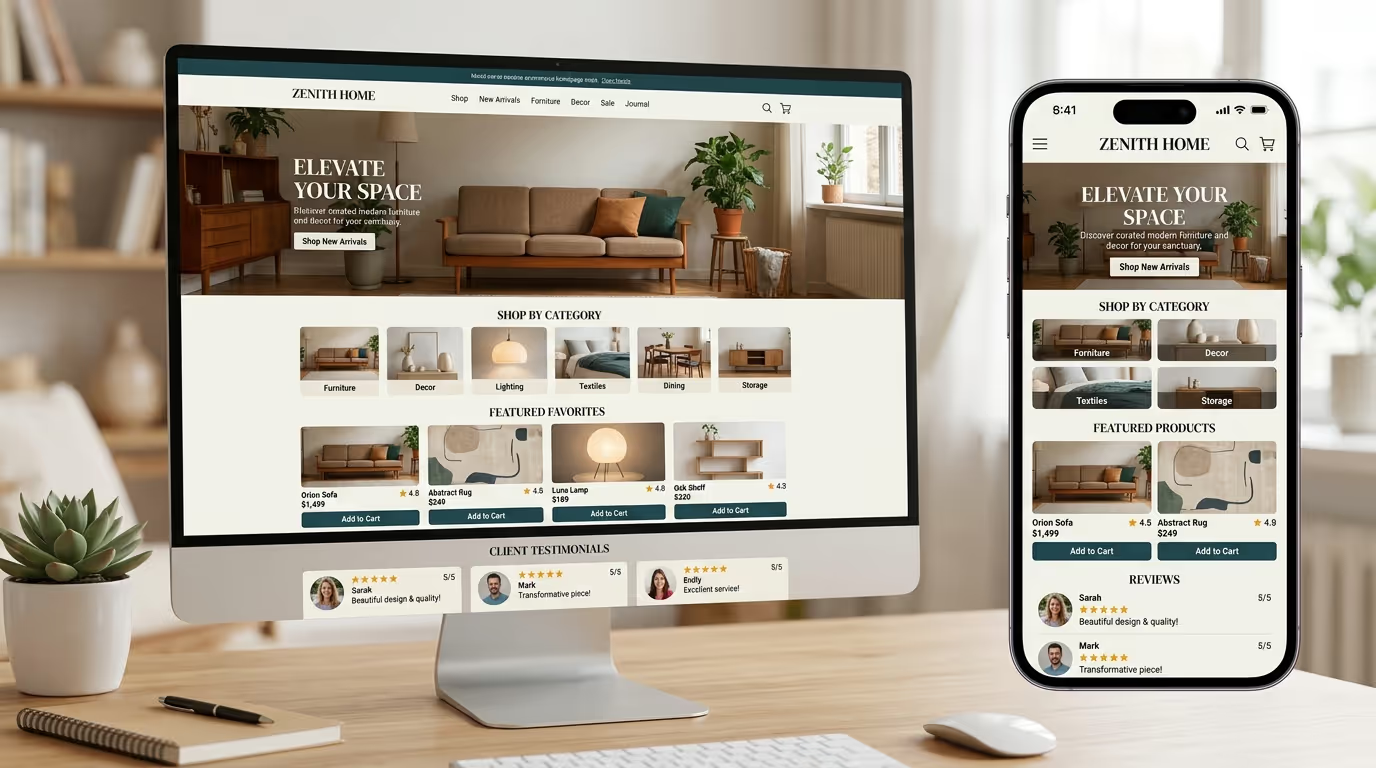
Your ecommerce homepage is more than the front page of your store—it is a critical part of your customer’s buying journey. Our Custom WordPress Website Development, eCommerce Store Development, and SEO & Growth Optimization services are designed to create fast, responsive, and conversion-focused ecommerce experiences.
Get in touch with TecHippo today for a free consultation and let’s build an ecommerce homepage that helps your business grow.
Conclusion
Effective ecommerce website homepage design combines attractive visuals with clear messaging, simple navigation, strong calls to action, trust-building elements, and a smooth shopping experience.
The goal isn’t to fill your homepage with as many features as possible. Instead, every section should help visitors understand your brand, discover relevant products, and move confidently toward making a purchase.
By focusing on usability, mobile performance, page speed, SEO, and continuous testing, you can create a homepage that not only looks professional but also turns more visitors into customers.


 Reach us on WhatsApp