Last updated: 13 November 2026. Plans and prices were checked on GreenGeeks’ own website on that day.
Quick answer: is GreenGeeks good for WordPress in 2026?
Yes, it is a good choice for small and growing WordPress sites, especially if you like eco-friendly hosting. GreenGeeks says it matches 300% of its energy use with renewable energy. Plans start at $1.95 a month during its early Black Friday offer (12-month prepay). They include a free domain for the first year, free SSL, a free CDN, daily backups and 24/7 WordPress support. The big catch: the price jumps a lot when the plan renews.
Want to look at the plans? See GreenGeeks’ current WordPress plans. There is a 30-day money-back guarantee.
GreenGeeks WordPress plans and prices (November 2026)
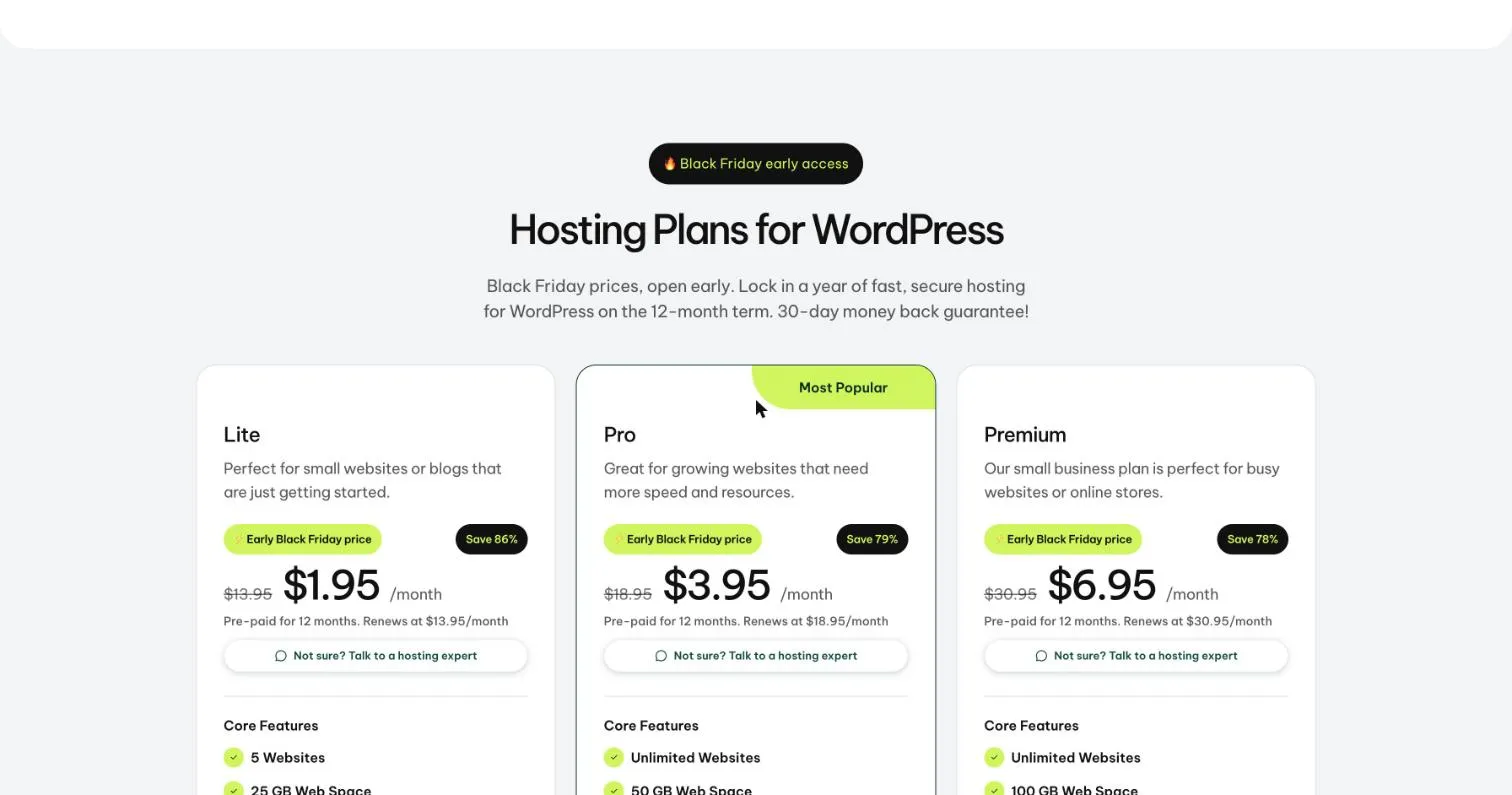
GreenGeeks has three WordPress plans. We checked them on 13 November 2026, during its early Black Friday offer. The sale price is for a 12-month prepaid term. Then the plan renews at the higher “original” price.
| Plan | Price (sale → renewal) | What you get | Best for |
|---|---|---|---|
| Lite | $1.95/mo → $13.95/mo | 5 websites, 25 GB web space, unmetered traffic | Small sites and new blogs |
| Pro (most popular) | $3.95/mo → $18.95/mo | Unlimited websites, 50 GB web space, unmetered traffic | Growing websites |
| Premium | $6.95/mo → $30.95/mo | Unlimited websites, 100 GB web space, unmetered traffic | Busy sites and small stores |
What you get with GreenGeeks WordPress hosting
These features come from the GreenGeeks plans page. All three plans share the core list.
- Free domain for the first year, free SSL and a free CDN.
- Free email and unmetered traffic.
- Daily backups on every plan.
- Speed tools: built-in caching, LiteSpeed optimization and NVMe storage, according to GreenGeeks.
- Enhanced security features.
- 24/7 support from a team of WordPress experts.
- 99.9% uptime guarantee and a 30-day money-back guarantee.
- Eco-friendly: GreenGeeks says it matches 300% of its energy use with renewable energy.
If you plan to run an online store, GreenGeeks also has a separate WooCommerce hosting plan.
GreenGeeks pros and cons
What we like
- Very low first-term price
- Free domain, SSL, CDN, email and daily backups
- Eco-friendly hosting with a renewable energy match
- 24/7 support from WordPress experts
- 30-day money-back guarantee
- Unlimited websites on Pro and Premium
What to watch out for
- Renewal prices are much higher than the sale prices
- The sale price needs a 12-month prepay
- Lite has only 5 websites and 25 GB of space
- Uptime guarantee is 99.9%, which is lower than some rivals
- Premium managed hosts offer more tools for large sites
Who should use GreenGeeks?
- New bloggers and small businesses who want a cheap start
- Eco-minded site owners who care about green hosting
- Freelancers with a few small client sites (Pro)
- Small stores that need more room (Premium or WooCommerce plan)
Who should look elsewhere?
If the renewal price worries you, compare with Hostinger and Bluehost. If you need cloud power, read our Cloudways review. Not sure what type to buy? Read shared hosting vs WordPress hosting.
How to start a WordPress site on GreenGeeks
Here is the simple path. It takes about 15 minutes.
- Open the GreenGeeks WordPress hosting page and pick a plan.
- Choose your 12-month term to get the early offer price.
- Pick your free domain, or connect your own.
- Create your account and pay.
- Open your dashboard and install WordPress.
- Turn on SSL so your site uses HTTPS.
- Log in to WordPress, choose a theme and publish your first page.
Is GreenGeeks fast enough for SEO?
GreenGeeks offers caching, LiteSpeed optimization and a free CDN, which help speed. But a heavy theme or too many plugins still slow a site down. Follow our guide on how to speed up a WordPress website and check your Core Web Vitals. For expert help, see our WordPress speed optimization services.
GreenGeeks vs other hosts
| Host | Good for | Price level |
|---|---|---|
| GreenGeeks | Eco-friendly budget hosting | Low (high renewal) |
| Hostinger | Lowest price WordPress hosting | Low |
| Bluehost | Beginners and small sites | Low to medium |
| Cloudways | Cloud power and control | Medium |
See more choices in our best web hosting guide.
What makes GreenGeeks different
GreenGeeks is known as an eco friendly web host. It says it matches the energy its servers use with renewable energy credits, so that the power put back is more than the power used. Besides this, it is a solid shared host with cPanel, free SSL and nightly backups.
If green hosting matters to your brand or your readers, this is a real reason to pick it. Be careful, though. Green claims are about energy matching, not about faster hosting. Judge the speed and support on their own.
Speed and tech
- LiteSpeed. GreenGeeks uses LiteSpeed web servers, which have a fast built in cache.
- SSD storage. Pages load faster than from old disk drives.
- CDN. A free CDN option is included.
- Data centers. You can choose from several locations in North America, Europe and Asia. Pick the nearest to your readers.
Install the LiteSpeed Cache plugin, compress images and keep plugins to a minimum. Then test with PageSpeed Insights.
Backups and security
Nightly backups are included, and the host runs real time security scans. You also get a free SSL certificate. For extra safety, keep a second backup in cloud storage and turn on two-factor login in WordPress.
Support
Support is open all day by chat and tickets, and by phone. The help library covers common WordPress and cPanel tasks.
Pricing: what to check
| Check | Why it matters |
|---|---|
| Renewal price | The intro price is for the first term |
| Free domain | Usually for the first year only |
| Plan limits | Number of sites and storage differ by plan |
| Refund window | Know the date and the terms |
Step by step: launch on GreenGeeks
- Choose a plan and a term.
- Pick your domain and your data center.
- Install WordPress with the one-click installer.
- Install LiteSpeed Cache and set it up.
- Add an image optimizer and a backup plugin.
- Set up your email accounts in cPanel.
- Test speed and fix the largest files.
Is GreenGeeks right for you?
| Good fit | Not the best fit |
|---|---|
| Eco minded blogs, shops and brands | Very large stores that need cloud scale |
| Users who want cPanel | People who only want the cheapest plan |
| Small business sites | Owners who need a fully managed service |
Alternatives to consider
| Host | Best for | Read our review |
|---|---|---|
| Hostinger | Low cost and easy panel | Hostinger review |
| Bluehost | Beginners | Bluehost review |
| DreamHost | Month to month and privacy | DreamHost review |
| InMotion | Business support | InMotion review |
Our verdict
GreenGeeks gives you good features and a very cheap first term. It is a nice pick if you like green hosting. Just remember the renewal price. Do the maths for the long term, and keep your own backups.
Ready? Check GreenGeeks’ current plans.
Frequently asked questions
Is GreenGeeks good for WordPress?
Yes. GreenGeeks offers WordPress hosting with a free domain for the first year, free SSL, a free CDN, daily backups and 24/7 support. It also says it matches 300% of its energy use with renewable energy.
How much does GreenGeeks cost?
On 13 November 2026, GreenGeeks listed Lite at $1.95/mo, Pro at $3.95/mo and Premium at $6.95/mo on a 12-month prepaid term during its early Black Friday offer. They renew at $13.95, $18.95 and $30.95 per month.
Does GreenGeeks have a money-back guarantee?
Yes. GreenGeeks offers a 30-day money-back guarantee on its WordPress hosting plans.
Does GreenGeeks include a free domain?
Yes. A free domain is included for the first year on the plans we checked.
Is GreenGeeks really eco-friendly?
GreenGeeks says it matches 300% of the energy it uses with renewable energy credits. That is the company’s own claim.
Is GreenGeeks good for WooCommerce?
GreenGeeks has a separate WooCommerce hosting plan for stores. Small stores can also run on the Premium plan.
Is GreenGeeks really eco friendly?
GreenGeeks says it matches its energy use with renewable energy credits. Read the details on their site if this matters for your decision.
Does GreenGeeks use cPanel?
Yes. You get the standard cPanel tools for files, email, databases and DNS.
Is GreenGeeks fast?
It uses LiteSpeed and SSD storage, which helps. Always test your own site, because themes and plugins affect speed more than the host.
Does GreenGeeks include backups?
Nightly backups are included. Keep your own copy as well, stored somewhere else.
Is GreenGeeks good for WordPress?
Yes. It offers one-click WordPress install and tools tuned for WordPress, and it suits small and medium sites.
GreenGeeks or Bluehost: which should I pick?
Pick GreenGeeks for green hosting and LiteSpeed. Pick Bluehost for a very simple start. Compare renewal prices before you choose.
Sources
- GreenGeeks, WordPress Hosting page (greengeeks.com/wordpress-hosting)