
A website redesign is one of the most exciting things you can do for your business online. A fresh design, improved user experience, and better performance can take your website to a completely new level.
But here is the problem a redesign gone wrong can wipe out years of SEO progress in days. Rankings drop, indexed pages disappear, and organic traffic falls off a cliff. And in most cases, it was completely avoidable.
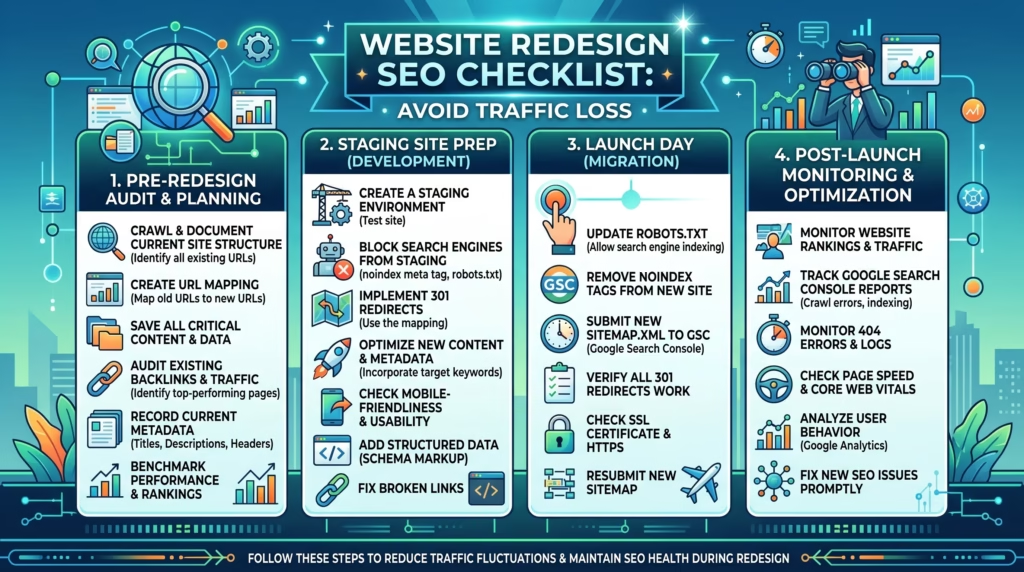
This website redesign SEO checklist covers everything you need to do before, during, and after your redesign to protect your search rankings and keep your traffic intact throughout the entire process.
Whether you are refreshing your homepage or rebuilding your WordPress website from the ground up, following these steps will make sure your redesign is an upgrade — not a setback.
Why Website Redesign SEO Matters
Most businesses treat SEO as something to think about after the redesign is done. That is exactly where things go wrong.
Website redesign SEO is the process of protecting your existing search rankings, indexed pages, backlinks, and organic traffic while making significant changes to your website. Google ranks your pages based on hundreds of signals your URL structure, content, internal links, metadata, and loading speed. When a redesign disrupts any of these without proper planning, your rankings suffer.
For businesses that depend on organic search traffic for leads and sales, a poorly handled redesign can set you back months. This is why website redesign SEO planning must begin before a single design change is made not after launch.
How a Redesign Can Hurt Your SEO
Understanding the risks of a poorly planned redesign is the first step toward avoiding them. Here are the most common ways a website redesign can damage your website redesign SEO efforts.
- Changing URLs without redirects causes Google to treat redesigned pages as entirely new content, losing all previously built ranking authority
- Removing or rewriting optimized content strips pages of the keywords and signals Google used to rank them in the first place
- Breaking internal links creates dead ends that confuse both users and search engine crawlers
- Deleting or changing meta titles and descriptions removes critical on-page SEO signals from your pages
- Slow loading speed after launch damages Core Web Vitals scores and sends negative performance signals to Google
- Launching without submitting a new sitemap delays Google from discovering and re-indexing your updated pages
- Going live without a staging environment means errors and broken pages are instantly visible to both users and Google
Every one of these mistakes is avoidable with a proper website redesign SEO plan in place from the very beginning.
Before the Redesign — What to Do First
The preparation you do before the redesign begins is the most critical part of your entire website redesign SEO checklist. Skipping these steps is where the majority of traffic losses begin.
Audit Your Current Website
Before changing anything, you need a complete and honest picture of where your website stands right now from both an SEO and performance perspective.
On-Page SEO Audit:
- Review and record meta titles, meta descriptions, H1 tags, and content across all key pages
- Identify thin, duplicate, or outdated content that needs to be improved or removed
- Check that existing URLs are clean, readable, and contain relevant keywords
- Review your internal linking structure across important pages
Technical SEO Audit:
- Use Google Search Console to identify crawl errors, indexing issues, and manual actions
- Test your current loading speed using Google PageSpeed Insights and record your Core Web Vitals scores
- Check that your website is fully mobile responsive across all screen sizes
- Use a tool like Screaming Frog to identify broken links and unnecessary redirect chains
Off-Page SEO Audit:
- Review your backlink profile using tools like Ahrefs or Ubersuggest
- Identify which pages have the most external links pointing to them these pages carry the most SEO authority and must be protected during the redesign
This audit gives you a clear baseline to protect during the redesign and measure against after launch. Our SEO & Growth Optimization service includes a full website audit as part of the process.
Back Up Your Website
A complete website backup is non-negotiable before any redesign work begins.
- Back up your entire WordPress database
- Back up all website files including your theme, plugins, and uploaded media
- Store the backup in a secure off-site location separate from your hosting server
- Test the backup to confirm it can be successfully restored if something goes wrong
If anything goes wrong during the redesign, a clean backup means you can restore your website to its previous working state without losing content, rankings, or SEO progress. Regular backups are also a standard part of our Monthly Website Management Plans.
Document Your Top Performing Pages
Your top performing pages carry the most SEO value and must be handled with extra care throughout the redesign process.
- Use Google Search Console and Google Analytics to identify pages driving the most organic traffic, leads, and conversions
- Record the exact URL, meta title, meta description, H1, and primary keyword for each of these pages
- Export or screenshot the full content of each page before any changes are made
- Note all internal links pointing to and from each high-value page
- Document any structured data or schema markup present on these pages
- Map out which pages have the most backlinks pointing to them from external websites
This documentation becomes your reference point throughout the entire redesign to ensure nothing critical is accidentally changed, deleted, or lost.
Set Up a Staging Environment
A staging environment is a private, password-protected copy of your website where all redesign work takes place before anything goes live.
- Set up a staging site on a separate subdomain or through your hosting provider’s built-in staging feature
- Block the staging site from being indexed by search engines using a noindex tag or password protection
- Carry out all redesign and development work on the staging site first
- Test every page, link, form, and redirect thoroughly on staging before pushing anything to your live website
Working in a staging environment means your live website and its existing SEO remain completely untouched until you are fully confident everything is working correctly. All WordPress Website Redesign projects at TecHippo include staging setup as a standard part of the process.

A website redesign is a major investment and skipping the SEO groundwork can cost you the rankings and traffic you have spent months or years building.
Our WordPress Website Redesign and SEO & Growth Optimization services are built to make sure your redesign improves your website without putting your search visibility at risk.
Get in touch with TecHippo today for a free consultation and let’s plan your redesign properly from day one.
During the Redesign — SEO Steps to Follow
The redesign phase is where most website redesign SEO mistakes happen. Design decisions get prioritized over SEO considerations, and critical elements get changed or removed without realizing the impact. Here is what to watch carefully while the redesign is in progress.
Keep Your URL Structure Intact
Your existing URLs carry ranking authority built up over time. Changing them without a proper redirect strategy is one of the most damaging things you can do to your website redesign SEO.
- Keep existing URLs exactly the same wherever possible
- If a URL must change, document the old URL and map it to the new one for a 301 redirect
- Avoid adding unnecessary subfolders, changing slugs, or restructuring your URL hierarchy without a clear plan
- Use clean, readable URLs that contain relevant keywords and avoid dynamic parameters
- Maintain your existing URL hierarchy by organizing content into logical categories and subcategories
Preserving your URL structure protects the ranking authority each page has accumulated and prevents Google from treating your redesigned pages as entirely new content.
Maintain Your Meta Titles and Descriptions
Meta titles and descriptions are critical on-page SEO signals. During a redesign it is easy for these to get accidentally deleted, overwritten, or reset to default values.
- Cross-reference your pre-redesign documentation and make sure every page retains its optimized meta title and description
- If meta titles or descriptions are being updated, ensure the primary keyword is still present and character limits are respected — under 60 characters for titles and under 160 characters for descriptions
- Check that your SEO plugin settings have carried over correctly to the redesigned pages
- Never leave meta titles or descriptions blank on any page
Preserve Header Tags and Content Structure
Your heading structure — H1, H2, and H3 tags — plays an important role in how Google understands and ranks your content. During a redesign, these can easily be disrupted.
- Ensure every page retains a single H1 tag containing its primary keyword
- Preserve the logical H2 and H3 hierarchy across all key pages
- Do not remove or significantly rewrite content on high-performing pages without a clear content migration strategy
- If content is being merged or consolidated, make sure the primary keyword and key information from both pages are retained
- Identify and fill content gaps by looking for topics or keywords that are missing or underrepresented on your redesigned pages
Content is one of the strongest website redesign SEO signals Google uses to rank pages. Protecting it during the redesign protects your rankings.
Optimize Images During the Redesign
A redesign often introduces new images, banners, and graphics. Without proper optimization these can significantly slow down your website and hurt your Core Web Vitals scores.
- Compress all new images before uploading to reduce file sizes without sacrificing quality
- Convert images to WebP format for better performance across all devices
- Always define explicit width and height dimensions on every image to prevent layout shifts
- Add descriptive, keyword-relevant alt text to every image on the redesigned website
- Use lazy loading for images below the fold so they do not delay the initial page load
Proper image optimization during the redesign prevents performance issues from appearing after launch and keeps your website redesign SEO on track. Our Website Speed Optimization service covers full image optimization as part of every project.
Check Internal Linking
Internal links distribute ranking authority across your website and help Google understand the relationship between your pages. A redesign can easily break or disrupt your internal linking structure.
- Cross-reference your pre-redesign documentation and verify all internal links are still pointing to the correct pages
- Update any internal links that pointed to old URLs to reflect the new URL structure
- Ensure your most important pages — service pages, landing pages, and high-traffic blog posts — are well linked from other relevant pages across the website
- Use descriptive anchor text that accurately reflects the content of the linked page
- After the redesign is complete on staging, run a full crawl using Screaming Frog to identify and fix any broken internal links before going live
After the Redesign — Post Launch Checklist
Launching your redesigned website is not the finish line — it is the beginning of a critical monitoring period. Here is what your website redesign SEO post launch checklist must include.
Set Up 301 Redirects
301 redirects tell Google and visitors that a page has permanently moved to a new location. They transfer the ranking authority from the old URL to the new one and prevent users from landing on 404 error pages.
- Implement 301 redirects for every URL that has changed during the redesign
- Use your pre-redesign URL documentation to map every old URL to its correct new destination
- Test all redirects using a tool like Redirect Checker or Screaming Frog to confirm they are working correctly
- Avoid redirect chains where one redirect points to another — keep all redirects direct and clean
- Check that no important pages are returning 404 errors after launch
Missing or incorrect 301 redirects are one of the most common causes of traffic loss after a website redesign SEO launch. Getting these right protects the ranking authority your pages have built over time.
Submit a New Sitemap to Google
After launching your redesigned website, Google needs to be told about your updated page structure as quickly as possible.
- Generate a fresh XML sitemap that reflects your new URL structure
- Submit the updated sitemap through Google Search Console under the Sitemaps section
- Make sure the sitemap only includes pages you want indexed — exclude thank you pages, admin pages, and any staging URLs
- Check that your robots.txt file is not accidentally blocking any important pages from being crawled
Submitting a new sitemap speeds up Google’s discovery and re-indexing of your redesigned pages and is a non-negotiable step in any website redesign SEO checklist.
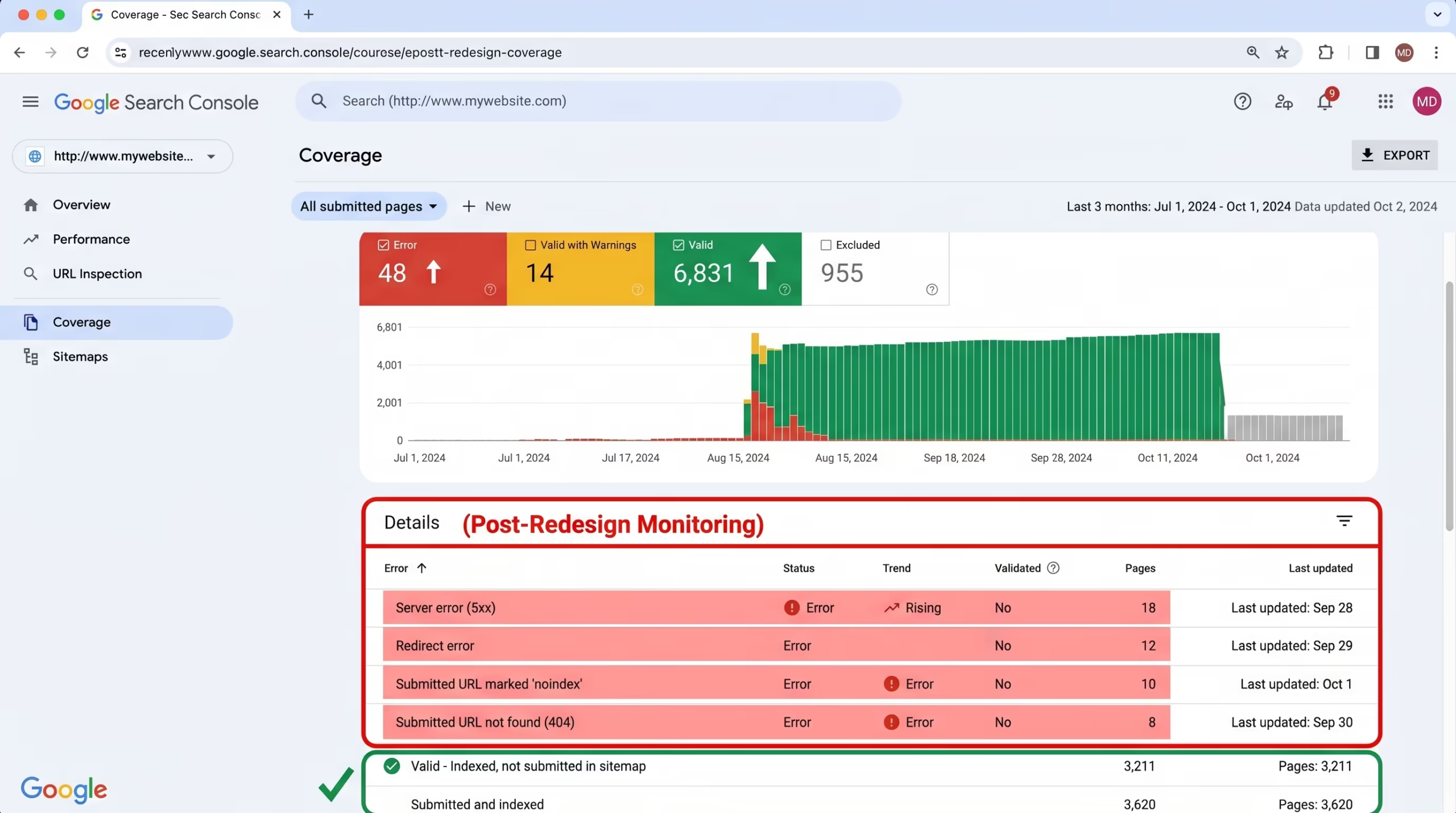
Check Google Search Console for Errors
Google Search Console is your most important tool in the days and weeks following a redesign launch.
- Check the Coverage report for any new crawl errors, excluded pages, or indexing issues
- Monitor the Page Experience report to confirm Core Web Vitals scores are acceptable on the new design
- Look for any manual actions or security issues that may have been triggered during the launch
- Verify that previously indexed pages are still being indexed correctly under the new design
- Fix any crawl errors quickly to prevent them from negatively impacting your rankings
Make it a habit to check Search Console daily for at least the first two weeks after launching your redesigned website.
Test Website Speed and Core Web Vitals
A redesign that looks great but loads slowly will hurt your rankings and user experience. Speed testing after launch is essential.
- Run your key pages through Google PageSpeed Insights and compare scores against your pre-redesign baseline
- Check LCP, INP, and CLS scores across both desktop and mobile versions of the redesigned website
- Address any new performance issues introduced by the redesign — new images, scripts, or design elements that are slowing things down
- Confirm that caching is properly configured and active on the live website
- Test loading speed from multiple locations if your audience is international
Our Website Speed Optimization service is available to address any performance issues identified after your redesign goes live.
Monitor Rankings and Traffic
The weeks following a redesign launch require close monitoring of your keyword rankings and organic traffic.
- Compare post-launch organic traffic against your pre-redesign baseline metrics recorded during the audit phase
- Track the keyword rankings of your most important pages and watch for any significant drops
- Monitor your top performing pages specifically — if any of these drop in rankings, investigate immediately
- Allow up to 28 days for Google’s field data in Search Console to fully reflect the impact of the redesign
- Be prepared to make quick adjustments if rankings drop significantly on key pages
Some fluctuation in rankings immediately after a redesign launch is normal. Significant or sustained drops are a signal that something in your website redesign SEO checklist needs to be revisited.
A lot can go wrong between staging and launch — and by the time you notice a traffic drop, the damage is already done.
Our WordPress Website Redesign, SEO & Growth Optimization, and Monthly Website Management Plans are designed to make sure every step of your redesign is handled correctly, from pre-launch preparation through to post-launch monitoring.
Reach out to TecHippo today and let’s make sure your redesign launch goes smoothly without costing you your rankings.
Common Website Redesign SEO Mistakes to Avoid
Even experienced website owners make critical website redesign SEO mistakes that cost them rankings and traffic. Being aware of these pitfalls before you start can save you months of recovery time.
- Treating SEO as an afterthought and only thinking about it after the redesign is already live
- Changing URLs without implementing 301 redirects causing Google to lose track of previously ranked pages
- Deleting high-performing content during the redesign without realizing its SEO value
- Resetting meta titles and descriptions by switching themes or page builders that overwrite existing metadata
- Ignoring mobile performance when the majority of visitors are browsing on smartphones and tablets
- Not setting up a staging environment and making changes directly on the live website
- Skipping the pre-redesign audit and having no baseline data to compare against after launch
- Installing too many new plugins during the redesign that slow down the website and hurt Core Web Vitals scores
- Not testing redirects after implementation and assuming they are working correctly without verification
- Launching and walking away without monitoring Search Console, rankings, and traffic in the weeks following launch
Every one of these mistakes is common, avoidable, and potentially very costly. A structured website redesign SEO checklist eliminates all of them before they have a chance to affect your website.
[IMAGE SUGGESTION: A warning-style graphic listing the top website redesign SEO mistakes with red caution icons next to each point.]
Alt Text: website redesign SEO common mistakes warning checklist showing errors that cause traffic loss after a WordPress redesign
Description: A warning-style graphic listing the most common website redesign SEO mistakes including URL changes without redirects, deleted content, ignored mobile performance, and missing post-launch monitoring, each marked with a red caution icon to help WordPress website owners avoid the most damaging errors during a redesign project.
How Long Does It Take to Recover SEO After a Redesign
If your website has already taken a traffic hit after a redesign, understanding the recovery timeline helps you set realistic expectations and take the right corrective steps quickly.
Recovery time depends on several factors:
- How many pages were affected — a small number of URL changes recovers faster than a complete site restructure
- Whether 301 redirects were implemented correctly — proper redirects significantly speed up recovery
- How quickly errors were identified and fixed — the sooner issues are addressed after launch the faster Google can re-evaluate your pages
- The overall authority of your website — older more established websites tend to recover faster than newer ones
- How frequently Google crawls your website — high-authority websites get crawled more often which accelerates re-indexing
In general, minor website redesign SEO issues can be resolved within four to eight weeks. More significant structural changes or missing redirects can take three to six months to fully recover from — if they recover at all without professional intervention.
The most important thing to understand is that prevention is always faster and cheaper than recovery. Following a proper website redesign SEO checklist before and during the redesign eliminates the need for recovery entirely in most cases.
[IMAGE SUGGESTION: A timeline graphic showing the SEO recovery period after a website redesign with milestones at 4 weeks, 8 weeks, and 3 to 6 months depending on the severity of issues.]
Alt Text: website redesign SEO recovery timeline showing milestones from launch to full ranking recovery after a WordPress redesign
Description: A timeline graphic illustrating how long website redesign SEO recovery can take after a poorly handled redesign, showing milestones at four weeks, eight weeks, and three to six months depending on the severity of SEO issues introduced, helping website owners understand why prevention through a proper checklist is always the better approach.
Website Redesign SEO Tips for WordPress
WordPress powers the majority of websites on the internet and most website redesign SEO projects involve a WordPress website in some form. Here are the most important tips specific to redesigning a WordPress website without losing SEO.
- Keep your SEO plugin active and configured throughout the redesign — plugins like Yoast SEO or Rank Math store your meta titles, descriptions, and schema markup separately from your theme, so switching themes does not automatically wipe your metadata
- Test your new theme on staging before going live — many WordPress themes load unnecessary scripts and styles that slow down your website and damage Core Web Vitals scores
- Audit your plugins before and after the redesign — remove anything no longer in use and replace heavy plugins with lightweight alternatives
- Check that your permalink structure has not changed — WordPress permalink settings can accidentally reset during a theme switch or migration, breaking all existing URLs instantly
- Resubmit your sitemap after switching themes or restructuring pages — your sitemap should always reflect your current live URL structure
- Test all contact forms, checkout pages, and lead generation elements after launch — broken conversion elements hurt both user experience and business results
- Enable and verify caching after launch — WordPress caching configurations often need to be rechecked after a redesign to ensure they work correctly with the new theme
Our WordPress Website Redesign and WordPress Bug Fixing & Support services cover all of these WordPress-specific considerations as standard parts of every redesign project.
[IMAGE SUGGESTION: A WordPress dashboard-style graphic highlighting key settings including SEO plugin configuration, permalink structure, sitemap submission, and caching setup as part of a post-redesign WordPress SEO checklist.]
Alt Text: website redesign SEO WordPress checklist graphic showing SEO plugin permalink structure and sitemap settings after redesign
Description: A WordPress dashboard-style graphic illustrating the key settings that must be verified as part of a website redesign SEO checklist for WordPress websites, including SEO plugin configuration, permalink structure, sitemap submission, and caching setup, helping WordPress website owners avoid common platform-specific SEO mistakes during and after a redesign.
Benefits of Doing a Website Redesign the Right Way
Following a proper website redesign SEO checklist does not just protect your existing rankings it gives you the opportunity to come out of the redesign stronger than when you started.
When a redesign is handled correctly you can expect:
- Protected organic traffic with no significant drop in rankings or visitors after launch
- Improved Core Web Vitals scores from a cleaner faster and better optimized website
- Better user experience across all devices leading to lower bounce rates and higher engagement
- Stronger on-page SEO from updated metadata improved content structure and optimized images
- Higher conversion rates as a well-designed and fast loading website converts more visitors into leads and customers
- Improved search visibility giving Google more reasons to rank your pages higher in competitive results
- Long-term SEO growth built on a clean well-structured website that is easy to maintain and scale over time
A redesign handled with website redesign SEO best practices in mind is not just a visual upgrade — it is a long-term competitive advantage.
Frequently Asked Questions
Will a website redesign always hurt my SEO?
Not necessarily. A poorly planned redesign without proper website redesign SEO preparation will almost certainly cause a rankings drop. However a redesign that follows a structured SEO checklist preserving URLs, metadata, content, and internal links can maintain or even improve your rankings. The outcome depends entirely on how well the SEO groundwork is done before and during the redesign.
How do I know which pages are most important to protect during a redesign?
Use Google Search Console and Google Analytics to identify your top performing pages by organic traffic, impressions, and conversions. These pages carry the most SEO value and must be treated with the highest level of care throughout the redesign. Our SEO & Growth Optimization service includes a full audit to identify and document these pages before any redesign work begins.
Do I need to submit a new sitemap after every redesign?
Yes. Any time your URL structure changes, new pages are added, or existing pages are removed, you should generate and submit a fresh XML sitemap through Google Search Console. This helps Google discover and re-index your updated pages as quickly as possible after launch.
What is the most important step in a website redesign SEO checklist?
Setting up 301 redirects for any URLs that have changed is arguably the single most critical technical step. Without proper redirects Google loses track of your previously ranked pages and treats the new URLs as entirely new content erasing the ranking authority those pages had built. Combined with a thorough pre-redesign audit, redirects are the foundation of any successful website redesign SEO strategy.
Can I do a website redesign without losing any traffic at all?
In most cases yes, if the redesign is planned properly. Preserving existing URLs, protecting optimized content, maintaining metadata, and setting up correct redirects where necessary will keep traffic stable throughout the transition. Some minor fluctuation immediately after launch is normal but significant sustained traffic loss is always a sign that something in the website redesign SEO checklist was missed.
How often should I monitor my website after a redesign launch?
Check Google Search Console daily for the first two weeks after launch then weekly for the following six weeks. Monitor keyword rankings and organic traffic closely and compare against your pre-redesign baseline. Allow up to 28 days for Google’s field data to fully reflect the impact of the redesign before drawing final conclusions about performance.
Conclusion
A website redesign is one of the biggest opportunities you have to improve your online presence but only if website redesign SEO is at the center of the process from day one.
By auditing your website before you start, protecting your URLs, content, and metadata during the redesign, setting up proper redirects, and monitoring performance closely after launch, you can come out of a redesign with stronger rankings, better user experience, and more conversions than before.
The businesses that treat SEO as a core part of the redesign process not an afterthought are the ones that grow from it. Follow this checklist, take every step seriously, and your redesign will be an upgrade in every sense of the word.



 Reach us on WhatsApp