
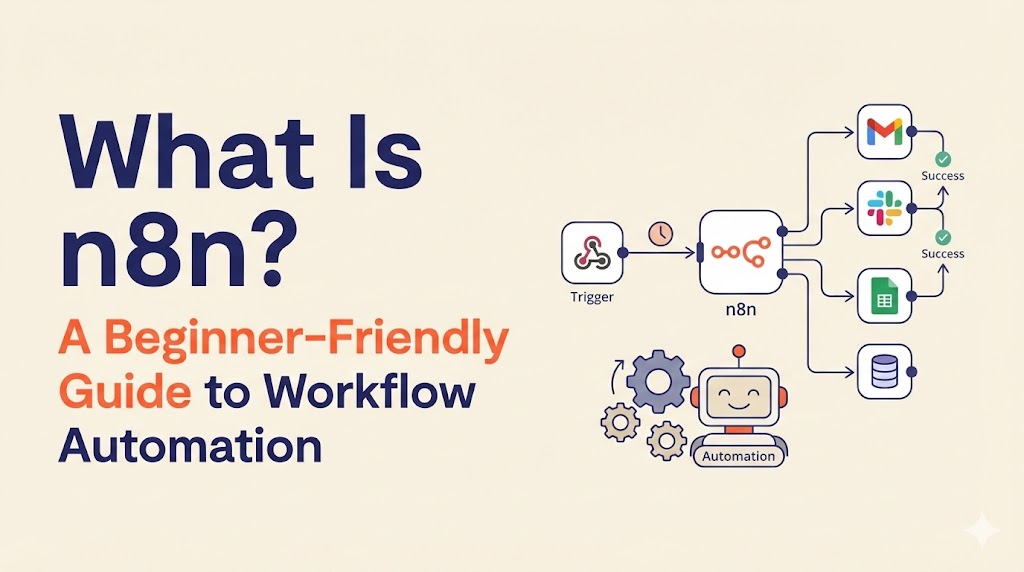
Automation sounds great in theory. In reality, most teams juggle too many apps that don’t talk to each other. Data gets copied manually, notifications are missed, reports take hours to compile, and repetitive admin work slowly eats into productive time.
That’s where n8n comes in.
If you’re wondering what is n8n, the simple answer is this: n8n is a workflow automation tool that connects your apps and automates repetitive tasks without requiring heavy coding skills. It lets you move data between platforms, trigger actions automatically, and build custom workflows tailored to your needs.
One of the biggest advantages? It supports self-hosting. That means you can run n8n on your own server, giving you full control over your data, performance, and costs.
In this guide, you’ll learn:
- What n8n is and what makes it different
- How it works
- Real-world use cases
- How it compares to Zapier
- Pricing and hosting options
Let’s start with the basics.
What Is n8n?
At its core, n8n is an open-source workflow automation platform. The name stands for “nodemation,” referring to the way it connects building blocks called nodes.
If you’re still asking what is n8n in practical terms, think of it as a visual automation engine. Instead of writing complex scripts, you drag and connect nodes inside a visual editor. Each node performs a specific task, and together they form a complete automated workflow.
Here’s what makes n8n stand out:
- It uses a visual workflow builder.
- It combines no-code simplicity with low-code flexibility.
- It’s open-source, which means you can self-host it.
- It allows deeper customization than many beginner-focused automation tools.
Unlike many cloud-only automation tools, n8n gives you the choice. You can use their hosted version or run it yourself. That flexibility is a major reason developers, startups, and growing businesses prefer it.
To understand why self-hosting is so powerful, it helps to first understand how n8n actually works.
How Does n8n Work?
n8n works by connecting apps and services using building blocks called nodes. Each node performs a specific function inside a workflow.
Nodes
Nodes are the foundation of n8n. Think of them as puzzle pieces. Each one represents an action or trigger, such as sending an email, updating a spreadsheet, or fetching data from an API.
Trigger Nodes
A trigger node starts the workflow. It could activate when:
- A new form is submitted
- A payment is received
- An email arrives
- A webhook receives data
Once triggered, the workflow begins running automatically.
Action Nodes
Action nodes define what happens next. These can include:
- Sending notifications
- Updating a CRM record
- Creating a task in a project management tool
- Running custom JavaScript or Python code
- Making HTTP requests to external APIs
Workflows
A workflow is simply a sequence of connected nodes. The trigger starts the process, and action nodes execute in order.
For example, a simple ecommerce workflow might look like this:
- Trigger: New order received
- Action: Store order data in a database
- Action: Send confirmation email
- Action: Notify team in Slack
Once built, this workflow runs automatically every time the trigger condition is met.
Templates
If building from scratch feels overwhelming, n8n offers over 1,250 ready-made workflow templates. These templates help you get started quickly and customize later.
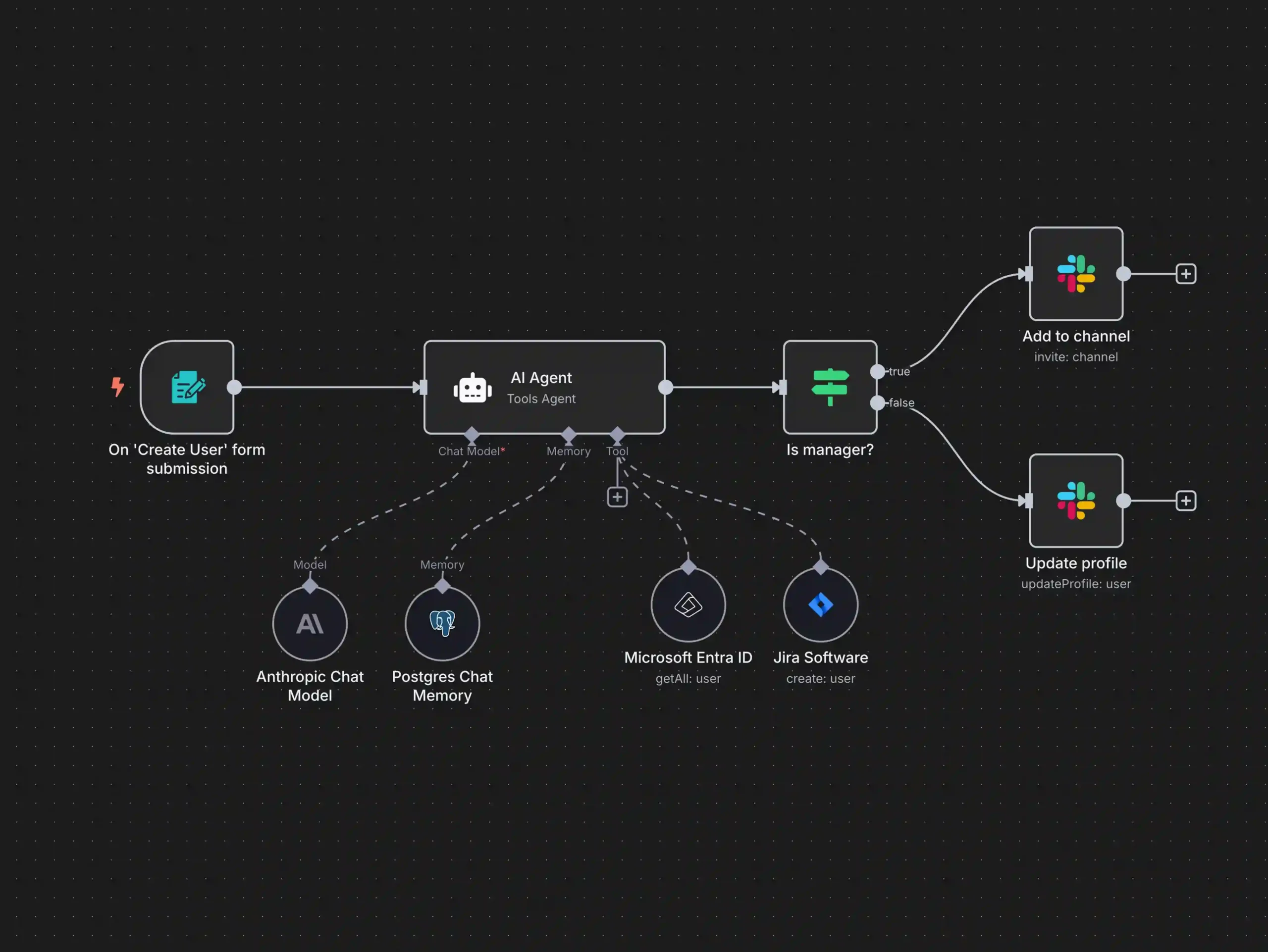
Because n8n allows advanced logic, conditional branching, and custom code, it can handle both simple automations and complex, multi-step processes. This flexibility is what makes it especially powerful when self-hosted.
Now that you understand how it works, let’s look at what you can actually do with it.
Common n8n Use Cases
n8n can automate tasks across marketing, operations, ecommerce, IT, and even personal productivity. Below are some of the most common real-world use cases.
Notifications & Alerts
One of the most popular uses of n8n is sending automated notifications.
For example:
- Send a Slack alert when a new order is placed
- Email your team when a form is submitted
- Trigger SMS notifications for urgent updates
Instead of checking multiple dashboards, your systems communicate automatically.
Data Synchronization
Keeping data consistent across platforms is time-consuming and error-prone.
With n8n, you can:
- Sync customer data between a CRM and project management tool
- Enable two-way synchronization between databases
- Automatically update records across systems
This eliminates manual copying and reduces human error.
Invoice & Payment Automation
For ecommerce or subscription businesses, payment automation is critical.
n8n can handle:
- Payment retries
- Recurring billing workflows
- Payment status updates
- Automatic invoice generation and email delivery
You can also verify payment data against fraud detection systems and store transaction records automatically.
Reporting Automation
Weekly reporting often takes hours of manual preparation.
With n8n, you can:
- Collect data from multiple platforms
- Compile it into a report template
- Generate a document automatically
- Send the report link before a scheduled meeting
This ensures reports are ready without last-minute stress.
Web Scraping & Data Collection
Need to gather insights from multiple sources?
n8n can:
- Extract data from websites
- Monitor competitor pricing
- Track media mentions
- Store structured data in a database or Google Sheets
This is useful for market research, analytics, and internal monitoring.
Smart Home Automation
Beyond business use, n8n can also automate home systems.
You could:
- Turn off lights when leaving home
- Reduce heating when your location changes
- Unlock doors when you return
Because it supports API integrations and custom logic, n8n can expand beyond traditional business automation.
Zapier vs n8n – What’s the Difference?
When comparing automation platforms, the discussion often comes down to simplicity versus control. If you’re researching what is n8n, you’re likely also comparing it with Zapier. Both tools connect apps and automate workflows, but they’re built for slightly different users.
Zapier focuses on ease of use and quick setup. n8n focuses on flexibility, customization, and control — especially if you choose to self-host.
Pros of Zapier
- Beginner friendly and easy to set up
- Wide app ecosystem with thousands of integrations
- Fully cloud-based, so no hosting setup required
Zapier is ideal for users who want automation running in minutes without worrying about servers or configuration.
Cons of Zapier
- Expensive at scale as task volume increases
- Limited customization for complex workflows
While Zapier works well for simple automations, advanced logic and deep customization can feel restrictive. That’s often where people start asking what is n8n and how it compares for more technical use cases.
Pros of n8n
- Self-hosting option
- Advanced customization with code support
- More control over data and infrastructure
If you’re serious about automation and scalability, understanding what is n8n reveals why developers and growing businesses prefer it. You’re not locked into rigid workflow structures, and you can extend functionality as needed.
Cons of n8n
- Has a learning curve compared to Zapier
- Smaller app ecosystem (though expanding rapidly)
- Hosting setup required if you self-host
Because n8n offers more flexibility, it naturally requires a bit more setup time — especially if you choose the self-hosted route.
Clear Conclusion
Zapier = quick start.
n8n = control + scalability.
Self-hosted n8n = maximum value and long-term flexibility.
If your goal is simple automation with minimal setup, Zapier works well. If you want power, customization, and ownership, learning what is n8n and choosing self-hosted deployment is often the smarter long-term decision.
How Much Does n8n Cost?
One of the reasons people research what is n8n is because they’re looking for a cost-effective automation solution. The pricing model is flexible, depending on how you deploy it.
Cloud Pricing
If you don’t want to manage hosting, you can use n8n’s official cloud version.
- Starter plan: $20/month (suitable for basic projects)
- Pro plan: $50/month (designed for teams and advanced workflows)
Cloud hosting is convenient, but as automation grows, costs increase. That’s why many users exploring what is n8n eventually consider self-hosting.
Self-Hosted Option (Primary Monetization Section)
The n8n software itself is free and open-source. That means you can install it on your own server and only pay for hosting.
This is where self-hosted n8n becomes extremely attractive.
Instead of paying per task or per workflow, you control your infrastructure costs. A Virtual Private Server (VPS) is usually the ideal setup.
👉 Ready to launch your own self-hosted n8n instance?
[START YOUR SELF-HOSTED N8N SETUP HERE]
A VPS is ideal because:
- You get dedicated resources
- Performance is consistent
- You can scale as workflows grow
- You maintain full control over your automation environment
For most beginners testing what is n8n, a basic VPS plan with 2 GB RAM is enough to start. As you build more complex workflows, resource usage increases. Monitoring CPU and memory ensures smooth performance.
It’s important to understand that automation can scale quickly. As you add more workflows or run complex logic, your server needs more power. The advantage of self-hosted n8n is that upgrading your VPS is straightforward.
If you’re ready to get started,
👉 Ready to launch your own self-hosted n8n instance?
[START YOUR SELF-HOSTED N8N SETUP HERE]
Why Self-Hosted n8n Is the Best Long-Term Choice
If you’re still asking what is n8n and whether it’s worth self-hosting, this is where the difference becomes clear.
Self-hosted n8n offers:
Data Ownership
Your data stays on your server. You’re not relying entirely on a third-party cloud provider.
No Workflow Limits
You’re not restricted by task quotas. Your only limit is your server capacity.
Lower Long-Term Costs
Instead of paying increasing subscription fees, you pay predictable hosting costs.
Better Performance Control
You decide server specs, performance tuning, and scaling.
Full Customization
You can modify workflows deeply, integrate custom code, and connect to internal systems without restrictions.
So who should choose self-hosted n8n?
- Developers
- Agencies
- SaaS startups
- Businesses running automation-heavy systems
- Anyone who values control and scalability
Who should stick with cloud?
- Complete beginners who don’t want to manage servers
- Small teams running minimal automations
For most growing businesses, once they fully understand what is n8n, they realize self-hosted deployment delivers the highest long-term value.
If you’re serious about automation ownership and scalability,
[DEPLOY SELF-HOSTED N8N ON A VPS HERE].
What You Need to Run Self-Hosted n8n
Setting up self-hosted n8n is straightforward if you have the right components.
Practical Checklist
- VPS (minimum 2 GB RAM recommended)
- Ubuntu server
- Node.js or Docker installed
- Basic command line knowledge
- Ongoing resource monitoring
A VPS provider with one-click Ubuntu setup makes the process much easier.
Suggested Image: n8n running on Ubuntu server interface
Many hosting dashboards allow simple OS installation and resource upgrades in a few clicks. As your automation grows, you can increase RAM or CPU without reinstalling everything.
Understanding what is n8n is only the first step. Running self-hosted n8n gives you full control over automation infrastructure.
A smart placement for your call-to-action button would be right after this checklist section, making it easy for readers to move from learning to implementation.
[GET YOUR VPS AND INSTALL SELF-HOSTED N8N TODAY]
Is n8n Worth It?
If you’re still asking what is n8n and whether it’s actually worth using, the answer depends on your goals.
n8n is especially valuable for:
- Startups that need automation without massive SaaS costs
- Agencies managing workflows across multiple client tools
- Developers who want customization and API-level control
- Automation-heavy businesses running complex, multi-step processes
For small, one-off automations, simpler tools might work. But once workflows become central to operations, understanding what is n8n changes the conversation. It’s not just about connecting apps — it’s about owning your automation stack.
Self-hosting is where the real long-term return on investment happens. Instead of paying increasing subscription fees as task volume grows, you control infrastructure costs. Over time, self-hosted deployment often becomes significantly more economical.
If automation is part of your growth strategy, n8n is not just worth it — it’s scalable.
Final Thoughts on What Is n8n
So, what is n8n in simple terms?
It’s a powerful but approachable workflow automation tool that gives you flexibility without locking you into rigid systems.
It allows:
- Visual workflow building
- Advanced customization
- API integrations
- Conditional logic
- Scalable infrastructure
Whether you’re automating reports, syncing data, processing payments, or building complex backend systems, n8n adapts as your needs grow.
What makes it especially future-proof is the self-hosted option. You’re not tied to subscription limits or third-party restrictions. As your workflows expand, you scale your infrastructure accordingly.
If you’ve been researching what is n8n, the next step is simple.
👉 Ready to launch your own self-hosted n8n instance?
[START YOUR SELF-HOSTED N8N SETUP HERE]
Frequently Asked Questions About n8n
Is n8n really free?
Yes, n8n is free if you self-host it. The software itself is open-source and can be installed on your own server. You only pay for hosting infrastructure if you choose to run it independently. If you use the cloud version, you’ll pay a monthly subscription fee.
Is n8n open source?
Yes. n8n follows a fair-code open-source model. This allows users to self-host, modify workflows, and customize the platform while still supporting the core project. This open nature is one of the reasons many developers choose it after researching what is n8n.
Is n8n better than Zapier?
It depends on your needs.
Zapier is easier for beginners and requires no hosting. However, n8n offers deeper customization, self-hosting, and more control over data and workflows. If you need advanced automation and scalability, n8n is often the better long-term choice.
Can beginners use n8n?
Yes, beginners can use n8n, especially with templates. However, there is a learning curve compared to beginner-focused automation tools. The visual interface makes it accessible, but advanced workflows may require some technical understanding.
What hosting is best for n8n?
A VPS is typically the best hosting option for self-hosted n8n. It provides dedicated resources, scalability, and performance control. Starting with at least 2 GB RAM is recommended for stable performance.
[GET A RECOMMENDED VPS FOR SELF-HOSTED N8N HERE]
If you want a deeper breakdown of server specs, performance tips, scaling advice, and how to choose the right plan for automation tools like n8n, check out our Hostinger Hosting Guide — it walks you through everything you need to confidently launch and scale your own self-hosted setup.
 Reach us on WhatsApp