Affiliate disclosure: some links may earn TecHippo a commission at no extra cost to you. Check current prices and terms with the provider.
Last updated: 13 November 2026. Plans and prices were checked on Cloudways’ own website on that day.
Quick answer: is Cloudways good for WordPress in 2026?
Yes, if you want more power and control than shared hosting, without running a server yourself. Cloudways is managed cloud hosting. You pick a cloud company (DigitalOcean, Vultr, Linode, AWS or Google Cloud) and Cloudways manages the server for you. Plans start at $14 a month on DigitalOcean Premium (1 GB RAM). You pay by the hour, and there is a free trial with no credit card.
Want to try it first? Start with Cloudways’ free trial. Check the live page for the current offer.
Cloudways plans and prices (November 2026)
Cloudways prices depend on the cloud company and the server size you choose. The table shows the DigitalOcean Premium “Basic” servers we saw on 13 November 2026. Cloudways was running a Black Friday offer of 80% off for the first 2 months. The normal price is the one you will pay after that.
| Server | Normal price | Resources | Best for |
|---|---|---|---|
| Micro | $14/mo | 1 GB RAM, 1 vCPU, 25 GB NVMe, 1 TB bandwidth | Personal sites and simple blogs |
| Small | $28/mo | 2 GB RAM, 1 vCPU, 50 GB NVMe, 2 TB bandwidth | Growing business sites |
| Medium (most popular) | $54/mo | 4 GB RAM, 2 vCPU, 80 GB NVMe, 4 TB bandwidth | Busier sites |
| Large | $99/mo | 8 GB RAM, 4 vCPU, 160 GB NVMe, 5 TB bandwidth | Online stores and heavy sites |
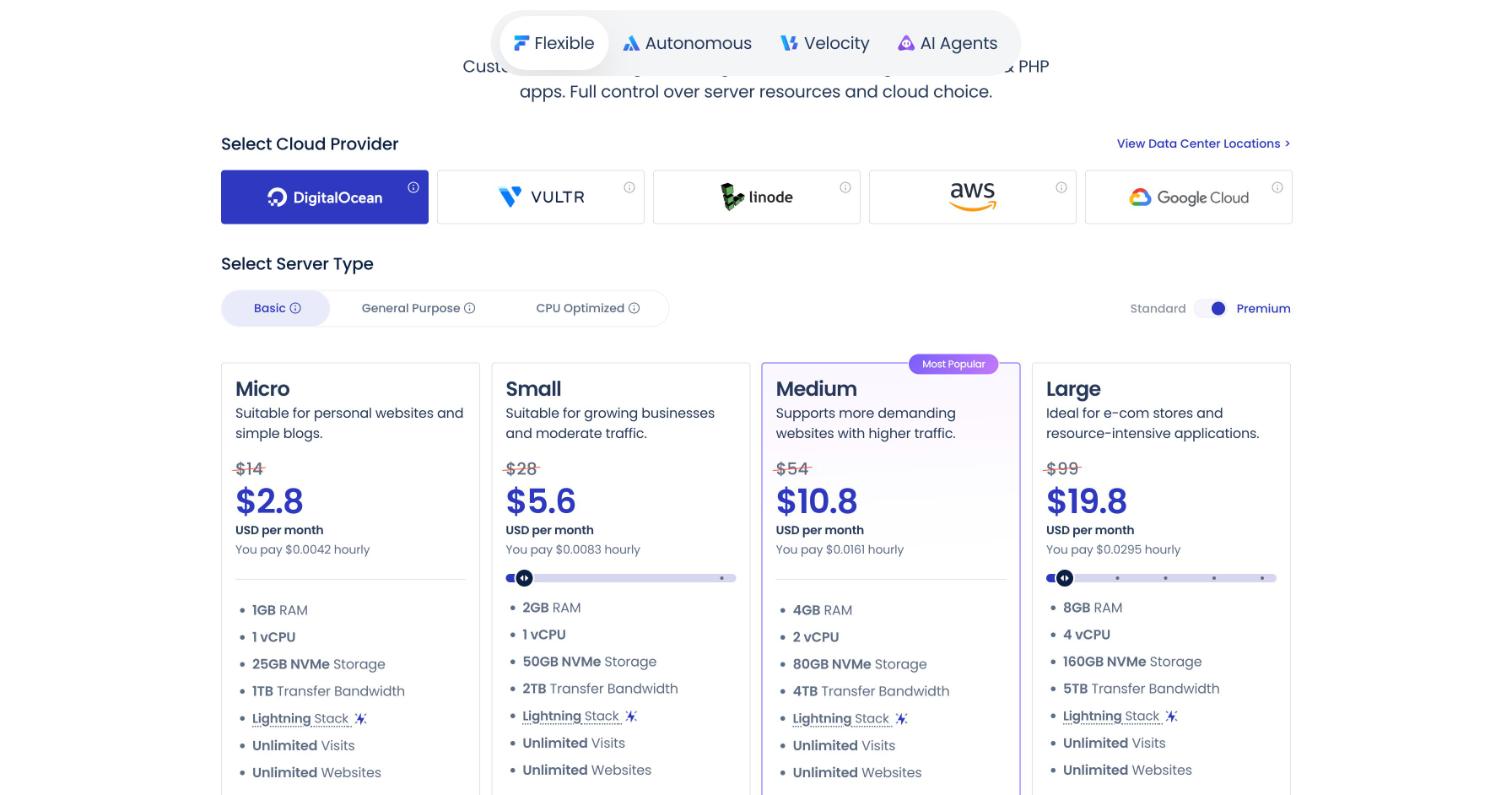
What you get with Cloudways
Cloudways is a “managed cloud” host. These are the main things it offers, taken from its pricing page.
- Choice of 5 cloud providers: DigitalOcean, Vultr, Linode, AWS and Google Cloud.
- Unlimited websites and visits on the server plans we checked (your server resources are the real limit).
- NVMe storage and the Lightning Stack, Cloudways’ speed setup for WordPress.
- 1-click SafeUpdates for WordPress, so updates can be tested before they go live.
- Automated and on-demand backups with one-click restore.
- Server firewall (Imunify360) and managed security.
- 24/7/365 support on all plans, and free migration offers.
- Free trial with no credit card, and pay-as-you-go billing.
- Easy scaling: move to a bigger server when your site grows.
Optional add-ons include Enterprise Cloudflare CDN, Malware Protection, Rackspace Email and advanced support. Prices for these were listed on the same page.
Cloudways pros and cons
What we like
- Strong performance for the price, with real cloud servers
- Pick your cloud company and server size
- Easy to scale up when traffic grows
- Good tools: backups, SafeUpdates, staging and a firewall
- 24/7 support and a free trial with no card
- Pay only for what you use
What to watch out for
- More expensive than cheap shared hosting
- No cPanel, so there is a learning curve
- Email, CDN and advanced support are paid add-ons
- The price depends on the server you choose, which can feel confusing
- Sale prices last only 2 months
Who should use Cloudways?
- Growing business sites that outgrew shared hosting
- WooCommerce stores that need speed and room to grow
- Agencies and freelancers who manage many client sites
- Developers who want server control without server chores
Who should look elsewhere?
If you are a total beginner on a tight budget, start with Hostinger or Bluehost. If you want a premium, fully managed WordPress host, read our Kinsta review. Not sure what type you need? Read shared hosting vs WordPress hosting.
How to start a WordPress site on Cloudways
Here is the simple path. It takes about 15 minutes.
- Open Cloudways and start the free trial.
- Choose “WordPress” as your application.
- Pick your cloud provider (DigitalOcean is a good start), server size and location close to your visitors.
- Launch the server and wait a few minutes.
- Point your domain to the server and install the free SSL certificate in the Cloudways panel.
- Turn on backups and SafeUpdates.
- Log in to WordPress and build your site.
Is Cloudways fast enough for SEO?
Cloudways gives you strong servers, which helps speed. But a heavy theme or too many plugins can still slow your site. Use our guide on how to speed up a WordPress website, set up a CDN, and watch your Core Web Vitals. Need help? See our WordPress speed optimization services.
Cloudways vs other hosts
| Host | Good for | Price level |
|---|---|---|
| Cloudways | Cloud power and control without server chores | Medium |
| Hostinger | Lowest price WordPress hosting | Low |
| Bluehost | Beginners and small business sites | Low to medium |
| Kinsta | Premium managed WordPress | High |
See more choices in our best web hosting guide.
How Cloudways works: a quick explanation
Cloudways is not a normal shared host. It is a management layer on top of big cloud companies such as DigitalOcean, Vultr, Linode, AWS and Google Cloud. You choose the cloud company, the data center and the server size. Cloudways sets up the server, installs the stack and looks after updates.
This gives you the power of a cloud server without having to be a server expert. It also means the price depends on the server you pick, and you pay for what you use.
| Part of the setup | What you choose | Why it matters |
|---|---|---|
| Cloud provider | DigitalOcean, Vultr, Linode, AWS or Google Cloud | Higher tier providers cost more and offer more power |
| Data center | A city near your readers | Closer servers answer faster |
| Server size | From small to large | You can scale up when traffic grows |
| Application | WordPress or WooCommerce | Cloudways installs it for you |
Speed and caching on Cloudways
Cloudways servers use a modern stack with caching built in. The Breeze plugin is the free cache plugin made by Cloudways. Install it and turn on page cache. Higher level options, such as object caching and an enterprise CDN, are paid add-ons.
- Use Breeze for page caching. Do not stack another page cache plugin on top.
- Pick a data center near your visitors.
- Start small, watch the server graphs, and scale up only when the numbers show you need it.
- Add a CDN if your visitors are in many countries.
- Keep PHP on a current version in the settings panel.
Backups and security
Cloudways takes automatic backups and lets you restore with a few clicks. It also includes a free SSL certificate, a firewall and the option to turn on two-factor login. You can set the backup frequency and the number of copies it keeps. More frequent backups use more storage, so choose a schedule that fits your site.
What you do not get
- No cPanel. Cloudways has its own panel. It is clean, but it is different.
- No built-in email hosting. You need a separate email service. Cloudways sells a paid email add-on, or you can use another provider.
- No free domain. Buy your domain from a registrar, then point it to the server. See our list of the best domain registrars.
- Support depth depends on the support tier. Basic chat support is included. Faster and deeper help costs extra.
Cloudways pricing: how to avoid surprise bills
Cloudways bills per hour up to a monthly cap, so you pay only for what you use. This is flexible, but extras can add up. Before you start, write down the full cost:
| Cost item | Included or extra |
|---|---|
| Server | Base price, depends on provider and size |
| Backups | Some storage included, more costs extra |
| Extra add-on or another provider | |
| CDN and object cache | Paid add-ons |
| Premium support | Paid tier |
| Domain | Buy separately |
Take the free trial first and build a test site. The trial helps you see if you like the panel before you pay.
Step by step: launch a WordPress site on Cloudways
- Sign up and choose the free trial if it is offered.
- Click Add Server and pick WordPress.
- Choose a cloud provider, a size and a data center near your readers.
- Wait a few minutes while the server is created.
- Open the application, add your domain, and point your DNS to the server IP.
- Install the free SSL certificate in the panel.
- Install and set up the Breeze cache plugin.
- Turn on backups and test a restore.
Is Cloudways right for you?
| You should choose Cloudways if… | You should skip it if… |
|---|---|
| You want more speed than cheap shared hosting | You want the lowest price possible |
| You are happy to learn a new panel | You want cPanel and email in one place |
| You expect traffic to grow | You never want to think about servers |
| You run a store or a membership site | You need phone support included |
Cloudways alternatives
| Host | Best for | Read our review |
|---|---|---|
| Kinsta | Fully managed premium WordPress | Kinsta review |
| Hostinger | Low cost and easy panel | Hostinger review |
| GreenGeeks | Eco friendly shared plans | GreenGeeks review |
| Bluehost | Beginners who like WordPress tools | Bluehost review |
Our verdict
Cloudways is a great step up from cheap shared hosting. You get real cloud servers, good tools and easy scaling. It costs more and has a small learning curve. If your site is growing, it is one of the best value cloud options. If you are just starting, a simpler host may be enough.
Ready to try? Check Cloudways’ current offer.
Frequently asked questions
Is Cloudways good for WordPress?
Yes. Cloudways offers managed cloud hosting for WordPress with a choice of five cloud providers, NVMe storage, backups, a firewall and 24/7 support. It suits growing sites and stores.
How much does Cloudways cost?
On 13 November 2026, Cloudways listed DigitalOcean Premium Basic servers at $14/mo (Micro), $28/mo (Small), $54/mo (Medium) and $99/mo (Large). A Black Friday offer of 80% off for the first 2 months was running. Prices vary by provider and size.
Does Cloudways have a free trial?
Yes. Cloudways offers a free trial and says no credit card is needed.
Does Cloudways include cPanel?
No. Cloudways uses its own control panel, which is simple but different from cPanel.
Can I move my WordPress site to Cloudways?
Yes. Cloudways offers migration help, and you can also use a migration plugin.
Is Cloudways good for WooCommerce?
Yes. The Medium and Large servers are a good fit for stores that need speed and room to grow.
Is Cloudways good for beginners?
It is easier than running your own server, but harder than a basic shared host. If you are comfortable following a guide, you can launch in about an hour.
Does Cloudways offer a free trial?
Cloudways has offered a free trial that does not need a card in the past. Check the current offer on their site before you sign up.
Does Cloudways include email?
No. You need a separate email service. Cloudways sells a paid add-on, or you can use another provider.
Is Cloudways good for WooCommerce?
Yes. A cloud server with caching and enough memory handles stores well. Choose a size with enough RAM and test checkout speed.
Can I move my site to Cloudways?
Yes. Cloudways has a free migrator plugin, and you can also use any migration plugin. Take a backup first.
Cloudways or Kinsta: which is better?
Kinsta is fully managed and costs more. Cloudways costs less and gives more control, but you do a little more yourself. Read both reviews.
Sources
- Cloudways, Pricing & Plans page (cloudways.com/en/pricing.php)