Affiliate disclosure: some links may earn TecHippo a commission at no extra cost to you. Check current prices and terms with the provider.
Last updated: 13 November 2026. Plans and prices were checked on DreamHost’s own website on that day.
Quick answer: is DreamHost good for WordPress in 2026?
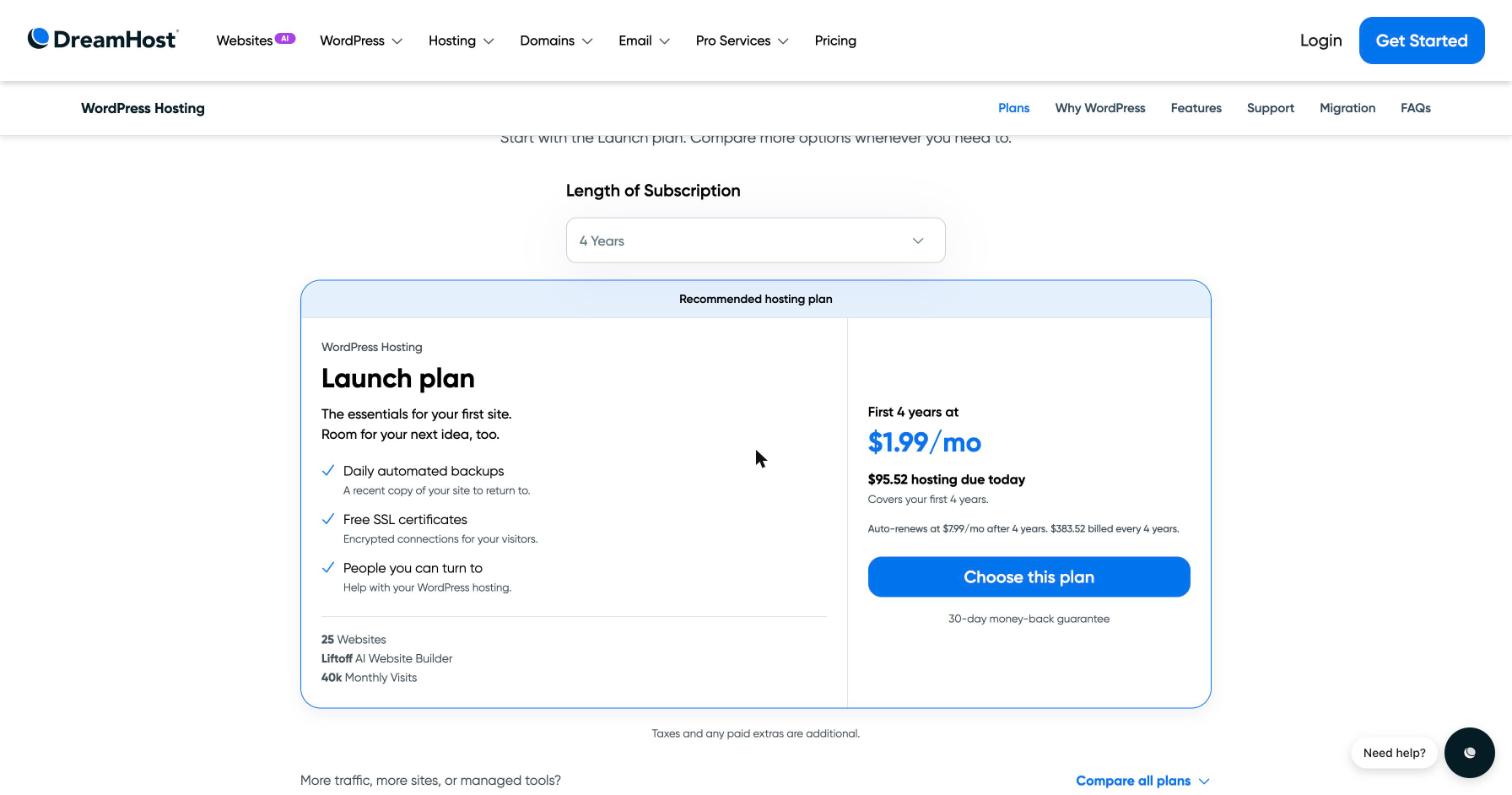
Yes, it is a good, honest choice for small sites, blogs and small businesses. DreamHost has hosted websites since 1997. Its WordPress Launch plan costs $1.99 a month on a 4-year term (you pay $95.52 upfront). It includes 25 websites, daily backups, free SSL and free automated migration, plus a 30-day money-back guarantee. After 4 years it renews at $7.99 a month.
Want to see the plan yourself? Check DreamHost’s WordPress hosting plans.
DreamHost WordPress plans and prices (November 2026)
DreamHost recommends its Launch plan for most people. You can compare more plans on its site, including the managed DreamPress plans. We checked the Launch plan on 13 November 2026.
| Plan | Price | Renewal | What you get |
|---|---|---|---|
| Launch (4-year term) | $1.99/mo ($95.52 paid today) | $7.99/mo ($383.52 per 4 years) | 25 websites, about 40K monthly visits, Liftoff AI website builder, daily backups, free SSL |
| DreamPress (managed WordPress) | See DreamHost for current prices | Varies | Managed WordPress with email included. For busier sites and stores |
What you get with DreamHost WordPress hosting
These features come from the DreamHost WordPress hosting page.
- Daily automated backups so you always have a recent copy of your site.
- Free SSL certificates for secure HTTPS.
- Free automated migration from your old host.
- 25 websites and about 40K monthly visits on the Launch plan.
- Liftoff AI Website Builder to help you start faster.
- Free domain for the first year on eligible plans.
- In-house WordPress support from the DreamHost team.
- 30-day money-back guarantee.
If you need more power or a managed setup, DreamHost also sells DreamPress, which includes email.
DreamHost pros and cons
What we like
- Very low price on the 4-year term
- 25 websites on the Launch plan
- Daily backups, free SSL and free migration
- Long history (since 1997) and a friendly brand
- 30-day money-back guarantee
- Clear price and renewal shown on the plan card
What to watch out for
- The best price needs a 4-year prepay
- Renewal ($7.99) is about four times higher
- Email is only free for 3 months
- About 40K monthly visits is a guide, so busy sites need a bigger plan
- Fewer speed extras than premium managed hosts
Who should use DreamHost?
- Beginners building a first blog or business site
- Small business owners with a few sites
- People moving from another host who want free migration
- Anyone who likes clear pricing and long-term plans
Who should look elsewhere?
If you need a very low first-year price or more speed tools, see Hostinger or Bluehost. If you need premium managed hosting, read our Kinsta review. Not sure what type to buy? Read shared hosting vs WordPress hosting.
How to start a WordPress site on DreamHost
Here is the simple path. It takes about 15 minutes.
- Open the DreamHost WordPress hosting page and choose the Launch plan.
- Pick your subscription length. The 4-year term gives the lowest monthly price.
- Choose a free domain, or connect your own.
- Create your account and pay.
- Install WordPress from your DreamHost panel, or use the free automated migration if you already have a site.
- Check that SSL is active so your site uses HTTPS.
- Log in to WordPress, pick a theme and publish your first page.
Is DreamHost fast enough for SEO?
Hosting helps, but heavy themes and too many plugins can still slow your site. Read our guide on how to speed up a WordPress website and learn about Core Web Vitals. For expert help, see our WordPress speed optimization services.
DreamHost vs other hosts
| Host | Good for | Price level |
|---|---|---|
| DreamHost | Small sites, clear long-term pricing | Low |
| Hostinger | Lowest price WordPress hosting | Low |
| Bluehost | Beginners and small sites | Low to medium |
| Kinsta | Premium managed WordPress | High |
See more choices in our best web hosting guide.
What DreamHost is known for
DreamHost has been in business since the late 1990s and is another host recommended by WordPress.org. It is known for a very long money-back window, month to month billing on some plans, and free domain privacy. It uses its own control panel, not cPanel.
Speed and tools
- A simple custom panel with a one-click WordPress installer.
- A free WordPress migration plugin for moving a site in.
- Free SSL and a built in staging option on some plans.
- DreamPress, a managed WordPress plan with extra speed tools, for sites that need more.
As always, test your own site. Use one cache plugin, light themes and compressed images.
Support
DreamHost offers support by chat and tickets, and a callback option on some plans. Shared plans do not include phone support, which some beginners miss. Prepare your domain, the error text and what you changed before you contact support.
Backups and security
Free SSL and domain privacy come with the plans. Backups depend on the plan, so check the details. Add your own plugin backup to cloud storage and turn on two-factor login.
Pricing and the refund window
| Feature | What to know |
|---|---|
| Month to month option | Costs more per month, but you can leave any time |
| Annual plans | Cheaper per month, and often include a free domain |
| Refund window | DreamHost advertises a long window on hosting. Read the terms |
| Renewal price | Check it before you pay |
Step by step: start on DreamHost
- Choose a plan and a term.
- Add your domain, or register one.
- Install WordPress from the panel.
- Install a cache plugin and an image tool.
- Set up email, or connect an email service.
- Add a backup plugin.
- Test the speed and publish.
Is DreamHost right for you?
| Good fit | Not the best fit |
|---|---|
| Owners who want a long refund window | People who want cPanel |
| Users who want month to month plans | Owners who need phone support on shared plans |
| Privacy minded site owners | Very high traffic stores on shared plans |
Alternatives to consider
| Host | Best for | Read our review |
|---|---|---|
| Hostinger | Low cost and easy panel | Hostinger review |
| Bluehost | Beginners and phone support | Bluehost review |
| GreenGeeks | cPanel and eco hosting | GreenGeeks review |
| Cloudways | More power and control | Cloudways review |
Our verdict
DreamHost is a friendly, honest host with clear prices. It is a good pick for a first or second site. Just remember the 4-year prepay and the higher renewal price. If your site grows, you can move to DreamPress or another host later.
Ready? Check DreamHost’s current plans.
Frequently asked questions
Is DreamHost good for WordPress?
Yes. DreamHost offers WordPress hosting with daily automated backups, free SSL, free automated migration and a 30-day money-back guarantee. It has hosted websites since 1997.
How much does DreamHost WordPress hosting cost?
On 13 November 2026, DreamHost listed its Launch plan at $1.99 a month on a 4-year term ($95.52 paid upfront). It renews at $7.99 a month. Prices change, so check the live page.
Does DreamHost include a free domain?
A free domain for the first year comes with eligible annual and multi-year plans. Domain renewal costs extra.
Does DreamHost have a money-back guarantee?
Yes. DreamHost offers a 30-day money-back guarantee.
Is email included with DreamHost?
The WordPress Hosting plan has a three-month email trial, then email is billed separately. DreamPress includes email.
Can DreamHost move my site for me?
Yes. DreamHost offers free automated migration.
Does DreamHost use cPanel?
No. DreamHost uses its own custom control panel.
Does DreamHost have a money-back guarantee?
DreamHost advertises a long money-back window on hosting plans. Check the current terms at checkout.
Does DreamHost offer month to month billing?
Yes, on some plans. It costs more per month than a longer term.
Does DreamHost have phone support?
Shared plans use chat and tickets. Phone callback is limited to some plans. Check the current options.
Is DreamHost good for WordPress?
Yes. It is a WordPress.org recommended host, and it has a managed WordPress plan, DreamPress, for bigger sites.
DreamHost or Bluehost: which is better?
DreamHost has a longer refund window and month to month plans. Bluehost has phone support and a simpler first setup. Compare the renewal price for both.
Sources
- DreamHost, WordPress Hosting page (dreamhost.com/hosting/wordpress/)