
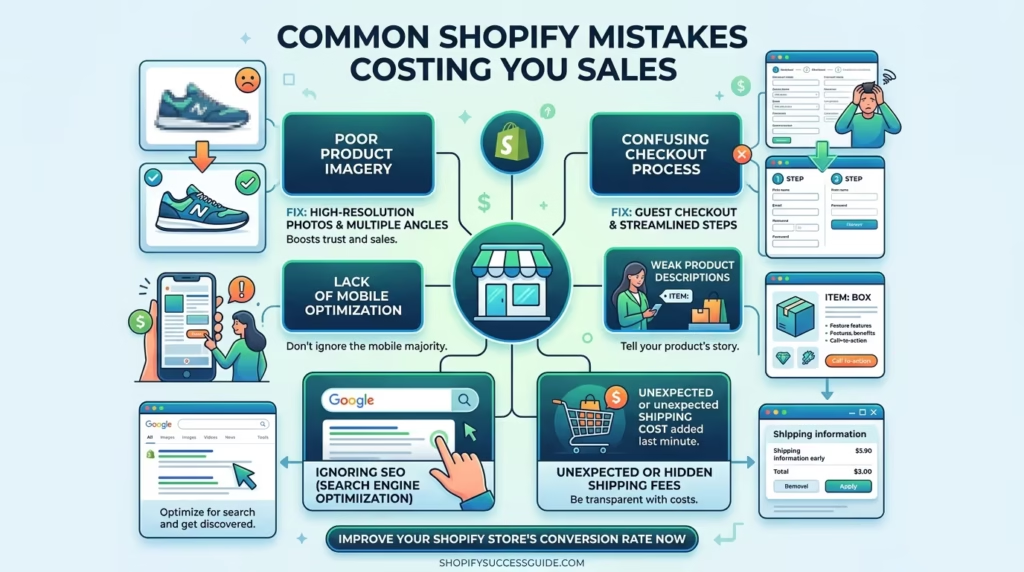
Shopify makes it easier than ever to launch an online store. But easy to launch does not mean easy to succeed — and thousands of store owners are quietly losing sales every day because of avoidable mistakes they do not even know they are making.
The difference between a Shopify store that converts consistently and one that struggles to generate sales is rarely the product. In most cases it comes down to a collection of common Shopify mistakes across design, product pages, checkout, speed, SEO, and customer experience that individually seem minor but collectively have a significant impact on revenue.
In this guide we will walk you through every major category of common Shopify mistakes — what they are, why they hurt your sales, and exactly what to do to fix them. Whether you are just launching your store or have been running it for months, this guide will help you identify and eliminate the mistakes that are costing you customers and revenue.
Why Avoiding Common Shopify Mistakes Matters
Every visitor who lands on your Shopify store represents a real acquisition cost — whether through paid advertising, organic search, social media, or word of mouth. When common Shopify mistakes cause those visitors to leave without buying, that acquisition cost is wasted entirely.
The cumulative impact of unresolved store mistakes is significant:
- Lower conversion rates mean you need more traffic to generate the same revenue — increasing your advertising costs without increasing your returns
- Higher bounce rates from poor design and slow loading times send negative signals to Google that damage your SEO rankings over time
- Poor customer experience leads to negative reviews, low repeat purchase rates, and damaged brand reputation
- Missed upsell and recovery opportunities leave significant revenue on the table from customers who were already interested in buying
- Weak SEO foundations limit your organic traffic growth meaning you remain dependent on paid advertising indefinitely
Understanding and fixing common Shopify mistakes is therefore not just about improving the experience for existing visitors — it is about maximizing the return on every marketing and advertising investment your store makes.
Common Shopify Mistakes — Store Setup and Design
The design and setup of your Shopify store creates the first impression that determines whether visitors trust your brand enough to keep browsing. These are the most damaging common Shopify mistakes in the setup and design category.
Choosing the Wrong Shopify Theme
Your theme is the foundation of your entire store experience. Choosing the wrong one — based on visual appeal alone without considering speed, mobile performance, and conversion features — is one of the most costly common Shopify mistakes a store owner can make.
- A slow theme hurts both conversion rates and SEO rankings through poor Core Web Vitals scores
- A non-responsive theme delivers a broken experience to mobile shoppers who now make up the majority of eCommerce traffic
- A theme without built-in conversion features like sticky add-to-cart buttons and quick view functionality requires expensive app additions to compensate
- An overly complex theme with heavy animations and video backgrounds often looks impressive in demos but loads slowly with real product content
Choose a theme that balances visual quality with performance — and always test the demo through Google PageSpeed Insights on the mobile tab before committing. Our eCommerce Store Development service includes strategic theme selection as a core part of every Shopify store project.
Cluttered and Confusing Homepage Design
Your homepage has one job — to orient new visitors, communicate your value, and guide them toward your products as quickly and clearly as possible. A cluttered homepage that tries to show everything at once achieves none of these goals.
- Too many competing sections, banners, and promotional messages overwhelm visitors and increase bounce rates
- Unclear navigation makes it difficult for visitors to find the product categories they are looking for
- Autoplay sliders — one of the most persistent common Shopify mistakes — are consistently shown to reduce conversion rates compared to a single strong static hero image
- Excessive pop-ups and overlays that fire immediately on arrival damage the first impression and frustrate visitors before they have had a chance to engage
Simplify your homepage to a clear hierarchy — hero section, featured collections, social proof, and a single strong call to action — and let your products do the selling.
Missing or Weak Branding
Visitors make trust decisions within seconds of landing on your store. A store with inconsistent or underdeveloped branding signals unprofessionalism and reduces the likelihood of purchase — particularly from first-time visitors.
- Inconsistent use of colors, fonts, and visual style across different pages of the store creates a disjointed experience that erodes trust
- A low-quality or missing logo makes the store look unfinished and reduces credibility
- Generic stock photography that does not reflect the actual products or brand identity fails to create emotional connection with visitors
- No clear brand voice or personality in product descriptions and homepage copy makes the store feel impersonal and forgettable
Strong consistent branding across every touchpoint of your Shopify store builds the trust that converts first-time visitors into customers.
No Clear Value Proposition Above the Fold
The content visible on your homepage before a visitor scrolls — above the fold — must immediately answer the question every new visitor is silently asking: why should I buy from you instead of someone else?
- A vague or generic headline like “Welcome to Our Store” communicates nothing and gives visitors no reason to stay
- Missing or buried free shipping, fast delivery, or satisfaction guarantee messaging — the three most conversion-impactful trust signals — is one of the most common common Shopify mistakes on Shopify homepages
- No clear call to action above the fold leaves visitors unsure what to do next
- Focusing on brand story rather than customer benefit in the hero section misses the primary conversion opportunity of the most valuable real estate on your store
Your value proposition should be immediately clear, benefit-focused, and accompanied by a strong call to action — all visible before a single scroll.
Common Shopify Mistakes — Product Pages
Your product pages are where purchase decisions are made. These common Shopify mistakes on product pages directly reduce add-to-cart rates and cost you sales every single day.
Poor Quality Product Images
Product images are the single most important conversion element on any product page — because online shoppers cannot physically touch, try, or inspect your products before buying. Poor quality images are among the most damaging common Shopify mistakes for conversion rates.
- Low resolution images that cannot be zoomed in on make it impossible for customers to assess product quality and detail
- Too few images — showing only one or two angles — leave customers with unanswered questions that prevent purchase
- Inconsistent image styling across products — different backgrounds, lighting, and orientations — makes the store look unprofessional
- No lifestyle images showing the product in real-world use context makes it harder for customers to visualize owning the product
- Missing video demonstrations for products where motion or scale is important to the purchase decision
Invest in high-quality consistent product photography and complement studio images with lifestyle shots and video where relevant. Our eCommerce Store Development service always includes product image optimization guidance as part of every store setup.
Weak or Missing Product Descriptions
A product description that consists only of a bullet list of specifications — or worse, a manufacturer’s generic description — is one of the most widespread common Shopify mistakes and one that consistently costs stores sales.
- Feature-focused descriptions that list specifications without translating them into customer benefits fail to persuade hesitant buyers
- Extremely short descriptions that leave obvious customer questions unanswered increase return rates and reduce conversion rates
- Copied manufacturer descriptions are penalized by Google as duplicate content and actively harm SEO rankings
- No storytelling or brand voice in descriptions makes products feel commodity-like rather than desirable
- Missing care instructions, compatibility information, or usage guidance for products where these details influence purchase decisions
Write original benefit-focused descriptions that answer your customer’s most important questions, speak to their desires and pain points, and give them every reason to add to cart with confidence.
No Customer Reviews on Product Pages
The absence of customer reviews on product pages is one of the most impactful common Shopify mistakes for conversion rates — particularly for stores targeting first-time buyers who have no prior experience with your brand.
- Products with no reviews are viewed with significantly more skepticism than products with even a small number of genuine reviews
- A missing review section signals either that the store is new and unproven or that the store owner is hiding feedback — neither of which builds purchase confidence
- Not actively soliciting reviews through post-purchase email sequences means review volume grows far more slowly than it could
- Failing to display reviews prominently near the add-to-cart button — where they have the most conversion impact — is a missed opportunity even for stores that do collect reviews
Install a review app like Judge.me or Loox and set up automated post-purchase review request emails immediately. Display reviews prominently on every product page. eCommerce Store Development projects at TecHippo always include review app setup and configuration as a standard deliverable.
Missing Size Guides and Product Details
For any store selling products where fit, dimensions, compatibility, or specifications influence the purchase decision, missing size guides and product details are significant common Shopify mistakes that directly increase both abandonment rates and return rates.
- No size guide on clothing and footwear product pages is one of the single most common reasons for cart abandonment in fashion eCommerce
- Missing dimensions for furniture, home decor, and equipment products leave customers unable to confirm the product will fit their space
- No compatibility information for electronics and accessories forces customers to search elsewhere for answers — and often not return
- Missing material and ingredient information for beauty, health, and food products blocks purchase for customers with specific sensitivities or preferences
Add detailed size guides, dimension charts, compatibility tables, and specification sections to every product page where these details influence the purchase decision.
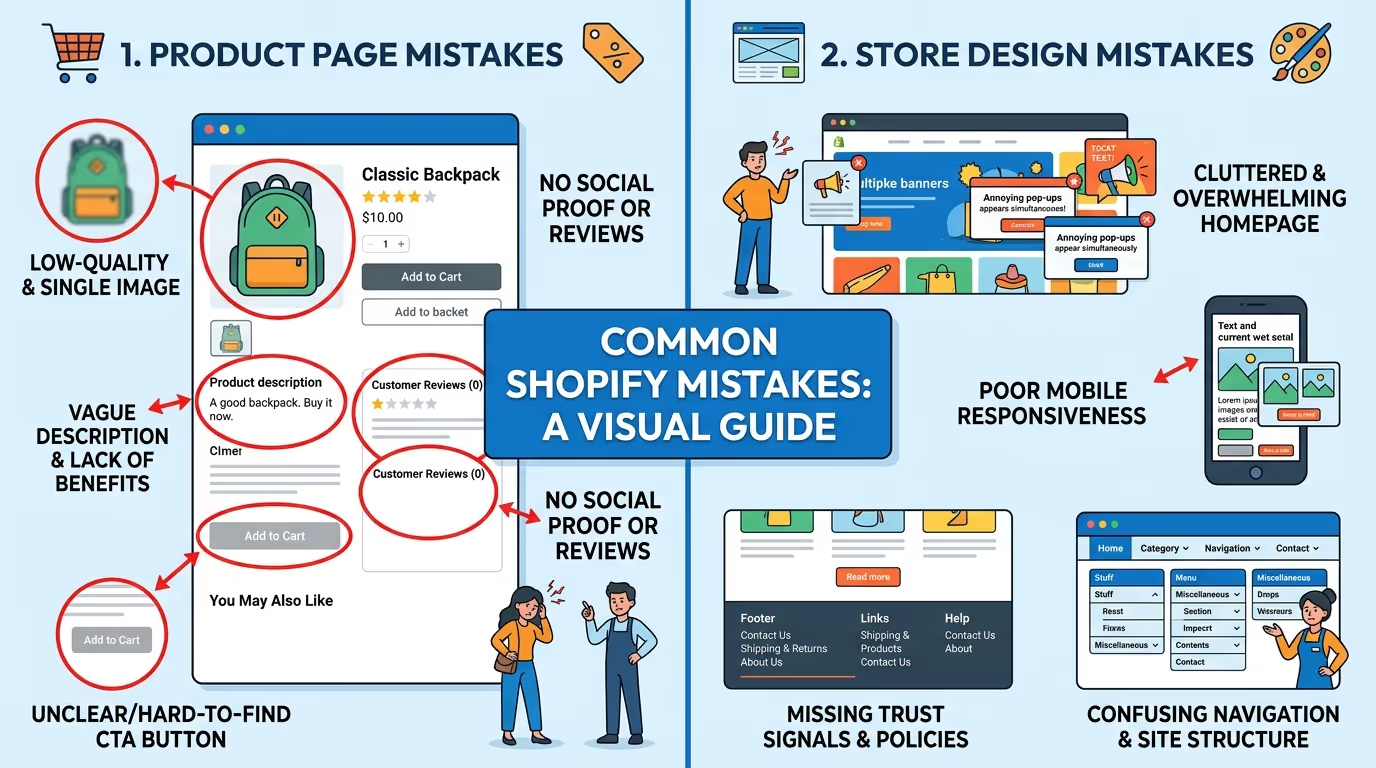
Poor product pages and weak store design are two of the most common reasons Shopify stores underperform — and most store owners do not discover the problem until their conversion rate tells them something is wrong.
Our eCommerce Store Development and Website Speed Optimization services are built to identify and fix the design, product page, and performance issues that are costing your Shopify store sales.
Get in touch with TecHippo today for a free consultation and let’s find the mistakes that are holding your store back.
Common Shopify Mistakes — Checkout and Conversions
The checkout process is where the majority of cart abandonments happen — and many of them are caused by entirely avoidable common Shopify mistakes that create unnecessary friction at the most critical moment in the customer journey.
Too Many Steps in the Checkout Process
Every additional step, page, or form field in your checkout process increases the likelihood that a customer abandons before completing their purchase. A lengthy or complicated checkout is one of the most damaging common Shopify mistakes for conversion rates.
- Requiring account creation before checkout is one of the highest-impact causes of checkout abandonment — always offer guest checkout as the default option
- Asking for unnecessary information — like a phone number when it is not needed for delivery — adds friction without adding value
- Multi-page checkouts that require clicking through multiple screens before reaching payment increase abandonment rates compared to streamlined single-page flows
- Shopify’s native one-page checkout is significantly more effective than the older multi-step version — ensure your store is using the latest checkout experience
Streamline your checkout to the absolute minimum number of steps and fields required to complete the transaction. Every field you remove is a friction point eliminated.
Limited Payment Options
Offering only one or two payment methods is a common Shopify mistakes that directly causes lost sales from customers whose preferred payment method is not available.
- Not offering PayPal is a significant conversion barrier — a large percentage of online shoppers prefer PayPal for the security and convenience it offers
- Missing buy now pay later options like Klarna or Afterpay reduces conversion rates for higher-priced products where payment flexibility influences the purchase decision
- No Apple Pay or Google Pay integration misses the growing segment of mobile shoppers who expect one-tap checkout
- Credit card only checkout excludes customers in markets where alternative payment methods are dominant
Enable every payment method Shopify supports in your market — the incremental revenue from customers who would otherwise abandon at payment selection far outweighs any administrative complexity.
No Trust Badges or Security Signals
At the checkout stage, purchase anxiety peaks. Customers are about to enter their payment details and any doubt about the security or legitimacy of your store can cause them to abandon. Missing trust signals at checkout is one of the most costly common Shopify mistakes in terms of lost conversions.
- No SSL certificate badge or secure checkout indicator near the payment form leaves security-conscious customers uncertain about the safety of their data
- Missing money-back guarantee or satisfaction guarantee messaging at checkout removes the safety net that overcomes last-minute hesitation
- No recognizable payment provider logos — Visa, Mastercard, PayPal — near the payment form reduces perceived legitimacy
- No clear returns policy link near the checkout CTA leaves customers uncertain about what happens if the product does not meet their expectations
Add trust badges, security indicators, guarantee messaging, and payment provider logos at every stage of the checkout process — particularly adjacent to the final payment confirmation button.
No Abandoned Cart Recovery Strategy
The majority of customers who add items to their cart do not complete their purchase on the first visit. Without an active abandoned cart recovery strategy, all of that potential revenue is permanently lost — making this one of the most expensive common Shopify mistakes a store owner can make.
- Not setting up automated abandoned cart email sequences through Klaviyo or Shopify Email leaves the most recoverable revenue segment completely unaddressed
- No exit-intent pop-up offering a discount or free shipping incentive for completing the purchase misses an opportunity to recover visitors at the moment of departure
- Missing SMS abandoned cart recovery through a tool like Postscript or Klaviyo SMS abandons a high open-rate recovery channel
- No browser push notification recovery through an app like PushOwl leaves an additional recovery channel unused
Set up a minimum three-email abandoned cart sequence — sent at one hour, 24 hours, and 72 hours after abandonment — with progressively stronger incentives. Our eCommerce Store Development and Monthly Website Management Plans include abandoned cart recovery setup as a standard part of every store optimization engagement.
Common Shopify Mistakes — Speed and Performance
Store speed is a conversion factor that operates invisibly — visitors do not consciously think about loading times but they absolutely feel them. Slow stores consistently convert at lower rates than fast ones, making speed-related common Shopify mistakes among the most impactful to fix.
Slow Loading Store Pages
A Shopify store that takes more than three seconds to load on mobile is losing a significant percentage of its visitors before they ever see a product. Slow loading is one of the most widespread common Shopify mistakes and one of the most directly impactful on revenue.
- Poor hosting performance — while Shopify handles server infrastructure, the code weight of your theme and apps determines how quickly pages render
- Excessive JavaScript from installed apps that all load scripts on every page regardless of whether their features are active
- Large unoptimized images that add unnecessary data weight to every page load
- No caching or CDN configuration to speed up asset delivery for visitors in different geographic locations
- Heavy theme animations and video backgrounds that prioritize visual impact over loading performance
Run your store through Google PageSpeed Insights on the mobile tab and treat the results as a priority fix list. Our Website Speed Optimization service delivers measurable Core Web Vitals improvements for Shopify stores of every size.
Unoptimized Product Images
Product images are typically the largest files loaded on any Shopify page — making image optimization one of the highest-impact and most accessible performance improvements available for fixing common Shopify mistakes related to speed.
- Uploading original camera images at full resolution — often 5MB to 20MB per file — adds enormous unnecessary weight to every product page load
- Not converting images to WebP format misses significant file size savings that are available without any visible quality reduction
- Missing explicit image dimensions cause layout shifts during loading that hurt CLS scores and create a jarring visual experience for visitors
- Not using lazy loading for below-the-fold product images forces the browser to load all images simultaneously rather than prioritizing visible content
Install an image optimization app like TinyIMG or Crush Pics and enable automatic compression and WebP conversion for all new and existing product images.
Too Many Installed Apps
Every app installed on your Shopify store adds JavaScript, CSS, and other code that loads on every page — regardless of whether that app’s features are actively being used on that specific page. Over-installing apps is one of the most common common Shopify mistakes for store performance.
- Many store owners install apps to trial them and then forget to uninstall them when they decide not to use them — leaving inactive apps still loading code
- Multiple apps performing overlapping functions — two review apps, two upsell apps, two analytics tools — adds double the performance cost with no additional benefit
- Apps that inject scripts into every page of the store regardless of relevance are particularly damaging — a chat widget loading on every product page adds loading time even for visitors who will never use it
- Not regularly auditing installed apps means performance degradation accumulates silently over time
Conduct a quarterly app audit — uninstall anything inactive, replace overlapping apps with single best-in-class alternatives, and check PageSpeed scores before and after every new app installation.
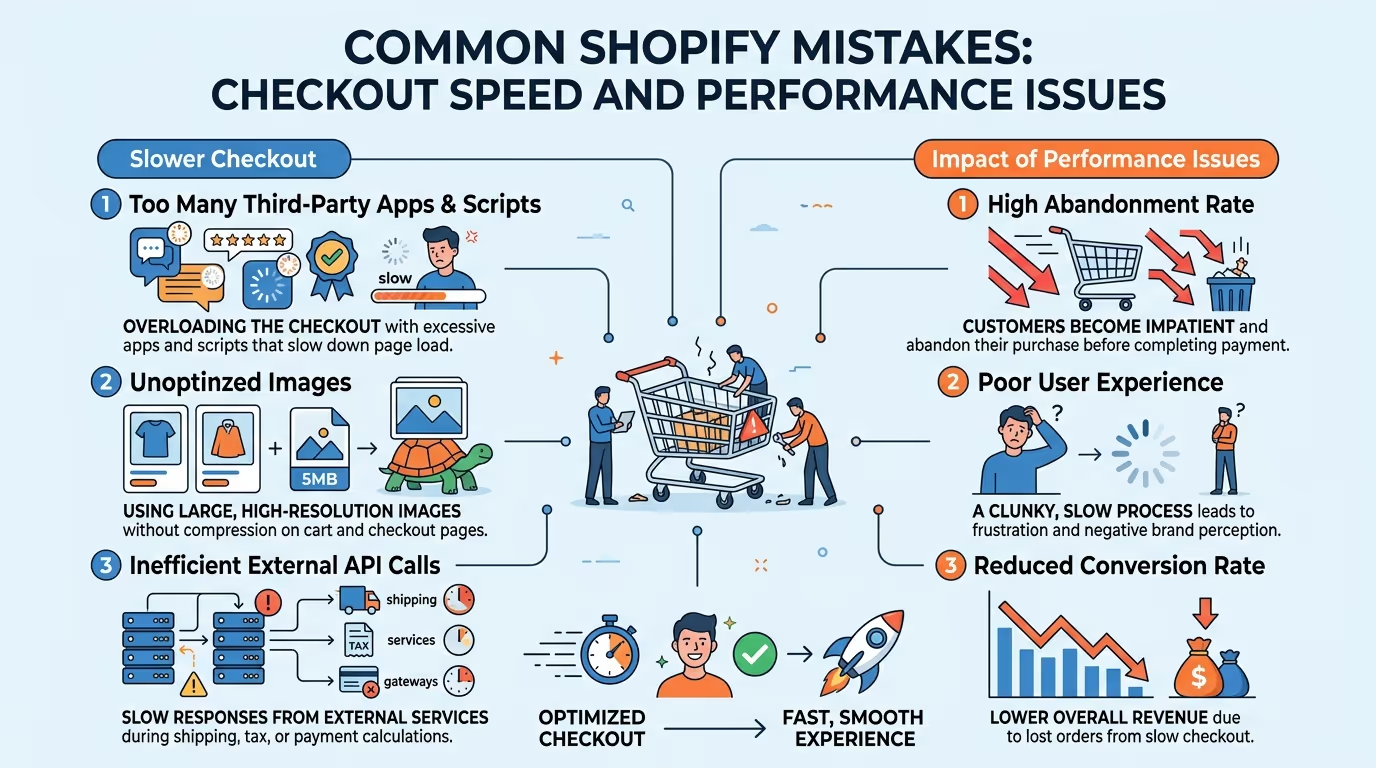
Slow loading times and checkout friction are two of the biggest revenue leaks in any Shopify store — and both are entirely fixable with the right expertise.
Our Website Speed Optimization, eCommerce Store Development, and Monthly Website Management Plans are specifically built to identify and resolve the speed and checkout issues that are costing your Shopify store sales every single day.
Reach out to TecHippo today and let’s fix the performance and conversion issues holding your store back.
Common Shopify Mistakes — SEO and Marketing
Organic search traffic is one of the most valuable and cost-effective sources of customers for any Shopify store. These common Shopify mistakes in SEO and marketing prevent stores from capturing that traffic and building sustainable long-term growth.
Missing Meta Titles and Descriptions
Meta titles and descriptions are what appear in Google search results when your store pages are listed — and leaving them on Shopify’s auto-generated defaults is one of the most widespread common Shopify mistakes for SEO performance.
- Auto-generated meta titles often default to the product name and store name without including any target keywords that potential customers are actually searching for
- Missing or auto-generated meta descriptions fail to communicate value and give searchers no compelling reason to click your listing over a competitor’s
- Duplicate meta titles across multiple product pages with similar names create keyword cannibalization issues that dilute ranking signals
- Meta titles that exceed 60 characters are truncated in search results making them less readable and less clickable
Manually write keyword-optimized meta titles and compelling meta descriptions for every product page, collection page, and key landing page across your store. Our SEO & Growth Optimization service covers full on-page SEO implementation for Shopify stores.
No Blog or Content Strategy
Relying entirely on paid advertising for traffic is an expensive and fragile growth strategy. The absence of a blog and content strategy is one of the most strategically costly common Shopify mistakes for long-term store growth.
- No blog means no opportunity to rank for informational keywords that your target customers are searching for at the research stage of their buying journey
- Missing content means no internal linking opportunities to drive organic traffic from informational articles to product and collection pages
- No content strategy leaves your store entirely dependent on paid advertising for traffic — meaning traffic stops the moment ad spend stops
- A dormant blog with a few old posts signals to Google that the store is not actively maintained — which can negatively affect crawl frequency and ranking performance
Publish regular SEO-optimized blog content targeting keywords your ideal customers are searching for at every stage of the buying journey — from informational research queries to product comparison and buying guide content.
Ignoring Mobile SEO
Since Google uses mobile-first indexing, your Shopify store’s mobile experience is what Google primarily evaluates for ranking purposes. Ignoring mobile SEO is one of the common Shopify mistakes with the most direct impact on search visibility.
- A store that performs well on desktop but poorly on mobile is ranked based on its mobile performance — meaning desktop SEO efforts are undermined by mobile weaknesses
- Poor mobile Core Web Vitals scores — particularly LCP and CLS — directly suppress rankings across all search results not just mobile searches
- Content that is hidden on mobile using CSS display none may not be fully counted by Google for ranking purposes
- Not testing mobile usability in Google Search Console means mobile-specific issues accumulate undetected over time
Check your store’s Mobile Usability report in Google Search Console monthly and treat any flagged issues as urgent SEO priorities.
Not Using Google Analytics and Search Console
Running a Shopify store without Google Analytics and Google Search Console connected is like driving without a dashboard — you have no visibility into what is working, what is not, and where your biggest opportunities lie. This is one of the most common common Shopify mistakes among newer store owners.
- Without Google Analytics you cannot identify which traffic sources are generating the most conversions, which products are viewed most, or where in the conversion funnel visitors are dropping off
- Without Google Search Console you cannot see which keywords are driving impressions and clicks, identify crawl errors that are blocking indexing, or monitor Core Web Vitals performance across your store
- No conversion tracking means you cannot accurately measure the ROI of any marketing or advertising investment
- Missing data makes every future optimization decision a guess rather than an evidence-based choice
Connect both Google Analytics 4 and Google Search Console to your Shopify store immediately and monitor both platforms at minimum monthly.
Common Shopify Mistakes — Customer Experience
Acquiring a customer is significantly more expensive than retaining one. These common Shopify mistakes in customer experience reduce repeat purchase rates, damage brand reputation, and limit the long-term revenue value of every customer your store acquires.
No Live Chat or Customer Support
Customers who have questions during the buying process and cannot get fast answers will abandon and buy elsewhere. Missing live chat or easily accessible customer support is one of the most conversion-damaging common Shopify mistakes for stores with complex or higher-priced products.
- No live chat means customers with pre-purchase questions — about sizing, compatibility, shipping times, or return policies — have nowhere to turn except to leave
- A contact form with a 24 to 48 hour response time is not sufficient for customers who need answers before they will complete a purchase
- No FAQ section on product pages forces customers to contact support for questions that could be answered proactively
- Missing phone number or email address on the contact page damages trust for first-time visitors who want to verify the store is a legitimate business
Install a live chat app like Tidio and configure an AI chatbot to handle common questions around the clock — ensuring customers always have a path to answers regardless of your team’s working hours.
Complicated Return and Refund Policy
A clear and generous return policy is one of the most powerful trust signals available to any online store. A complicated, restrictive, or hard-to-find return policy is a common Shopify mistakes that directly reduces purchase confidence.
- A return policy buried in the footer and never referenced on product pages misses the opportunity to use it as a conversion tool
- Complicated return conditions with multiple exceptions and restrictions create uncertainty that increases purchase hesitation
- No free returns option — where competitors offer it — creates a significant competitive disadvantage particularly for fashion and apparel stores
- A return window shorter than 30 days makes customers feel rushed and reduces confidence in purchases made as gifts or for future occasions
Display your return policy prominently on product pages near the add-to-cart button — treating it as a trust signal rather than a legal disclaimer.
No Post-Purchase Follow-Up
The relationship with a customer does not end at checkout — but many Shopify store owners treat it as though it does. No post-purchase follow-up strategy is one of the common Shopify mistakes with the highest long-term revenue impact.
- No thank you email beyond the order confirmation misses the opportunity to strengthen the customer relationship at the moment of highest engagement
- Missing post-purchase upsell emails or SMS messages leave additional revenue opportunities untapped from customers who are already in a buying mindset
- No review request sequence means review volume grows slowly and organic social proof accumulates at a fraction of its potential rate
- No win-back email campaign for customers who have not purchased in 60 to 90 days allows high-value customer relationships to lapse without any re-engagement attempt
- Missing loyalty program or referral incentive leaves the most powerful customer acquisition channel — word of mouth from satisfied buyers — completely undeveloped
Set up a complete post-purchase email sequence through Klaviyo that includes a thank you email, a review request, a complementary product recommendation, and a win-back campaign for lapsed customers. Our Monthly Website Management Plans include ongoing email marketing support to keep these sequences optimized and performing.
How to Audit Your Shopify Store for These Mistakes
Now that you understand the full range of common Shopify mistakes across every category, here is a systematic approach to auditing your own store and prioritizing fixes for maximum revenue impact.
Step 1 — Speed Audit
Run your homepage, a collection page, and your best-selling product page through Google PageSpeed Insights on the mobile tab. Record your LCP, INP, and CLS scores and note every issue flagged in the opportunities and diagnostics sections.
Step 2 — Design and UX Review
View your store on a real smartphone as a first-time visitor. Ask yourself honestly whether the value proposition is immediately clear, whether navigation is intuitive, and whether the path from landing to add-to-cart is friction-free.
Step 3 — Product Page Audit
Review your five best-selling product pages against the criteria in this guide — image quality, description quality, review presence, and completeness of product details. Identify which pages have the most gaps and prioritize those first.
Step 4 — Checkout Review
Complete a test purchase on your own store from a mobile device using a real payment method. Count the number of steps, identify every form field, and note every point of friction you encounter between cart and confirmation.
Step 5 — SEO Audit
Check Google Search Console for crawl errors, mobile usability issues, and Core Web Vitals warnings. Review the meta titles and descriptions of your top 10 pages and identify any that are auto-generated or missing target keywords.
Step 6 — Analytics Review
Check Google Analytics for your top exit pages, highest bounce rate pages, and lowest conversion rate traffic sources. These data points reveal where your biggest conversion opportunities lie.
Step 7 — App Audit
Review every installed app and ask whether it is actively contributing to conversion or revenue. Remove anything inactive and check PageSpeed scores before and after removal to quantify the performance impact.
Working through this audit systematically will reveal which common Shopify mistakes your store is making and give you a clear prioritized list of fixes ordered by revenue impact.
Every day your Shopify store continues making these mistakes is a day you are losing customers and revenue to competitors who have already fixed them.
At TecHippo our eCommerce Store Development, Website Speed Optimization, SEO & Growth Optimization, and Monthly Website Management Plans are built to identify and fix every category of common Shopify mistakes — from design and product pages to checkout, speed, SEO, and customer experience — so your store converts more visitors into customers and generates more revenue from every traffic source.
Book a free consultation with TecHippo today and let’s fix the mistakes that are costing your Shopify store sales.
Conclusion
Common Shopify mistakes are rarely obvious — they accumulate quietly across design, product pages, checkout, speed, SEO, and customer experience until their combined impact on conversion rates and revenue becomes impossible to ignore.
The good news is that every mistake covered in this guide is fixable. And fixing them does not require rebuilding your store from scratch — it requires a systematic audit, a clear prioritization of fixes by revenue impact, and the discipline to address each category methodically.
By eliminating the common Shopify mistakes that are currently costing your store sales, you can significantly improve your conversion rate, reduce your customer acquisition costs, and build a Shopify store that generates sustainable and growing revenue month after month.


 Reach us on WhatsApp