
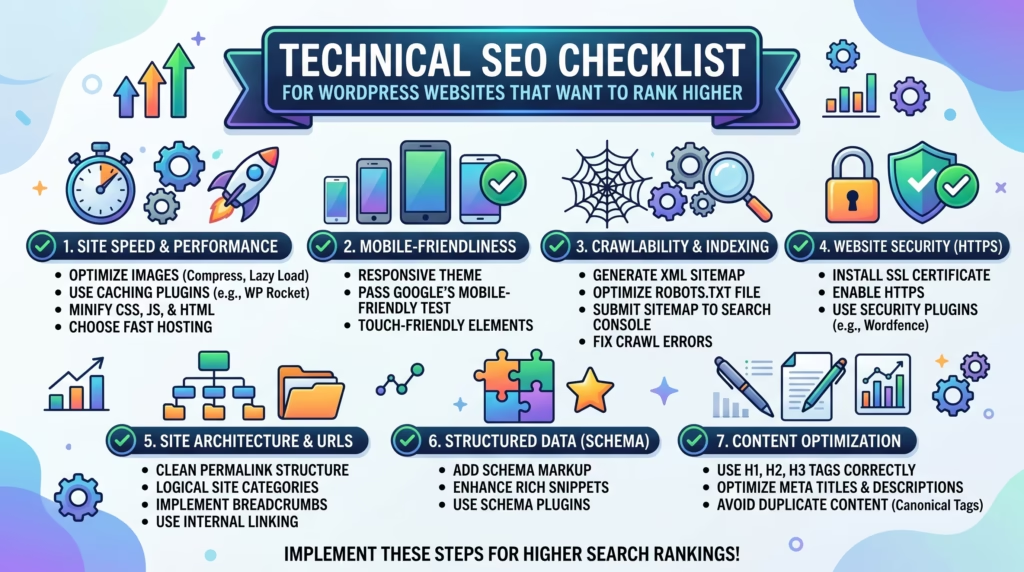
Great content alone is not enough to rank on Google. Behind every high-ranking WordPress website is a solid technical foundation that makes it easy for search engines to find, crawl, index, and understand every page.
That foundation is built through technical SEO — and without it, even the best content can struggle to reach the top of search results.
If you have been wondering why your WordPress website is not ranking as well as it should, this technical SEO checklist is exactly what you need. We will walk you through every critical technical area — from crawlability and speed to security and structured data — so you can identify and fix the issues holding your website back.
Whether you manage a business website, an eCommerce store, or a blog, following this technical SEO checklist will give your WordPress website the strongest possible foundation for long-term ranking success.
What Is Technical SEO
Technical SEO refers to the process of optimizing the technical elements of your website so that search engines can crawl, index, and rank it effectively.
While on-page SEO focuses on content and keywords, and off-page SEO focuses on backlinks and authority, technical SEO focuses on the infrastructure of your website — the things that happen under the hood that determine whether Google can actually access and understand your pages.
A solid technical SEO checklist covers areas including:
- Website crawlability and indexability
- Page speed and Core Web Vitals performance
- Mobile responsiveness and usability
- Website security and HTTPS
- URL structure and internal linking
- Structured data and schema markup
For WordPress websites, technical SEO is particularly important because WordPress sites can develop technical issues quickly — through plugin conflicts, theme changes, hosting limitations, and content growth — that silently damage rankings without obvious visible signs.
Why Technical SEO Matters for WordPress Websites
Technical SEO is the foundation on which all of your other SEO efforts are built. Without it, your content strategy, keyword targeting, and link building will all underperform.
Here is why working through a technical SEO checklist regularly matters for every WordPress website:
- Google cannot rank what it cannot find — if your pages are not being crawled and indexed correctly, they will never appear in search results regardless of content quality
- Page speed is a ranking factor — slow loading WordPress websites are penalized in search results through poor Core Web Vitals scores
- Mobile-first indexing means Google evaluates your mobile experience first — a non-responsive WordPress website is at an immediate disadvantage
- Security signals matter — websites without HTTPS are flagged as not secure by Google and browsers, damaging both rankings and visitor trust
- Duplicate content confuses Google — without proper canonical tags and URL management, Google may split ranking signals across multiple versions of the same page
- Structured data unlocks rich results — schema markup helps Google understand your content and display enhanced search results that drive higher click-through rates
Following a comprehensive technical SEO checklist ensures your WordPress website gives Google every reason to crawl, index, and rank your pages as highly as possible.
Technical SEO Checklist — Crawlability and Indexing
The first section of any technical SEO checklist must address crawlability and indexing — because if Google cannot access and index your pages correctly, nothing else matters.
Submit Your XML Sitemap to Google
An XML sitemap is a file that lists all the important pages on your website and tells Google where to find them. Submitting it to Google Search Console ensures your pages are discovered and indexed as quickly as possible.
- Generate an XML sitemap using your SEO plugin — Yoast SEO and Rank Math both create sitemaps automatically
- Submit your sitemap through Google Search Console under the Sitemaps section
- Make sure your sitemap only includes pages you want indexed — exclude thank you pages, admin pages, and duplicate content
- Update and resubmit your sitemap any time you make significant structural changes to your WordPress website
- Check your sitemap regularly for errors flagged in Google Search Console
A correctly submitted sitemap is one of the most fundamental items on any technical SEO checklist and should be verified on every WordPress website.
Check and Optimize Your Robots.txt File
Your robots.txt file tells search engine crawlers which pages and sections of your website they are allowed or not allowed to access.
- Access your robots.txt file by visiting yourdomain.com/robots.txt
- Make sure no important pages or sections are accidentally blocked from being crawled
- Ensure your staging environment URL is blocked from being indexed if it shares content with your live website
- Avoid blocking CSS and JavaScript files that Google needs to render your pages correctly
- Use Google Search Console’s robots.txt tester to verify your file is configured correctly
An incorrectly configured robots.txt file can accidentally block Google from crawling your entire website — making this one of the most critical checks on your technical SEO checklist.
Fix Crawl Errors in Google Search Console
Crawl errors occur when Google tries to access a page on your website but cannot reach it successfully. These errors prevent pages from being indexed and can signal broader technical problems to Google.
- Check the Coverage report in Google Search Console regularly for crawl errors
- Identify and fix 404 not found errors by either restoring the missing page or setting up a 301 redirect to a relevant existing page
- Resolve server errors (500 errors) by investigating hosting or plugin conflicts causing them
- Fix redirect errors including redirect chains and redirect loops that prevent Google from reaching the final destination page
- Monitor the Valid with warnings section for pages that are indexed but have issues worth addressing
Regularly fixing crawl errors is an ongoing part of any technical SEO checklist and is something our SEO & Growth Optimization and Monthly Website Management Plans cover as standard.
Use Canonical Tags to Avoid Duplicate Content
Duplicate content occurs when the same or very similar content appears on multiple URLs on your website. This confuses Google and can split ranking signals across multiple pages instead of concentrating them on one.
- Use canonical tags to tell Google which version of a page is the preferred one to index and rank
- Ensure your SEO plugin is automatically adding canonical tags to all pages and posts
- Check that your WordPress website is not accessible on multiple URL versions — for example both www and non-www or both HTTP and HTTPS — and set a preferred version
- Avoid creating multiple pages targeting the same keyword with very similar content
- Use canonical tags on paginated content, category pages, and tag pages where duplicate content issues commonly occur on WordPress websites
Canonical tag management is an essential item on every technical SEO checklist and prevents Google from wasting crawl budget on duplicate versions of your content.
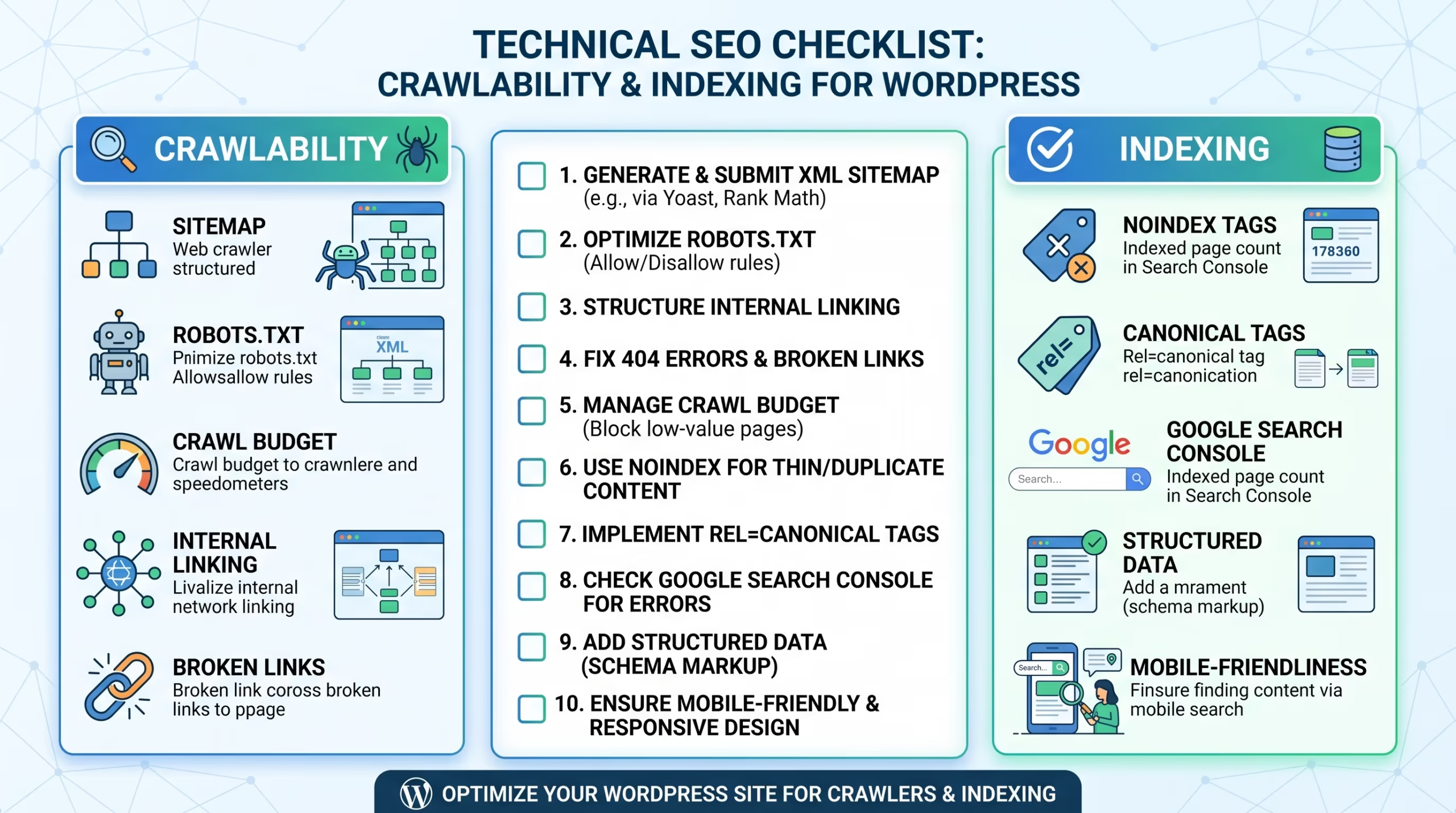
Crawlability and indexing issues are silent ranking killers — your website may look fine on the surface while Google is unable to access and rank your most important pages.
Our SEO & Growth Optimization and Monthly Website Management Plans include regular technical SEO audits to identify and fix crawlability issues before they damage your rankings.
Get in touch with TecHippo today and let’s make sure Google can find and index every important page on your WordPress website.
Technical SEO Checklist — Website Speed and Performance
Website speed is one of the most impactful items on any technical SEO checklist. Google uses Core Web Vitals as an official ranking signal, and slow WordPress websites consistently underperform in competitive search results.
Improve Core Web Vitals
Core Web Vitals measure three key aspects of real-world page performance — loading speed, interactivity, and visual stability. Improving them is a critical part of any technical SEO checklist.
- Check your Core Web Vitals scores in Google Search Console under the Page Experience report
- Target an LCP score under 2.5 seconds by optimizing your largest above-the-fold images and improving server response time
- Achieve an INP score under 200 milliseconds by reducing JavaScript execution and removing heavy third-party scripts
- Keep CLS below 0.1 by defining explicit image dimensions and avoiding dynamically injected content above existing page elements
- Monitor Core Web Vitals regularly and after every significant website change
Our Website Speed Optimization service specifically targets Core Web Vitals improvements as part of a comprehensive performance strategy.
Enable Caching on Your WordPress Website
Caching stores static versions of your pages and delivers them to visitors without generating the page from scratch on every request — dramatically reducing server load and improving loading times.
- Install a reliable WordPress caching plugin such as WP Rocket, LiteSpeed Cache, or W3 Total Cache
- Enable page caching, browser caching, and object caching where supported by your hosting environment
- Configure cache expiry settings to balance performance with content freshness
- Clear your cache after making website updates to ensure visitors always see the latest version of your content
Caching is one of the quickest and most impactful speed improvements available on any technical SEO checklist for WordPress websites.
Optimize Images for Faster Loading
Unoptimized images are the most common cause of slow loading times on WordPress websites and one of the most important items on any technical SEO checklist.
- Compress all images before uploading using tools like ShortPixel or Imagify
- Convert images to WebP format for smaller file sizes without visible quality loss
- Define explicit width and height dimensions on every image to prevent layout shifts
- Enable lazy loading for all images below the fold
- Serve appropriately sized images to different devices using WordPress’s built-in srcset functionality
Minify CSS JavaScript and HTML
Every unnecessary character in your CSS, JavaScript, and HTML files adds to your page weight and slows down loading times.
- Use your caching plugin or a plugin like Autoptimize to minify CSS and JavaScript files
- Defer or delay non-critical JavaScript so it does not block the initial rendering of your page
- Remove unused CSS that is loaded across your website but not needed on specific pages
- Load third-party scripts asynchronously to prevent them from blocking page rendering
- Combine multiple CSS or JavaScript files where possible to reduce the number of server requests
Minification and code optimization are technical steps that directly improve both loading speed and Core Web Vitals scores on your WordPress website.
Technical SEO Checklist — Mobile Optimization
Since Google uses mobile-first indexing, your mobile experience is evaluated first for ranking purposes. Mobile optimization is therefore a non-negotiable section of any technical SEO checklist.
Ensure Full Mobile Responsiveness
Your WordPress website must display correctly and function perfectly on every screen size — from smartphones to tablets to desktops.
- Use a responsive WordPress theme that adapts layouts fluidly across all screen sizes
- Test your website on real mobile devices rather than relying solely on desktop browser emulation
- Use Google’s Mobile-Friendly Test tool to get a quick assessment of your website’s mobile responsiveness
- Check every key page individually — homepage, service pages, blog posts, and contact page
- Ensure navigation menus, buttons, forms, and images all display and function correctly on mobile screens
Full mobile responsiveness is one of the most critical items on any technical SEO checklist for WordPress websites competing in today’s mobile-first search landscape.
Test Mobile Usability in Google Search Console
Google Search Console provides a dedicated Mobile Usability report that identifies specific mobile issues affecting your WordPress website’s performance in search results.
- Check the Mobile Usability report in Google Search Console for any flagged issues
- Fix clickable elements that are too close together making them difficult to tap accurately on touchscreens
- Resolve viewport configuration issues that prevent your pages from scaling correctly on mobile devices
- Address content wider than screen issues that cause horizontal scrolling on mobile
- Monitor the Mobile Usability report regularly and after making design or theme changes
Optimize Font Sizes and Tap Targets for Mobile
Two of the most commonly overlooked mobile usability issues on WordPress websites are font sizes that are too small to read and tap targets that are too small to click accurately.
- Set a minimum body font size of 16px for comfortable reading on mobile screens without requiring zoom
- Ensure all buttons and clickable elements are at least 44px by 44px to meet Google’s recommended tap target size
- Add sufficient spacing between links and buttons to prevent accidental taps on the wrong element
- Check that text does not overflow its container on smaller screen sizes
- Review and adjust mobile-specific font sizes in your theme or page builder settings
Optimizing font sizes and tap targets is a simple but often overlooked part of a complete technical SEO checklist that directly improves mobile usability scores in Google Search Console.
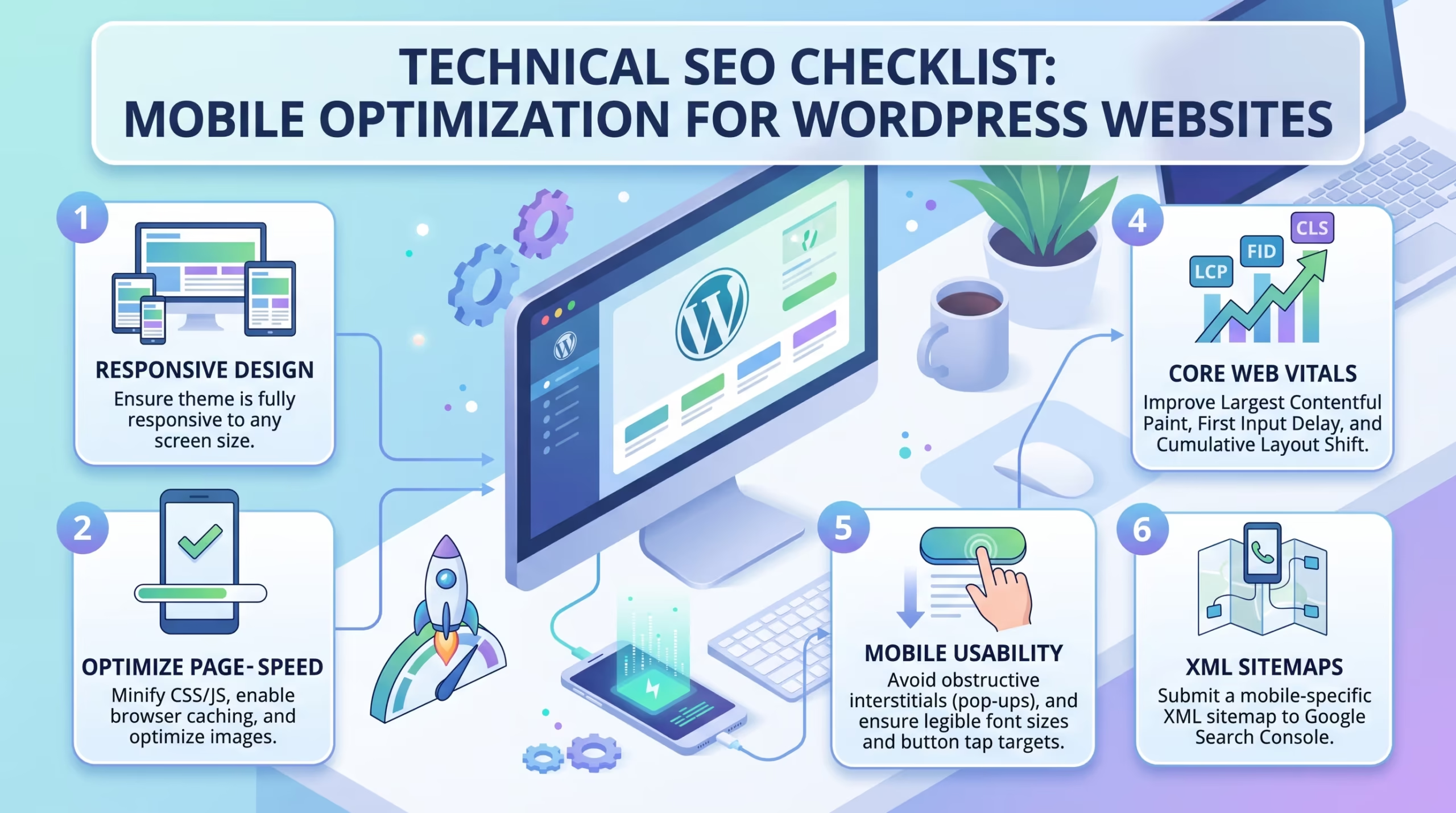
Poor Core Web Vitals scores and mobile usability issues are two of the most common reasons WordPress websites underperform in search results — and most website owners do not even know they have them.
Our Website Speed Optimization, SEO & Growth Optimization, and Custom WordPress Website Development services are built to identify and fix every speed and mobile technical SEO issue on your WordPress website.
Reach out to TecHippo today and let’s fix the technical SEO issues that are holding your rankings back.
Technical SEO Checklist — Website Security
Website security is an increasingly important part of any technical SEO checklist. Google actively flags insecure websites in search results and browsers, damaging both rankings and visitor trust.
Install an SSL Certificate
An SSL certificate encrypts the connection between your website and its visitors, protecting sensitive data and signaling trustworthiness to both users and search engines.
- Ensure your WordPress website has a valid SSL certificate installed
- Most reputable hosting providers include a free SSL certificate through Let’s Encrypt
- Check that your SSL certificate is not expired — an expired certificate causes browsers to display security warnings that drive visitors away
- Verify your SSL certificate covers all subdomains if your website uses them
- Use a tool like SSL Labs to test your SSL certificate configuration and identify any issues
An SSL certificate is one of the most basic but essential items on any technical SEO checklist — and one that no WordPress website should be without.
Enable HTTPS Across Your Entire Website
Installing an SSL certificate is only the first step. You also need to ensure your entire WordPress website is served over HTTPS rather than HTTP.
- Update your WordPress address and site address to HTTPS in Settings — General
- Set up 301 redirects from all HTTP URLs to their HTTPS equivalents
- Update all internal links from HTTP to HTTPS to prevent mixed content warnings
- Check for mixed content issues using a browser console or a tool like Why No Padlock
- Update your Google Search Console property to the HTTPS version of your website
Mixed content warnings — where a page is served over HTTPS but loads some resources over HTTP — can undermine your security signal and are a common technical SEO issue on WordPress websites that have recently migrated to HTTPS.
Protect Your WordPress Website from Malware
A WordPress website infected with malware can be penalized or completely removed from Google search results — making malware protection a critical part of any technical SEO checklist.
- Install a reputable WordPress security plugin such as Wordfence or Solid Security
- Run regular malware scans and address any threats identified immediately
- Keep WordPress core, themes, and plugins updated at all times to close known security vulnerabilities
- Use strong unique passwords for your WordPress admin, hosting, and database accounts
- Enable two-factor authentication on your WordPress admin account
- Limit login attempts to prevent brute force attacks on your WordPress login page
Ongoing malware protection and security monitoring is a standard part of all our Monthly Website Management Plans — keeping your WordPress website secure and protected from threats that could damage your search rankings.
Technical SEO Checklist — URL Structure and Navigation
A clean and logical URL structure helps both users and search engines understand the organization of your WordPress website — making it an important section of any technical SEO checklist.
Use Clean and Keyword Friendly URLs
Your URLs should be clean, readable, and contain relevant keywords that accurately describe the content of each page.
- Set your WordPress permalink structure to Post Name under Settings — Permalinks
- Use short descriptive URLs that include the primary keyword for each page
- Avoid URLs that contain unnecessary numbers, dates, or random characters
- Use hyphens to separate words in URLs rather than underscores
- Keep URLs as short as possible while still being descriptive and keyword relevant
Clean keyword-friendly URLs are a fundamental part of any technical SEO checklist and contribute to both search engine understanding and user click-through rates from search results.
Fix Broken Links and Redirect Chains
Broken links and redirect chains waste crawl budget, create poor user experiences, and dilute the link equity flowing through your WordPress website.
- Use a tool like Screaming Frog or Broken Link Checker to identify all broken links across your website
- Fix or remove broken internal links by updating them to point to the correct live page
- Set up 301 redirects for any broken external links where the destination page has moved
- Clean up redirect chains by updating redirects to point directly to the final destination URL
- Check for and fix any redirect loops that cause pages to redirect back to themselves endlessly
Fixing broken links and redirect chains is a regular maintenance task that should appear on every technical SEO checklist — and is covered as part of our WordPress Bug Fixing & Support service.
Optimize Your Internal Linking Structure
Internal links distribute ranking authority across your WordPress website and help Google understand the relationship and relative importance of your pages.
- Ensure your most important pages — service pages, landing pages, and cornerstone content — receive internal links from multiple relevant pages across your website
- Use descriptive keyword-rich anchor text that accurately reflects the content of the linked page
- Avoid orphan pages — pages that have no internal links pointing to them and are therefore difficult for Google to discover
- Create a logical site hierarchy with the homepage linking to main category pages and category pages linking to individual posts and service pages
- Regularly audit your internal linking structure as you add new content to ensure all new pages are properly linked
A strong internal linking structure is one of the most underutilized items on any technical SEO checklist and can significantly improve the ranking performance of important pages across your WordPress website.
Technical SEO Checklist — Structured Data and Schema
Structured data helps Google understand the content of your pages beyond just reading the text — and is an increasingly important part of any comprehensive technical SEO checklist.
Add Schema Markup to Key Pages
Schema markup is code added to your pages that tells Google what type of content is on each page — whether it is a business, a service, an article, a product, an FAQ, or a review.
- Use your SEO plugin to add schema markup to key pages — Rank Math and Yoast SEO both include schema options
- Add LocalBusiness schema to your homepage and contact page if you serve a local area
- Add Article schema to blog posts to help Google understand and categorize your content correctly
- Add FAQPage schema to pages containing frequently asked questions to unlock FAQ rich results in search
- Add Service schema to your service pages to provide Google with structured information about what you offer
Schema markup gives Google richer information about your content and can unlock enhanced search result features — known as rich results — that significantly increase click-through rates from search results.
Test Your Structured Data with Google Rich Results Test
After adding schema markup to your WordPress website, always verify it is implemented correctly using Google’s testing tools.
- Use Google’s Rich Results Test tool to check if your schema markup is valid and eligible for rich results
- Fix any errors or warnings flagged by the tool before expecting rich results to appear in search
- Check the Enhancements section in Google Search Console for a site-wide view of structured data performance
- Monitor rich result appearances in Search Console to track whether your schema markup is generating enhanced search listings
- Retest your structured data after making changes to your website that might affect schema implementation
Testing structured data is the final step in the schema section of your technical SEO checklist and ensures all the markup you have added is actually working correctly in Google’s eyes.
Common Technical SEO Mistakes to Avoid
Even website owners who are actively working on their technical SEO checklist often make avoidable mistakes. Here are the most common ones to watch out for on WordPress websites.
- Accidentally blocking pages in robots.txt preventing Google from crawling important content
- Not submitting a sitemap leaving Google to discover pages on its own which significantly slows indexing
- Ignoring crawl errors in Google Search Console and allowing 404 errors and server errors to accumulate
- Running on HTTP instead of HTTPS which flags your website as insecure in both Google’s eyes and visitors’ browsers
- Skipping Core Web Vitals optimization and losing ranking ground to faster competitors
- Using duplicate content across multiple URLs without canonical tags to consolidate ranking signals
- Installing too many plugins that conflict with each other and create technical errors that damage SEO
- Not testing on mobile and missing responsiveness issues that hurt mobile-first indexing performance
- Ignoring structured data and missing out on rich result opportunities that increase click-through rates
- Never auditing internal links leaving orphan pages and broken links that waste crawl budget and dilute link equity
Avoiding these mistakes ensures your technical SEO checklist delivers the full ranking benefits that technical optimization is capable of providing.
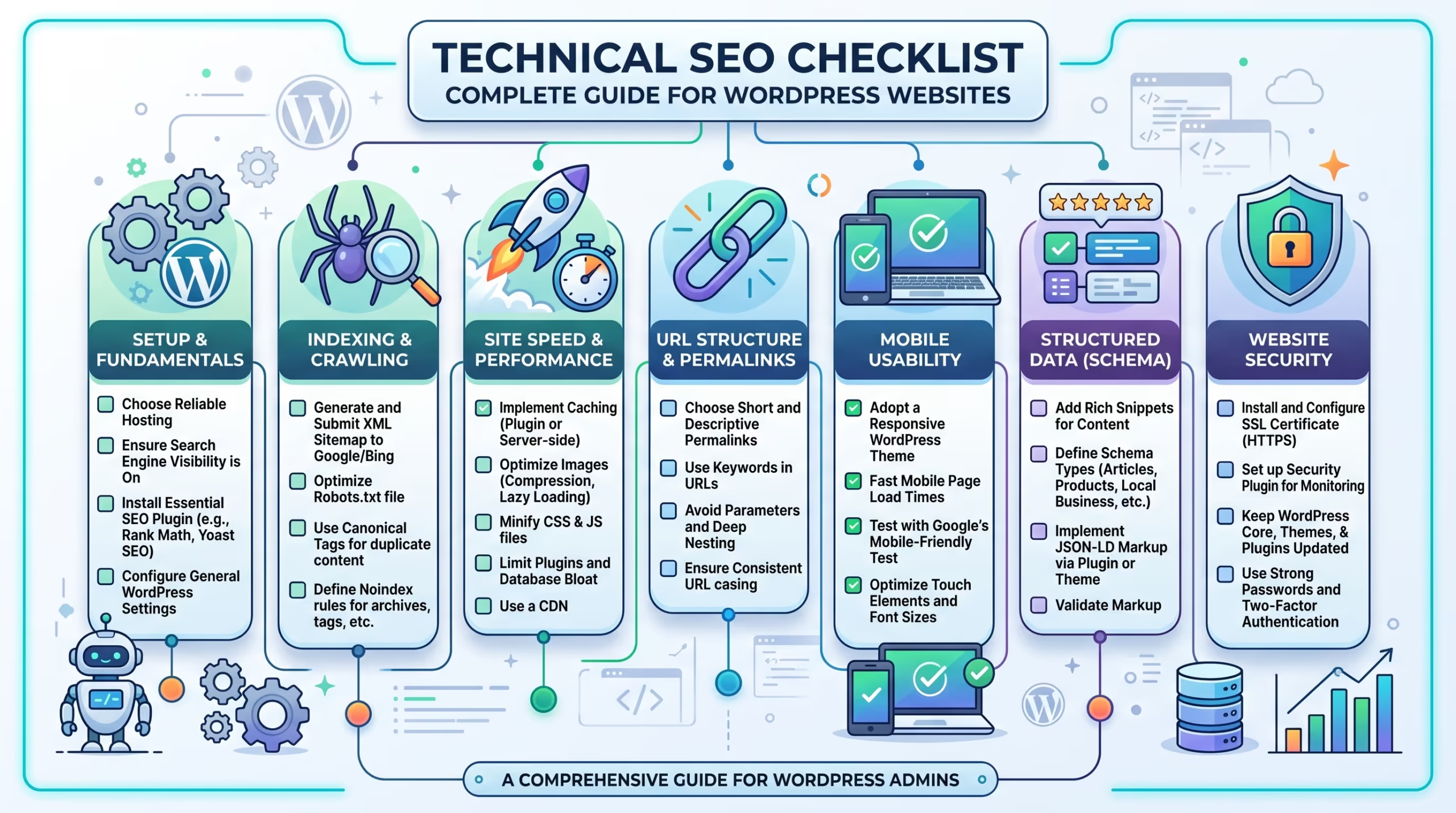
Working through a full technical SEO checklist takes time, technical knowledge, and ongoing attention — and missing even one item can quietly hold your WordPress website back from the rankings it deserves.
At TecHippo our SEO & Growth Optimization, Website Speed Optimization, and Monthly Website Management Plans cover every item on a comprehensive technical SEO checklist — so your WordPress website is fully optimized, properly indexed, and built to rank higher in competitive search results.
Book a free consultation with TecHippo today and let’s build the technical SEO foundation your WordPress website needs to rank higher.
Conclusion
A strong technical SEO checklist is the foundation every high-ranking WordPress website is built on. Without it, your content, keywords, and backlinks will all underperform — because Google simply cannot access, understand, and rank your pages as effectively as it could with proper technical optimization in place.
By working through every section of this technical SEO checklist — from crawlability and speed to mobile optimization, security, URL structure, and structured data — you give your WordPress website the strongest possible foundation for long-term ranking success.
Technical SEO is not a one-time task. It is an ongoing process of monitoring, fixing, and improving — and the WordPress websites that treat it that way are the ones that consistently outrank their competitors.

 Reach us on WhatsApp