

Every second counts when it comes to your website. Studies show that visitors expect a webpage to load in under three seconds — and if it doesn’t, they leave. No second chances, no waiting around.
For WordPress website owners, slow loading speed is one of the most common and most damaging problems affecting both user experience and search engine rankings. The good news is that it is also one of the most fixable.
In this guide, we will walk you through everything you need to know about how to speed up WordPress website performance — from understanding why speed matters to the exact steps you can take to make your website faster, leaner, and better optimized for SEO.
Whether you run a business website, an online store, or a blog, a faster WordPress website means better rankings, more traffic, and more conversions.
Why WordPress Website Speed Matters
Website speed is not just a technical metric — it directly affects how visitors experience your website and whether they stay long enough to take action.
When a page loads slowly, visitors lose patience and leave before seeing your content, services, or products. This increases your bounce rate, reduces engagement, and ultimately costs you leads and revenue.
Here is why knowing how to speed up WordPress website performance should be a top priority for every website owner:
- Visitors expect pages to load in under three seconds on both desktop and mobile
- A one-second delay in load time can reduce conversions by up to 7%
- Slow websites frustrate users and damage the credibility and professionalism of your brand
- Mobile users on slower connections are disproportionately affected by poor loading speed
- Fast websites keep visitors engaged longer, increasing the chances of conversions and sales
For businesses using WordPress — whether for a service website, eCommerce store, or LMS platform — speed is directly connected to how well your website performs for real users every single day.
How Website Speed Affects SEO and Rankings
Google has made it clear that website speed is an official ranking factor. A slow website does not just frustrate visitors — it actively hurts your position in search results.
Since 2021 Google has used Core Web Vitals as part of its page experience signals. These metrics measure real-world loading speed, responsiveness, and visual stability. Websites that perform poorly on these metrics are at a disadvantage in competitive search results.
Understanding how to speed up WordPress website performance is therefore not just about user experience — it is directly connected to your SEO strategy and organic traffic growth.
The specific ways website speed impacts SEO include:
- Slower pages rank lower in competitive search results where multiple pages have similar content quality
- Higher bounce rates from slow loading pages send negative engagement signals to Google
- Poor Core Web Vitals scores — particularly LCP and INP — can cause ranking drops across your entire website
- Mobile page speed is especially important as Google uses mobile-first indexing to evaluate and rank websites
- Faster websites earn more backlinks as other website owners are more likely to link to pages that load quickly and provide a good experience
Improving your WordPress website speed is one of the highest-return SEO investments you can make — it improves rankings, reduces bounce rates, and increases the value of every visitor that lands on your website.
How to Test Your WordPress Website Speed
Before you can improve your WordPress website speed you need to know where you currently stand. Several free tools make it easy to measure your performance and identify specific areas to fix.
Google PageSpeed Insights
The most widely used speed testing tool. Enter any URL and receive both a performance score and a breakdown of specific issues affecting your loading speed. It shows field data from real users as well as lab data for diagnosing problems. This is the best starting point for anyone learning how to speed up WordPress website performance.
Google Search Console — Page Experience Report
Shows real-user Core Web Vitals data across your entire website over the past 28 days. Identifies pages that are failing or need improvement and segments results by desktop and mobile. Essential for understanding how Google actually sees your website’s performance.
GTmetrix
A third-party tool that provides waterfall charts, loading breakdowns, and detailed performance recommendations. Useful for cross-referencing findings from PageSpeed Insights and getting a more granular view of what is slowing your pages down.
Lighthouse in Chrome DevTools
Built directly into the Chrome browser. Run a full performance audit on any page and receive a detailed breakdown of exactly where time is being spent during load. Best suited for technically confident users who want to go deeper into diagnostics.
Always test your most important pages — your homepage, service pages, and top landing pages — rather than just one URL. Performance can vary significantly across different pages on the same website.
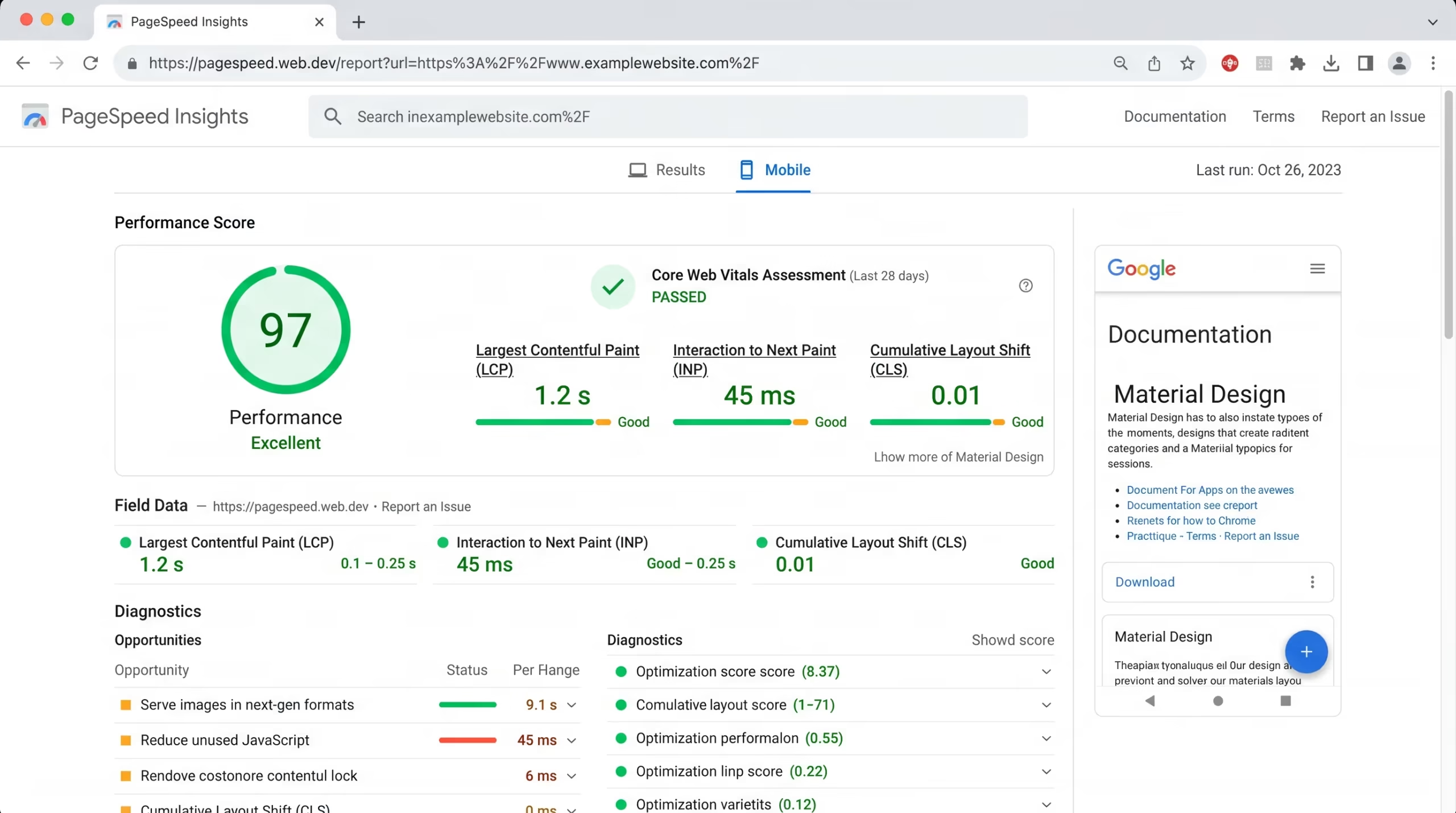
Identifying the real cause of slow loading speed requires more than just running a speed test it requires knowing what the results actually mean and how to fix them.
Our Website Speed Optimization and SEO & Growth Optimization services are designed to diagnose exactly what is slowing your WordPress website down and fix it properly — so you see real improvements in both performance scores and search rankings.
Get in touch with TecHippo today for a free consultation and let’s make your website faster.
How to Speed Up WordPress Website — Top Optimization Steps
Now that you know why speed matters and how to measure it, here are the most effective steps for how to speed up WordPress website performance. These are the same optimizations our team applies to every WordPress website we work on.
Choose a Fast and Reliable Hosting Provider
Your hosting environment is the single most important factor affecting your WordPress website speed. Everything else builds on top of it.
A slow or oversold shared hosting server will produce poor server response times regardless of how well everything else is optimized. If your Time to First Byte (TTFB) is over 600 milliseconds, your hosting is likely the problem.
- Choose a hosting provider that specializes in WordPress performance
- Look for hosting that includes server-level caching and PHP 8+ support
- Avoid heavily oversold cheap shared hosting where server resources are stretched across too many websites
- Consider managed WordPress hosting for consistent speed and reliability
- Check that your hosting server is located geographically close to the majority of your website visitors
Upgrading your hosting is the foundation of how to speed up WordPress website performance — and often the single change that makes the biggest difference. WordPress hosting upgrades are something our team can advise on as part of our Monthly Website Management Plans.
Install a Caching Plugin
Caching reduces the load on your server by storing static versions of your pages and delivering them to visitors without generating the page from scratch on every single request.
- Install a reliable WordPress caching plugin such as WP Rocket, W3 Total Cache, or LiteSpeed Cache
- Enable page caching, browser caching, and object caching where supported by your hosting environment
- Configure cache expiry settings so visitors always receive reasonably up-to-date content
- Clear your cache after making updates to ensure visitors see the latest version of your pages
A properly configured caching plugin can dramatically reduce loading times for both new and returning visitors and is one of the quickest wins available when learning how to speed up WordPress website performance.
Optimize and Compress Images
Images are the most common cause of slow loading times on WordPress websites. Large unoptimized image files add unnecessary weight to every page load.
- Compress all images before uploading using tools like ShortPixel, Smush, or Imagify
- Convert images to WebP format for significantly smaller file sizes without visible quality loss
- Always define explicit width and height dimensions on every image to prevent layout shifts
- Resize images to the actual dimensions they will display on screen — never upload a 4000px wide image for a 600px display slot
- Use a WordPress image optimization plugin to automatically compress images on upload
Image optimization alone can cut page weight by 30 to 50 percent on many WordPress websites and is a core part of our Website Speed Optimization service.
Use a Content Delivery Network (CDN)
A Content Delivery Network stores copies of your website’s static assets — images, CSS, JavaScript — on servers distributed around the world. When a visitor loads your page, assets are delivered from the server closest to them geographically.
- A CDN reduces the physical distance between your server and your visitor significantly
- It lowers server load during traffic spikes and high-traffic periods
- It improves loading speed for international visitors dramatically
- Popular CDN options for WordPress include Cloudflare, BunnyCDN, and KeyCDN
For any WordPress website with visitors from multiple locations, a CDN is one of the highest-impact improvements available for how to speed up WordPress website performance.
Minify CSS JavaScript and HTML
Every CSS, JavaScript, and HTML file your website loads adds to the total page weight and loading time. Minification removes unnecessary whitespace, comments, and characters from these files to make them smaller and faster to load.
- Use your caching plugin or a dedicated plugin like Autoptimize to minify CSS and JavaScript files
- Combine multiple CSS or JavaScript files where possible to reduce the number of server requests
- Defer or delay non-critical JavaScript so it does not block the initial rendering of your page
- Remove unused CSS that is being loaded across your website but not actually needed on specific pages
- Load third-party scripts asynchronously where possible to prevent them from blocking page rendering
Minifying and optimizing your code files is a key technical step in how to speed up WordPress website performance and can noticeably improve both LCP and INP scores.
Reduce and Optimize Plugins
Every plugin installed on your WordPress website adds code that needs to load on every page request. Too many plugins — especially poorly coded or outdated ones — add significant weight to your website.
- Audit all installed plugins and deactivate and delete anything you are not actively using
- Replace heavy multi-purpose plugins with lightweight alternatives that do one job well
- Avoid installing multiple plugins that perform overlapping functions
- Check plugin performance impact using tools like Query Monitor or Asset CleanUp Pro
- Keep all active plugins updated to their latest versions for optimal performance and security
A lean plugin setup is one of the most underrated aspects of how to speed up WordPress website performance — and one of the easiest wins available to most website owners. Our WordPress Bug Fixing & Support team regularly helps clients identify and remove plugin bloat as part of performance improvements.
Enable Lazy Loading
Lazy loading delays the loading of images and videos that are not immediately visible on screen — below the fold — until the visitor scrolls down to them. This reduces the initial page weight and speeds up above-the-fold loading significantly.
- Enable lazy loading for images using WordPress’s built-in lazy loading attribute or a dedicated plugin
- Apply lazy loading to embedded videos and iframes such as YouTube embeds and Google Maps
- Avoid applying lazy loading to above-the-fold images — these should load immediately as they are part of your LCP element
- Test your pages after enabling lazy loading to confirm above-the-fold content is not being delayed
Lazy loading is a simple but effective technique for how to speed up WordPress website performance without requiring significant technical changes.
Optimize Your WordPress Database
Over time your WordPress database accumulates unnecessary data — post revisions, spam comments, transient options, and orphaned metadata — that can slow down database queries and overall website performance.
- Use a plugin like WP-Optimize or Advanced Database Cleaner to clean up your WordPress database regularly
- Remove post revisions or limit the number of revisions WordPress saves per post
- Delete spam and trashed comments that are taking up unnecessary database space
- Clear expired transients that are stored in your database but no longer needed
- Run database optimization routinely as part of your ongoing website maintenance
Database optimization is included as part of our Monthly Website Management Plans to keep your WordPress website running at peak performance over time.
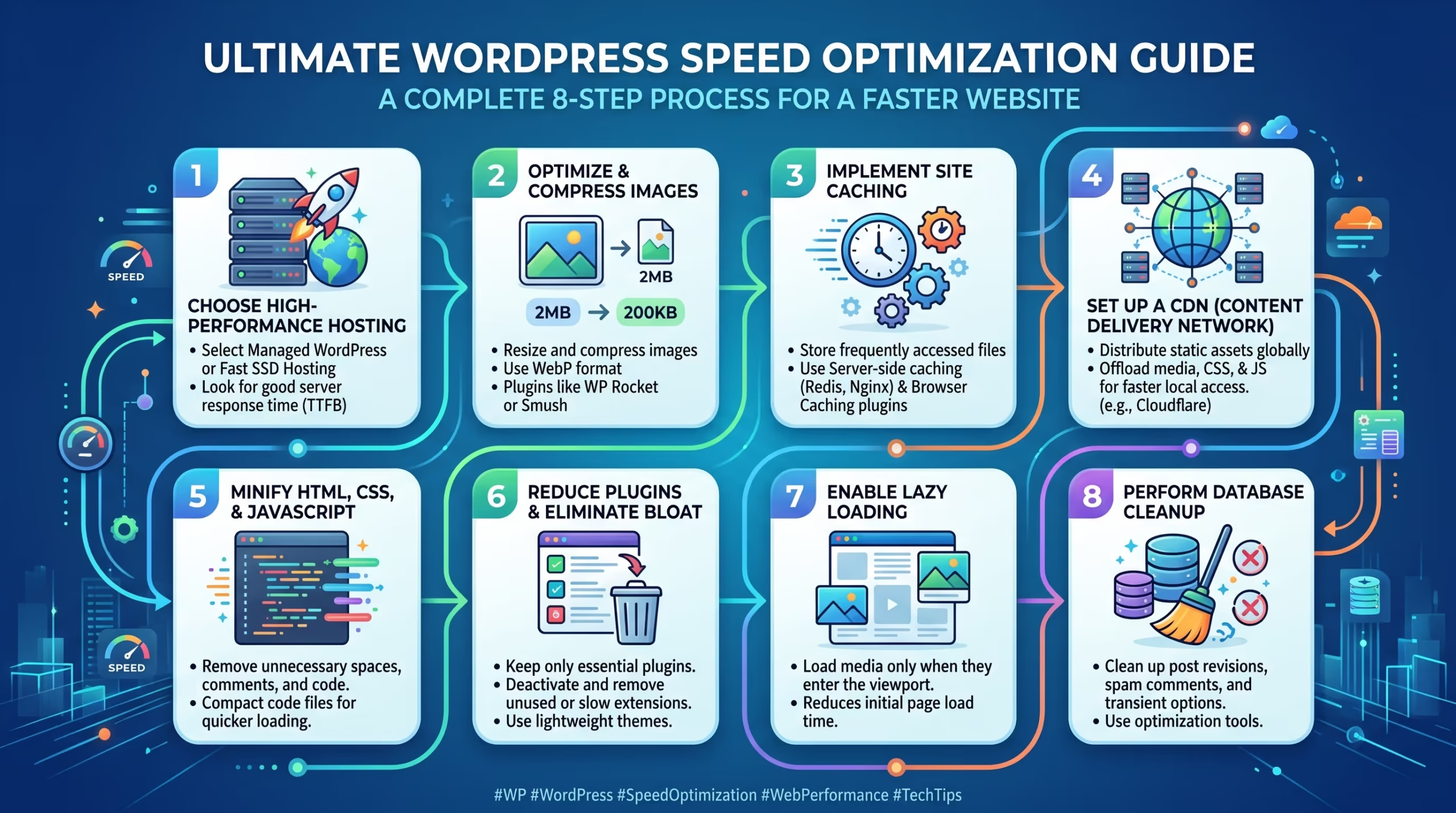
Implementing all of these optimizations correctly takes time, technical knowledge, and ongoing attention — and getting one step wrong can create new problems.
Our Website Speed Optimization, WordPress Bug Fixing & Support, and Monthly Website Management Plans are built specifically to help WordPress website owners achieve faster loading times, better Core Web Vitals scores, and stronger SEO rankings without the technical headache.
Contact TecHippo today and let’s build a faster WordPress website that ranks higher and converts better.
Common WordPress Speed Mistakes to Avoid
Even website owners who are actively trying to improve their speed often make mistakes that hold their performance back. Here are the most common ones to watch out for.
- Using cheap shared hosting and expecting good server response times regardless of other optimizations
- Uploading large, uncompressed images directly to WordPress without any optimization
- Installing too many plugins without checking their individual performance impact
- Not configuring caching properly after installing a caching plugin — installation alone is not enough
- Using a heavy page builder that generates bloated HTML, CSS, and JavaScript on every page
- Ignoring mobile speed when the majority of visitors are on smartphones with slower connections
- Loading third-party scripts without delay including chat widgets, ad pixels, social media embeds, and tracking tools
- Not testing speed after making changes — every update, new plugin, or design change can affect loading performance
- Relying only on lab data from PageSpeed Insights instead of monitoring real-user field data in Google Search Console
- Never cleaning the database allowing unnecessary data to accumulate and slow down queries over time
Avoiding these mistakes puts you significantly ahead of competitors who are not paying attention to how to speed up WordPress website performance at all.
How Core Web Vitals Connect to WordPress Speed
Core Web Vitals and WordPress speed are closely connected — in fact Core Web Vitals are Google’s way of measuring the real-world impact of your website’s loading performance on actual users.
The three Core Web Vitals metrics each relate directly to specific aspects of how to speed up WordPress website performance:
- LCP (Largest Contentful Paint) measures how quickly the main content of your page loads and becomes visible. Slow hosting, large unoptimized images, and render-blocking scripts are the most common causes of poor LCP on WordPress websites.
- INP (Interaction to Next Paint) measures how quickly your website responds to user interactions like button clicks and menu opens. Heavy JavaScript, too many plugins, and resource-intensive page builders are the most common causes of poor INP.
- CLS (Cumulative Layout Shift) measures visual stability and how much content moves around unexpectedly during loading. Images without defined dimensions and dynamically loaded content are the most common causes of poor CLS on WordPress websites.
Improving your WordPress website speed through the optimization steps covered in this guide will directly improve all three Core Web Vitals metrics — helping you rank better and deliver a smoother experience to every visitor.
Our Website Speed Optimization service specifically targets Core Web Vitals improvements as part of every project we take on.
WordPress Speed Optimization for WooCommerce
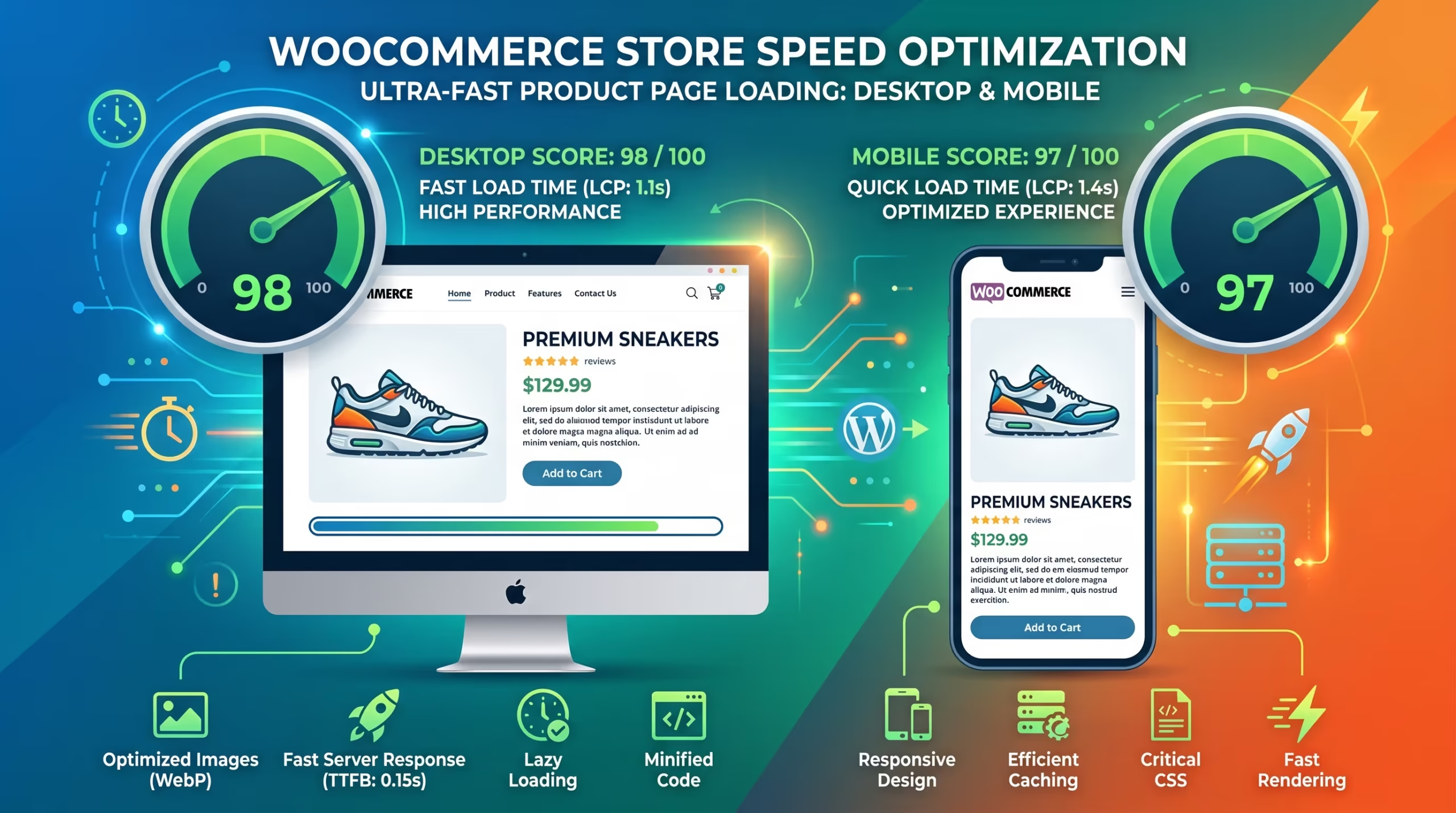
WooCommerce stores have unique speed challenges compared to standard WordPress websites. Product pages, cart functionality, checkout flows, and dynamic pricing all add complexity that can slow things down significantly.
Here is what to focus on specifically for how to speed up WordPress website performance on a WooCommerce store:
- Choose WooCommerce-compatible hosting — not all hosting providers handle the dynamic nature of WooCommerce efficiently
- Exclude cart and checkout pages from full-page caching — these pages are dynamic and must load fresh for every visitor
- Optimize product images aggressively — WooCommerce stores often have hundreds or thousands of product images that add significant page weight
- Use a lightweight WooCommerce-compatible theme — avoid heavy multipurpose themes that load unnecessary code on every page
- Limit the number of products displayed per page — loading too many products on a single page increases load time significantly
- Enable fragment caching for dynamic WooCommerce elements like the cart count and mini cart so the rest of the page can still be cached
- Optimize the checkout flow — a slow checkout page directly causes abandoned carts and lost sales
A fast WooCommerce store not only ranks better but converts significantly more visitors into paying customers. Our eCommerce Store Development and Website Speed Optimization services are specifically designed to help WooCommerce store owners achieve peak performance.
Benefits of a Fast WordPress Website
Knowing how to speed up WordPress website performance and actually implementing these improvements delivers benefits that go far beyond just a better PageSpeed score.
- Better search engine rankings as Google rewards fast, well-optimized websites in competitive search results
- Lower bounce rates as visitors are far less likely to leave a website that loads quickly and smoothly
- Higher conversion rates because a fast and stable website builds trust and reduces friction in the buying process
- Improved user experience across all devices especially on mobile where speed matters most
- Better Core Web Vitals scores leading to improved page experience signals and stronger SEO performance
- Increased revenue for eCommerce stores where every second of load time directly impacts sales
- Stronger brand credibility as a fast professional website signals reliability and quality to first-time visitors
- Lower advertising costs as faster landing pages perform better in Google Ads campaigns improving Quality Scores
- Long-term SEO growth built on a performance foundation that supports ongoing content and ranking improvements
A fast WordPress website is not just a technical achievement — it is a business advantage that pays off across every aspect of your online presence.
A slow WordPress website is not just a technical problem — it is a business problem. Every extra second of loading time costs you visitors, rankings, and revenue every single day.
At TecHippo, our Website Speed Optimization, Monthly Website Management Plans, and WordPress Bug Fixing & Support services are built to deliver real measurable performance improvements — so your WordPress website loads faster, ranks higher, and converts more visitors into customers.
Book a free consultation with TecHippo today and let’s build the fast WordPress website your business deserves.
Conclusion
Learning how to speed up WordPress website performance is one of the most valuable investments you can make in your online presence. Speed affects everything — your search rankings, your user experience, your conversion rates, and your overall business growth.
By choosing the right hosting, enabling caching, optimizing images, using a CDN, cleaning up plugins, and monitoring your performance regularly, you can transform a slow and frustrating WordPress website into a fast and competitive one.
Speed is not a luxury. In today’s search landscape it is a necessity — and the businesses that prioritize it are the ones that rank higher, retain more visitors, and grow faster online.



 Reach us on WhatsApp