
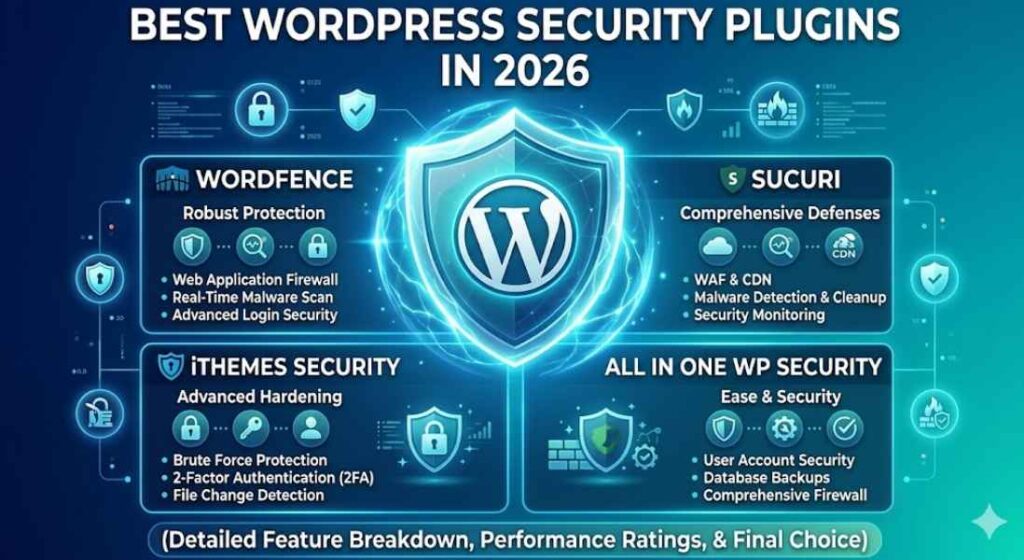
Website security is one of the most important parts of running a successful WordPress site.
Without proper protection, your website can become vulnerable to malware, brute-force attacks, spam, and data breaches. A single security issue can damage your SEO rankings, hurt your reputation, and even result in lost revenue.
The good news is that WordPress security plugins make it much easier to protect your website against modern cyber threats.
In this guide, we cover the best plugins for WordPress security to help you secure your website and protect your business online.
Why WordPress Security Matters
WordPress powers millions of websites worldwide, which also makes it one of the biggest targets for hackers and malicious bots.
Many website owners assume their site is too small to be targeted, but automated attacks scan websites of all sizes every day. Without proper protection, even a simple vulnerability can lead to hacked files, stolen customer information, or complete website downtime.
Using a reliable WordPress security plugin helps reduce these risks by adding layers of protection to your website.
Common WordPress Security Threats
Malware Infections
Malware can inject harmful code into your website, redirect visitors to spam pages, or steal sensitive information.
Brute-Force Login Attacks
Hackers use automated bots to repeatedly guess usernames and passwords until they gain access to your WordPress dashboard.
Spam and Bot Attacks
Spam bots can flood your forms and comments with unwanted content, damaging user experience and site credibility.
Vulnerable Plugins and Themes
Outdated or poorly coded plugins and themes often create security loopholes hackers can exploit.
Data Theft and Hacking Attempts
Hackers may try to steal customer data, payment information, or website files for malicious purposes.
What to Look for in a WordPress Security Plugin
Not all security plugins offer the same level of protection. Some focus mainly on malware scanning, while others provide complete website security solutions.
Here are the most important features to look for when choosing a WordPress security plugin.
Essential Security Features
Firewall Protection
A firewall blocks suspicious traffic before it reaches your website.
Malware Scanning
Malware scanners regularly check your website files for malicious code and vulnerabilities.
Login Security
Strong login protection helps prevent brute-force attacks and unauthorized access attempts.
Two-Factor Authentication
Two-factor authentication adds an extra verification step during login for better account security.
Real-Time Threat Monitoring
Real-time monitoring helps detect suspicious activities immediately before they become major problems.
Backup and Recovery Options
Website backups are essential in case your site gets compromised or corrupted
Best Plugins for WordPress Security
There are dozens of WordPress security plugins available, but a few consistently stand out because of their reliability, features, and performance.
Wordfence Security
Wordfence is one of the most popular WordPress security plugins available today.
It offers strong firewall protection, malware scanning, and real-time threat detection directly inside your WordPress dashboard.
Key Features
- Powerful firewall
- Malware scanner
- Login protection
- Real-time security alerts
Wordfence is especially useful for users who want advanced protection without needing technical expertise.
Sucuri Security
Sucuri Security is well known for its cloud-based firewall and malware cleanup services.
It focuses heavily on website monitoring and server-level protection.
Key Features
- Website malware monitoring
- Security activity auditing
- Firewall protection
- CDN and performance optimization
Sucuri is an excellent choice for business websites that need strong protection and performance improvements.
iThemes Security
iThemes Security is designed to simplify WordPress security for beginners.
It offers many important security features with an easy-to-use interface.
Key Features
- Brute-force protection
- File change detection
- Database backups
- Easy beginner setup
It’s ideal for website owners who want strong protection without complicated configurations.
All In One WP Security & Firewall
All In One WP Security & Firewall is a beginner-friendly plugin packed with useful free features.
It uses a visual grading system that helps users improve website security step by step.
Key Features
- Beginner-friendly interface
- Firewall and spam protection
- Login lockdown features
- Free security features
This plugin is particularly good for small websites and bloggers looking for free security improvements.
MalCare Security
MalCare Security focuses heavily on malware detection and removal.
Unlike many traditional scanners, MalCare uses cloud-based scanning to reduce server load.
Key Features
- One-click malware removal
- Automated scans
- Cloud-based security
- Minimal server load
MalCare is a strong option for websites that prioritize fast malware cleanup and minimal performance impact.
Free vs Premium WordPress Security Plugins
Many WordPress security plugins offer both free and premium versions. The right choice depends on your website size and security needs.
Free Security Plugins
Free security plugins are often enough for small blogs or beginner websites.
Benefits of Free Plugins
- Good for small websites
- Basic protection features
- Easy to install and use
Limitations
- Limited advanced tools
- No priority support
- Fewer real-time protections
Premium Security Plugins
Premium plugins provide more advanced protection and monitoring features.
Benefits of Premium Plugins
- Advanced firewall protection
- Real-time malware monitoring
- Priority support
- Better protection for business websites
For eCommerce stores, membership websites, or high-traffic blogs, premium security is usually worth the investment.
Which WordPress Security Plugin Is Best
The best plugin depends on your website type, technical experience, and budget.
Best for Beginners
All In One WP Security
Simple interface and excellent free features make it beginner-friendly.
iThemes Security
Easy setup and strong login protection make it great for non-technical users.
Best for Advanced Protection
Wordfence Security
Offers advanced firewall protection and detailed threat monitoring.
Sucuri Security
Excellent for cloud-based website security and malware cleanup.
Best for Malware Removal
MalCare Security
Fast malware removal and cloud-based scanning make it highly effective.
Common WordPress Security Mistakes to Avoid
Even with the best security plugin installed, certain mistakes can still leave your website vulnerable.
Using Nulled Themes or Plugins
Nulled software often contains hidden malware and security vulnerabilities.
Ignoring Plugin Updates
Outdated plugins and themes are one of the biggest causes of hacked WordPress websites.
Weak Admin Passwords
Simple passwords make brute-force attacks much easier.
No Website Backups
Without backups, recovering a hacked website becomes much harder.
Installing Too Many Plugins
Too many plugins increase the risk of compatibility issues and vulnerabilities.
Frequently Asked Questions
Do I really need a WordPress security plugin?
Yes, security plugins help protect your website from malware, hackers, spam bots, and vulnerabilities.
What is the best free WordPress security plugin?
Wordfence and All In One WP Security & Firewall are among the best free options available.
Can security plugins slow down WordPress?
Some poorly optimized plugins can affect performance, but most quality security plugins have minimal impact on website speed.
Is Wordfence better than Sucuri?
Wordfence is excellent for endpoint protection, while Sucuri Security is stronger for cloud firewall protection and malware cleanup.
Final Verdict: Best Plugins for WordPress Security
Choosing the right WordPress security plugin depends on your website goals and the level of protection you need.
Best Overall
Wordfence
Best for Beginners
All In One WP Security & Firewall
Best Premium Option
Sucuri Security
Best Malware Cleanup
MalCare Security
The best plugin ultimately depends on your website size, traffic, and security requirements.


 Reach us on WhatsApp