
Making changes directly on a live website can be risky. A simple plugin update or design tweak can break your layout, crash pages, or even take your entire site offline. This is one of the most common mistakes beginners make when managing a WordPress site.
That’s where a staging wordpress website becomes essential. Instead of testing changes on your live site, you can use a staging wordpress website to safely experiment, fix issues, and improve your design without affecting real visitors.
If you’ve ever wondered how professionals update websites without breaking anything, the answer is simple they use a staging wordpress website.
In this guide, you’ll learn:
- What a staging wordpress website is
- Why it’s important
- How it works
- How to create one
- Best tools and methods to use
Many beginners struggle with safely managing updates, especially without the right setup. This is where proper hosting and a structured workflow can save you time, stress, and costly mistakes.
What Is a Staging WordPress Website?
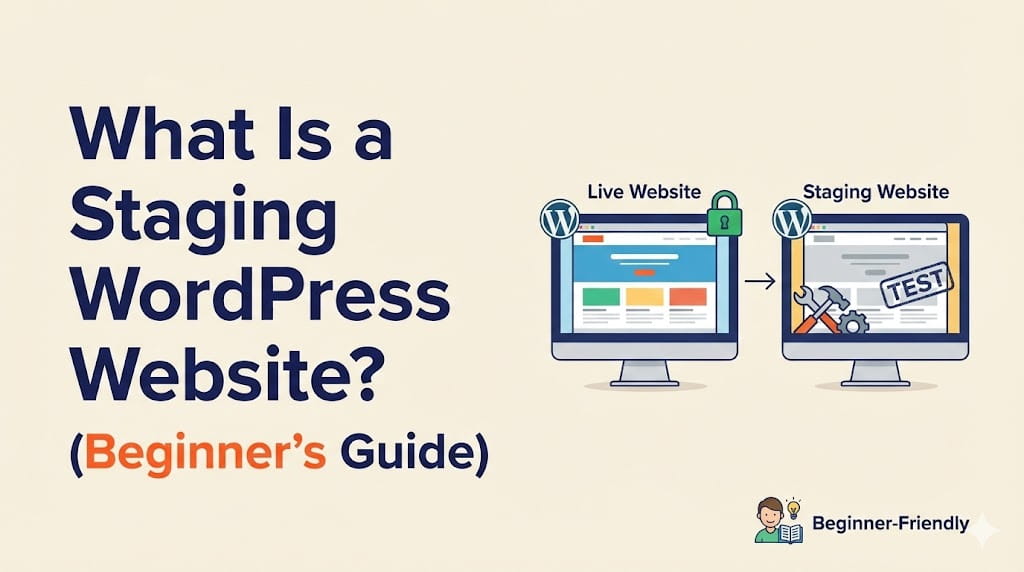
A staging wordpress website is a copy (or clone) of your live website that allows you to test changes in a safe, private environment before making them public.
Think of it like this:
Your live website is your real store, and your staging wordpress website is your testing lab where you experiment without consequences.
Here’s what makes a staging wordpress website important:
- It is completely private and not visible to your visitors
- You can test updates, plugins, and design changes safely
- It prevents accidental errors from affecting your live site
Instead of guessing whether a change will work, a staging wordpress website lets you test everything first then push only the working version live.
Why You Should Use a Staging Website
Using a staging website is not optional if you care about stability it’s a smart and necessary step for anyone managing a website.
Here’s why:
- You can test updates safely without breaking your site
- It helps you avoid downtime and lost visitors
- You can detect and fix plugin conflicts early
- It allows performance testing before deployment
- You can redesign pages without affecting users
Real-world scenarios where a staging wordpress website helps:
- Updating your WordPress theme
- Installing a new plugin
- Redesigning your homepage or landing pages
Most website issues happen because changes are made directly on the live site. A staging wordpress website eliminates that risk completely.
If you’re not sure how to set this up properly, this is exactly where having the right hosting setup or professional help can make a big difference.
Staging Website vs Live Website
Understanding the difference between a staging environment and a live site is critical if you want to avoid costly mistakes.
| Feature | Staging Website | Live Website |
|---|---|---|
| Visibility | Private | Public |
| Purpose | Testing | Real users |
| Risk | None | High |
| Performance Impact | No | Yes |
A staging website is meant for experimentation, while your live website is what your visitors actually see. Mixing the two is where most problems begin.
Conclusion:
Never experiment on a live site always use a staging environment first.
How Does a Staging Website Work?
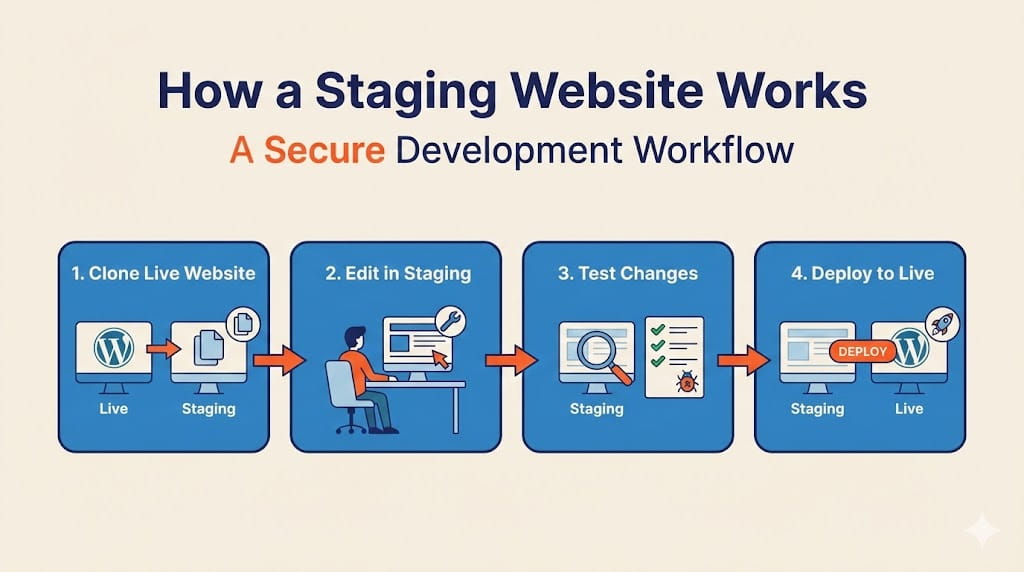
A staging website works by creating a duplicate version of your live website where you can safely test changes before applying them.
Here’s the basic workflow:
- Clone your live website
- Make changes in the staging environment
- Test everything (design, speed, functionality)
- Push the changes to your live site
This process ensures that your actual website remains stable while you experiment freely in the background.
Many modern hosting providers now offer one-click staging, which simplifies the entire process. Instead of manually cloning your site, you can create a staging wordpress website with just a few clicks.
A good hosting setup can make staging faster, safer, and much easier especially for beginners who don’t want to deal with technical complexity.
How to Create a Staging WordPress Website (3 Easy Methods)
There are multiple ways to create a staging wordpress website, and the right method depends on your technical skills and hosting setup.
Some methods are beginner-friendly, while others require more manual work.
Method 1 – Using Hosting Provider (Recommended)
This is the easiest and most reliable way to create a staging wordpress website.
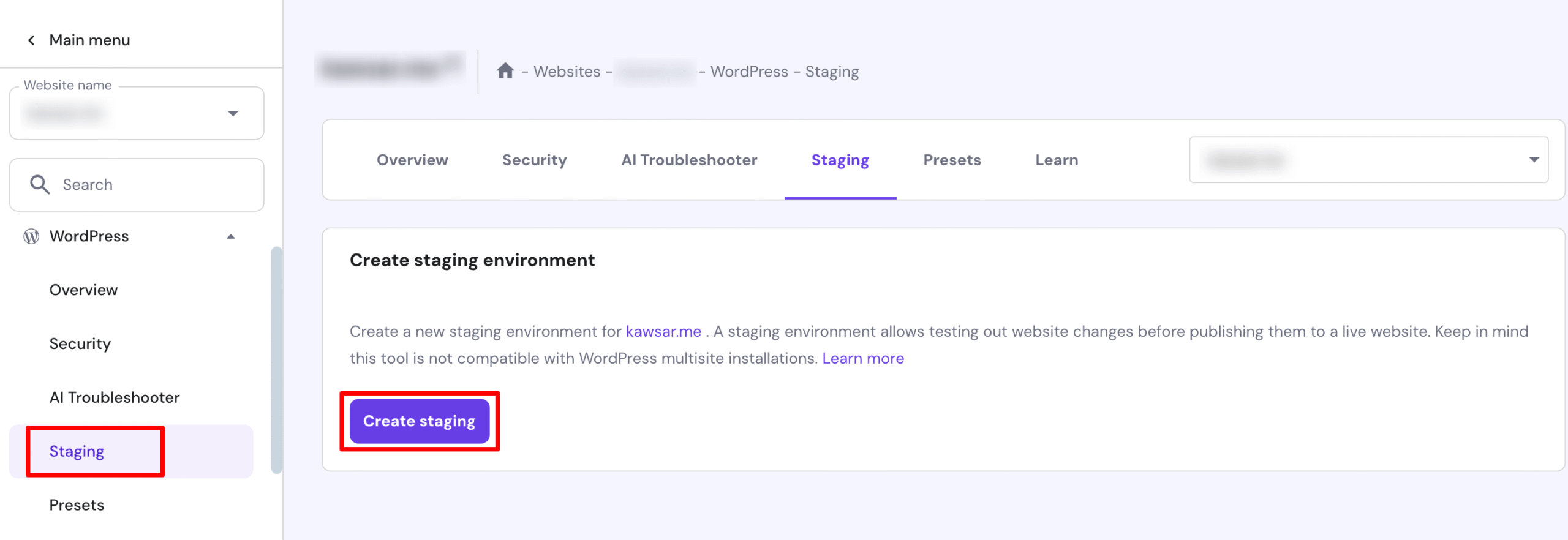
Many managed WordPress hosting providers offer a one-click staging feature, which allows you to duplicate your site instantly.
Steps:
- Log in to your hosting dashboard
- Find the “Staging” option
- Click “Create Staging Environment”
- Wait for the system to clone your site
That’s it your staging site will be ready to use.
This method is ideal because it:
- Requires no technical knowledge
- Is fast and automated
- Reduces chances of errors
👉 Recommended: Managed WordPress Hosting with built-in staging makes this process effortless and reliable.
Method 2 – Using a Plugin
Another simple way to create a staging wordpress website is by using a plugin. This method is perfect for beginners who don’t have access to hosting-based staging.
Popular plugins:
Steps:
- Install and activate your preferred plugin
- Create a staging copy of your website
- Access your staging environment and start testing
This method is beginner-friendly and doesn’t require deep technical knowledge. Most plugins guide you through the process step by step.
👉 We can set this up for you if you want zero hassle
Method 3 – Manual Staging Setup
Manual setup is the most advanced way to create a staging wordpress website and is usually preferred by developers.
Process includes:
- Creating a subdomain (e.g., staging.yoursite.com)
- Copying your website files
- Duplicating your database
- Updating configuration files
This method gives you full control but requires technical knowledge of hosting, databases, and file management.
Note:
This approach is best suited for developers or advanced users who are comfortable working with cPanel or server environments.
Best Tools for Staging WordPress Website
Choosing the right tools can make creating a staging wordpress website much easier and faster.
Here are some of the best options:
- WP Staging – Simple and beginner-friendly plugin for quick staging setup
- Duplicator – Powerful tool for cloning and migrating websites
- All-in-One WP Migration – Easy backup and staging solution
- Hosting-based staging – One-click staging offered by managed hosting providers
Each tool has its own advantages, but for most users, hosting-based staging is the fastest and safest option.
Common Mistakes to Avoid
When working with a staging wordpress website, avoiding common mistakes can save you from serious issues:
- Editing your live site instead of using staging
- Not syncing changes properly before going live
- Forgetting to block staging from search engine indexing
- Ignoring backups before making changes
Even a small mistake in a staging wordpress website workflow can lead to downtime or data loss if not handled correctly.
Do You Need Professional Help?
If you’re not comfortable with the technical side of creating a staging wordpress website, getting professional help can save you time and prevent costly mistakes.
WordPress Staging Setup Service
Managed WordPress Hosting with Staging
We help you:
- Set up safe and secure staging environments
- Handle backups and smooth deployment
- Ensure zero downtime during updates
- Optimize your website performance
A properly configured staging wordpress website ensures your site stays stable while you make improvements confidently.
Instead of risking your live website, let experts handle the setup so you can focus on growing your business.
Final Thoughts on Staging WordPress Website
A staging website is no longer optional it’s a must-have for anyone serious about managing a website properly. Whether you run a blog, business site, or eCommerce store, working without a staging wordpress website is simply risky.
The process is simple:
Test → Fix → Deploy
That’s exactly what a staging wordpress website allows you to do without breaking your live site or affecting real users.
From plugin updates to full redesigns, every change should go through a staging wordpress website first. It keeps your site stable, secure, and professional at all times.
👉 Set Up Your Staging WordPress Website Today
👉 Get Expert WordPress Setup & Hosting
FAQs
What is a staging website?
A staging website is a duplicate version of your live site used for testing changes safely before applying them to the real website.
Is a staging website necessary?
Yes, a staging website is essential because it prevents errors, downtime, and broken features on your live website.
How do I create a staging website?
You can create a staging website using hosting tools, plugins, or manual setup depending on your technical skills.
Is staging available on all hosting providers?
No, not all providers offer it. A staging wordpress website is usually available with managed WordPress hosting that includes one-click staging features.
Can I push staging changes to live website?
Yes, most tools and hosting platforms allow you to push changes from your staging website to your live site easily.
You May Also Want to Read
If you want to go deeper into WordPress and improve your website performance, check out these helpful guides:
These resources will help you build, optimize, and manage your website more effectively while avoiding common mistakes.
 Reach us on WhatsApp