
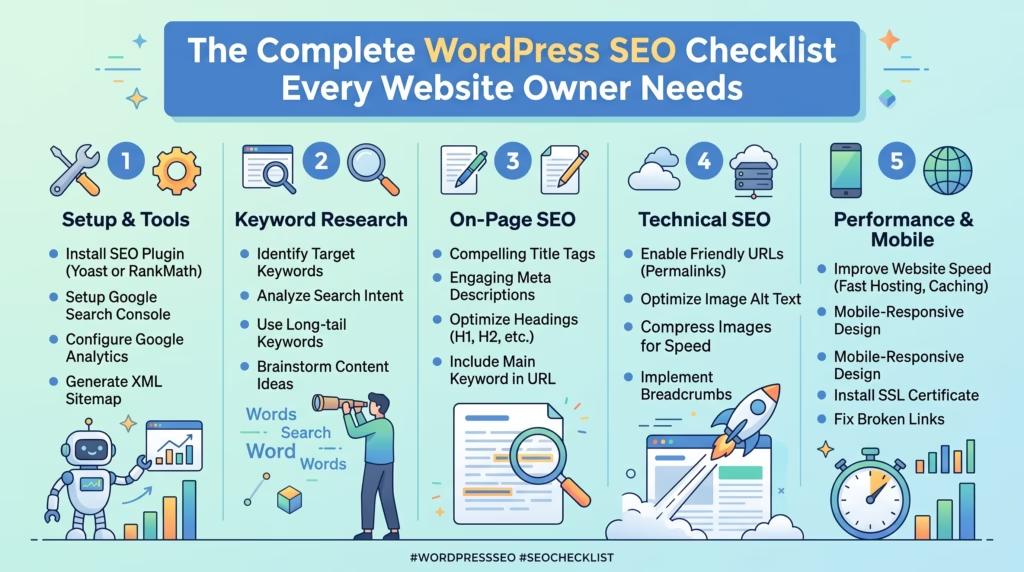
WordPress powers over 40 percent of all websites on the internet — but having a WordPress website does not automatically mean having a well-optimized one. Without the right SEO foundation in place, even the best WordPress website can struggle to rank, attract organic traffic, and generate leads or sales from search engines.
That is where a comprehensive WordPress SEO checklist makes all the difference. Rather than guessing which SEO tasks matter most, a structured checklist gives you a clear and prioritized roadmap covering every area — from initial setup and on-page optimization to technical SEO, content strategy, and ongoing monitoring.
Whether you are launching a brand new WordPress website or auditing an existing one, this WordPress SEO checklist covers every essential step you need to take to build a strong SEO foundation, improve your search rankings, and grow your organic traffic consistently over time.
Why You Need a WordPress SEO Checklist
SEO is not a single task — it is a collection of interconnected practices across setup, content, technical performance, and ongoing maintenance that all need to work together for your WordPress website to rank effectively.
Without a structured WordPress SEO checklist, it is easy to focus on the areas you are most familiar with while unknowingly leaving critical gaps that prevent your website from reaching its full ranking potential.
Here is why following a comprehensive WordPress SEO checklist matters for every website owner:
- SEO mistakes compound over time — a misconfigured robots.txt file, missing canonical tags, or duplicate content issues can silently suppress rankings for months before being discovered
- Google evaluates multiple signals simultaneously — content quality, page speed, mobile performance, backlinks, and technical health all influence rankings together — neglecting any one area creates a ceiling on how well your other efforts perform
- WordPress-specific issues are common — the flexibility that makes WordPress powerful also makes it easy to introduce SEO problems through plugin conflicts, theme changes, and permalink misconfigurations
- Consistent monitoring prevents ranking drops — SEO is not set and forget — regular auditing catches new issues before they damage traffic
- A checklist creates accountability — working through a structured WordPress SEO checklist ensures every important area is addressed rather than leaving SEO to intuition and guesswork
Our SEO & Growth Optimization service follows a comprehensive WordPress SEO checklist approach for every client website we work on — ensuring nothing critical is missed.
WordPress SEO Checklist — Initial Setup
The first section of any WordPress SEO checklist covers the foundational setup steps that every WordPress website needs before any other optimization work can be effective.
Install an SEO Plugin
WordPress does not include native SEO management tools out of the box — making an SEO plugin the most essential first installation for any WordPress SEO checklist.
- Install either Yoast SEO or Rank Math — the two most widely used and most capable WordPress SEO plugins available
- Configure your plugin’s basic settings including site name, separator, and default meta description format
- Enable XML sitemap generation through the plugin
- Configure social media metadata settings for Open Graph and Twitter Card tags
- Set up breadcrumb functionality if your theme supports it — breadcrumbs improve both user experience and search engine understanding of your site structure
- Connect the plugin to Google Search Console for direct integration if your chosen plugin supports it
An SEO plugin is the control center for your entire WordPress SEO checklist — and everything else in this guide is easier to implement with one properly installed and configured.
Set Up Google Search Console
Google Search Console is the single most important free tool available for any WordPress SEO checklist — providing direct data from Google about how your website is being crawled, indexed, and ranked.
- Verify ownership of your WordPress website in Google Search Console using the HTML tag method through your SEO plugin
- Add both the www and non-www versions of your domain and set a preferred version
- Submit your XML sitemap through the Sitemaps section
- Review the Coverage report for any existing indexing issues immediately after setup
- Check the Page Experience report for Core Web Vitals performance data
- Set up email alerts for any new manual actions or security issues detected on your website
Check Google Search Console at minimum monthly — and more frequently in the first weeks after launching or making significant changes to your WordPress website.
Set Up Google Analytics
Google Analytics provides the visitor behavior data that Google Search Console does not — telling you where your traffic comes from, how visitors behave on your website, and which pages and channels are generating the most conversions.
- Install Google Analytics 4 on your WordPress website through a plugin like Site Kit by Google or through your SEO plugin’s analytics integration
- Set up conversion goals for every key action on your website — form submissions, phone clicks, purchase completions, and email sign-ups
- Configure audience segments to distinguish between new and returning visitors and between different traffic sources
- Link your Google Analytics and Google Search Console accounts for a unified view of traffic and ranking data
- Set up regular monthly reporting to track progress against your baseline metrics
Without Google Analytics connected and properly configured, your WordPress SEO checklist efforts have no measurement foundation — making it impossible to know what is working and what is not.
Configure Your Permalink Structure
Your WordPress permalink structure determines the URL format of every page and post on your website — and getting it right from the start is a critical item on any WordPress SEO checklist.
- Go to Settings — Permalinks in your WordPress dashboard and select the Post Name option
- This creates clean readable URLs like yourdomain.com/your-page-title rather than ugly parameter-based URLs like yourdomain.com/?p=123
- Avoid including dates in your permalink structure — date-based URLs become outdated and create SEO disadvantages for evergreen content
- If changing permalink structure on an existing website, set up 301 redirects from old URLs to new ones before making the switch
- Keep individual page and post slugs short, descriptive, and keyword-focused — edit the auto-generated slug before publishing any new content
A clean keyword-friendly permalink structure is a foundational element of any WordPress SEO checklist that affects every page on your website simultaneously.
Submit Your XML Sitemap
An XML sitemap tells Google where to find all the important pages on your WordPress website — accelerating indexing and ensuring no important pages are missed during crawling.
- Generate your XML sitemap through your SEO plugin — both Yoast SEO and Rank Math create sitemaps automatically
- Submit your sitemap URL through Google Search Console under the Sitemaps section
- Ensure your sitemap only includes pages you want indexed — exclude thank you pages, login pages, and admin pages
- Check your sitemap regularly for errors flagged in Google Search Console
- Update and resubmit your sitemap any time you make significant structural changes to your website
Sitemap submission is one of the quickest and most impactful steps in any WordPress SEO checklist — particularly for newer websites that Google has not yet fully crawled and indexed.
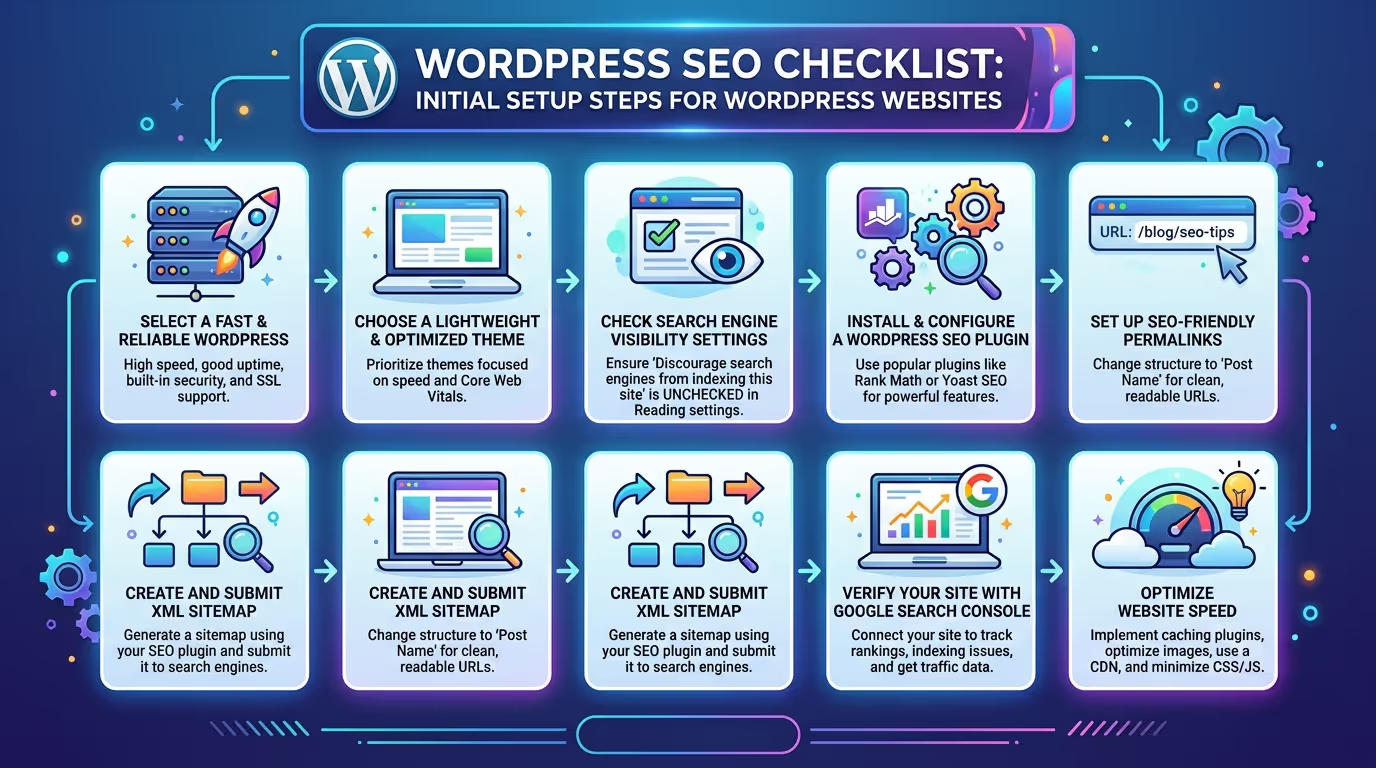
A missing SEO plugin, unverified Search Console property, or incorrect permalink structure can silently limit your rankings from day one — and many WordPress website owners do not realize these foundational issues exist until their traffic stalls.
Our SEO & Growth Optimization and Custom WordPress Website Development services ensure every WordPress website we build or optimize starts with a complete and correctly configured SEO foundation.
Get in touch with TecHippo today for a free consultation and let’s audit your WordPress SEO setup from the ground up.
WordPress SEO Checklist — On Page SEO
On-page SEO covers the optimization of individual pages and posts on your WordPress website. It is one of the most directly impactful sections of any WordPress SEO checklist because it directly determines how Google understands and ranks each page.
Optimize Your Page Titles and Meta Descriptions
Your page title and meta description are what appear in Google search results — they determine whether searchers click your listing or scroll past it to a competitor.
- Write a unique meta title for every page and post that includes the primary keyword and stays under 60 characters
- Write a compelling meta description for every page that expands on the title, includes the keyword naturally, and gives searchers a clear reason to click — keep it under 160 characters
- Never leave meta titles or descriptions on auto-generated defaults — these rarely include the right keywords and never communicate value as effectively as manually written ones
- Treat your meta title as an advertisement headline — it needs to stand out in a list of competing results
- Avoid duplicate meta titles across multiple pages — each page should have a unique title that accurately reflects its specific content
Optimized meta titles and descriptions are one of the most accessible and highest-impact items on any WordPress SEO checklist — and can be implemented immediately using your SEO plugin.
Use Proper Heading Structure H1 to H3
Your heading structure — H1, H2, and H3 tags — helps Google understand the hierarchy and organization of your content, while also making your pages more readable and scannable for visitors.
- Use exactly one H1 tag per page containing the primary keyword for that page
- Use H2 tags for main section headings that break the content into logical topic areas
- Use H3 tags for subsections within H2 sections — never skip heading levels
- Ensure headings accurately describe the content that follows them — do not use headings purely for visual styling
- Include relevant secondary keywords naturally in H2 and H3 headings where they fit contextually
- Never use heading tags on elements that are not actually headings — buttons, captions, and navigation items should use appropriate HTML tags rather than headings
A clear and logical heading hierarchy is one of the most fundamental items on any WordPress SEO checklist — and one of the most commonly implemented incorrectly on WordPress websites.
Optimize Your Images with Alt Text
Every image on your WordPress website should have descriptive alt text that tells Google what the image depicts — contributing to both image search rankings and overall page relevance signals.
- Write unique descriptive alt text for every image that accurately describes what is shown in the image
- Include the primary keyword in the alt text of the most important images on the page where it fits naturally — never force keywords into alt text where they do not make contextual sense
- Keep alt text concise — one to two sentences maximum — and focused on describing the image rather than keyword stuffing
- Ensure decorative images that convey no meaningful content use empty alt attributes rather than descriptive text
- Compress and convert images to WebP format before uploading — image optimization for speed is a related but equally important item on your WordPress SEO checklist
Alt text optimization is a quick but frequently overlooked item on many WordPress SEO checklist implementations that contributes to both accessibility and search visibility.
Write SEO Friendly URLs
Every page and post URL on your WordPress website should be clean, readable, and keyword-focused — contributing to both search engine understanding and user click-through rates from search results.
- Edit the auto-generated URL slug for every new page and post before publishing — WordPress often generates slugs that include unnecessary words
- Keep slugs short — ideally three to five words — and include the primary keyword
- Use hyphens to separate words in slugs — never underscores
- Remove stop words like and, the, of, and in from slugs where removing them does not affect clarity
- Never change URLs on published pages without setting up a 301 redirect — changing an established URL without a redirect destroys the ranking authority that page has built
SEO-friendly URLs are a foundational item on any WordPress SEO checklist that affects every page on your website and contributes to both rankings and click-through rates.
Add Internal Links Throughout Your Content
Internal links connect your pages together, distribute ranking authority across your website, and help Google understand the relationship and relative importance of your content.
- Link from blog posts and informational content to relevant service pages and landing pages using descriptive keyword-rich anchor text
- Ensure your most important pages — service pages, cornerstone content, and high-converting landing pages — receive internal links from multiple relevant pages
- Avoid orphan pages — pages with no internal links pointing to them are difficult for Google to discover and rank
- Add internal links to new content immediately after publishing rather than waiting for a future audit
- Review and update internal links on older content regularly as new relevant pages are published
A strong internal linking structure is one of the most underutilized items on any WordPress SEO checklist and can significantly improve the ranking performance of important pages without requiring any additional external links.
Target One Primary Keyword Per Page
Keyword focus is essential for effective on-page SEO. Trying to rank a single page for multiple unrelated keywords dilutes the page’s topical relevance and reduces its ranking potential for all of them.
- Assign one primary keyword to each page or post before writing — and build the entire page around that keyword’s search intent
- Use your primary keyword in the H1, the first paragraph, the meta title, the meta description, the URL slug, and naturally throughout the content
- Use semantically related secondary keywords throughout the content to reinforce topical relevance without keyword stuffing
- Maintain a keyword density of approximately 1.5 to 2 percent for your primary keyword — enough to signal relevance without triggering over-optimization penalties
- Use a keyword research tool like Ahrefs, Ubersuggest, or Google Keyword Planner to identify keywords with the right balance of search volume and competition before assigning them to pages
Single keyword focus per page is one of the most important strategic principles in any WordPress SEO checklist — and one that most WordPress website owners benefit from applying more rigorously.
WordPress SEO Checklist — Technical SEO
Technical SEO ensures Google can access, crawl, render, and index your WordPress website correctly. Without a solid technical foundation the rest of your WordPress SEO checklist efforts will underperform regardless of how strong your content is.
Improve Website Speed and Core Web Vitals
Page speed and Core Web Vitals are official Google ranking signals. A slow WordPress website consistently underperforms in competitive search results — making speed improvement one of the highest-impact items on any WordPress SEO checklist.
- Check your Core Web Vitals scores in Google Search Console and Google PageSpeed Insights for both desktop and mobile
- Install a caching plugin like WP Rocket or LiteSpeed Cache to reduce server load and improve page delivery speed
- Compress and convert all images to WebP format to reduce page weight
- Minify CSS and JavaScript files to reduce the amount of code that needs to load on each page
- Choose a hosting provider with fast server response times — poor TTFB undermines all other speed optimizations
- Use a CDN to serve assets from servers geographically close to your visitors
Speed optimization is one of the most technically involved items on any WordPress SEO checklist — and one where professional expertise delivers the most consistent results. Our Website Speed Optimization service specifically targets Core Web Vitals improvements as part of every engagement.
Ensure Your Website Is Mobile Friendly
Since Google uses mobile-first indexing, your WordPress website’s mobile experience is what Google evaluates for ranking purposes — making mobile friendliness a non-negotiable item on any WordPress SEO checklist.
- Use Google’s Mobile-Friendly Test tool to assess your website’s mobile performance and identify specific issues
- Check the Mobile Usability report in Google Search Console for site-wide mobile issues flagged by Google’s crawler
- Ensure your WordPress theme is fully responsive across all screen sizes
- Test on real mobile devices — not just browser emulation — across your most important pages
- Fix tap target size issues, font size problems, and content wider than screen errors flagged in the Mobile Usability report
Fix Broken Links and Redirect Errors
Broken links and redirect chains waste crawl budget, create poor user experiences, and dilute the link equity flowing through your WordPress website — making them important items to address on any WordPress SEO checklist.
- Use a plugin like Broken Link Checker or a tool like Screaming Frog to identify all broken links across your website
- Fix broken internal links by updating them to point to the correct live page
- Set up 301 redirects for broken external links where the destination page has moved
- Clean up redirect chains by pointing redirects directly to their final destination rather than through intermediate URLs
- Check for and resolve redirect loops that cause infinite redirect cycles
Regular broken link auditing is an ongoing maintenance task that belongs on every WordPress SEO checklist and is covered as part of our WordPress Bug Fixing & Support and Monthly Website Management Plans.
Use SSL and Enable HTTPS
An SSL certificate and HTTPS are basic but essential requirements for any WordPress website that wants to rank well — making them fundamental items on any WordPress SEO checklist.
- Ensure your WordPress website has a valid SSL certificate installed — most quality hosting providers include one free through Let’s Encrypt
- Update your WordPress address and site address to HTTPS in Settings — General
- Set up 301 redirects from all HTTP URLs to their HTTPS equivalents
- Fix any mixed content warnings where a page is served over HTTPS but loads some resources over HTTP
- Verify your SSL certificate is not expired and will not expire soon — an expired certificate causes security warnings that immediately damage trust and rankings
Set Up Canonical Tags to Avoid Duplicate Content
Duplicate content occurs when the same or very similar content appears on multiple URLs — confusing Google and splitting ranking signals across multiple pages instead of concentrating them on one.
- Ensure your SEO plugin is automatically adding canonical tags to all pages and posts pointing to the preferred version
- Set a preferred domain version — either www or non-www — and ensure all other versions redirect to it
- Add canonical tags to paginated content, category pages, and tag pages where duplicate content issues commonly arise on WordPress websites
- Check for and resolve parameter-based URL duplication where the same content is accessible via multiple URL formats
- Use Google Search Console’s URL Inspection tool to verify which version of a page Google is treating as canonical
Check and Optimize Your Robots.txt File
Your robots.txt file controls which pages and sections of your WordPress website search engine crawlers are allowed to access — making it one of the most technically critical items on any WordPress SEO checklist.
- Access your robots.txt file at yourdomain.com/robots.txt and review its contents carefully
- Ensure no important pages or sections are accidentally blocked from crawling
- Block admin pages, login pages, and staging environment URLs from being crawled and indexed
- Avoid blocking CSS and JavaScript files that Google needs to render your pages correctly
- Use Google Search Console’s robots.txt tester to verify your file is configured correctly before and after making any changes
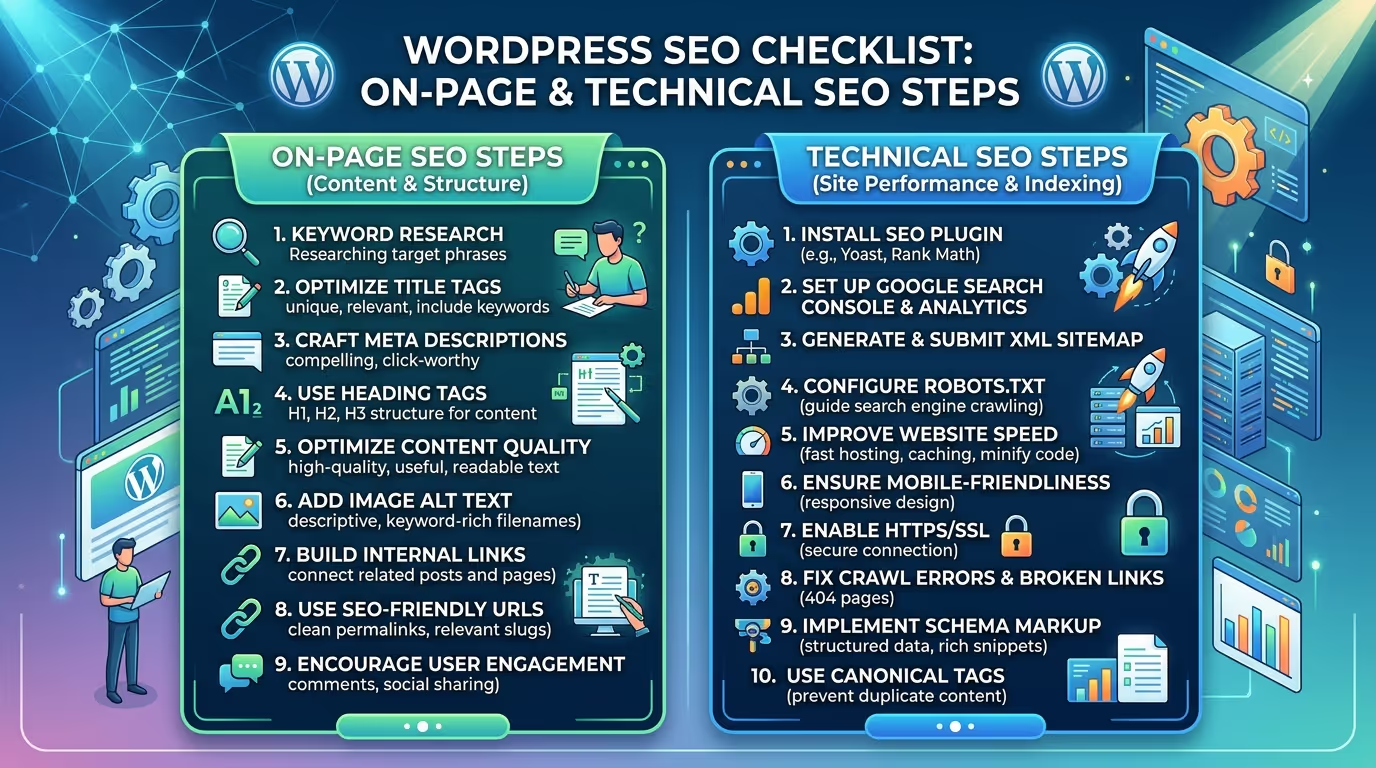
Technical SEO issues are among the most common reasons WordPress websites fail to rank — and most of them are completely invisible to the naked eye until rankings and traffic start declining.
Our SEO & Growth Optimization, Website Speed Optimization, and Monthly Website Management Plans cover every item in the technical section of this WordPress SEO checklist — identifying and fixing the issues that are silently holding your rankings back.
Contact TecHippo today and let’s conduct a full technical SEO audit of your WordPress website.
WordPress SEO Checklist — Content SEO
Content is still the most important ranking factor in Google’s algorithm — and a WordPress SEO checklist that does not cover content strategy is fundamentally incomplete.
Conduct Keyword Research Before Writing
Every piece of content on your WordPress website should be built around a keyword that your target audience is actively searching for — and identifying the right keywords requires research rather than guesswork.
- Use keyword research tools like Ahrefs, Ubersuggest, Google Keyword Planner, or Semrush to identify keywords relevant to your business and target audience
- Evaluate keywords based on search volume, keyword difficulty, and most importantly search intent — the reason behind the search
- Target a mix of high-volume competitive keywords and lower-volume long-tail keywords that are more achievable for newer or lower-authority websites
- Group related keywords into topic clusters and plan content that covers the full topic comprehensively rather than individual isolated keywords
- Research competitor content for your target keywords to understand what level of depth and quality is required to rank
Keyword research is the strategic foundation of the content section of any WordPress SEO checklist — and the quality of your research directly determines the quality of the SEO results your content can achieve.
Write High-Quality Long-Form Content
Google consistently ranks comprehensive well-written content higher than thin or superficial content — making content quality the most important single factor in any WordPress SEO checklist content strategy.
- Write content that fully answers the search intent behind your target keyword — not just partially addresses it
- Aim for long form content on competitive topics — comprehensive guides, detailed tutorials, and in-depth analysis consistently outperform short posts in competitive search results
- Use your primary keyword at a density of approximately 1.5 to 2 percent — naturally woven throughout the content rather than artificially inserted
- Cover related subtopics and questions that searchers are likely to have alongside the main topic — this builds topical authority and helps rank for semantic keyword variations
- Write in a clear conversational style that is easy for your target audience to read and understand — readability is both a user experience factor and an indirect SEO signal through engagement metrics
- Update and publish consistently — Google favors websites that regularly publish new high-quality content over those that publish occasionally
Update and Refresh Old Content Regularly
Content freshness is an important ranking signal for many query types — and updating existing content is one of the most efficient ways to improve rankings across your entire WordPress SEO checklist content strategy.
- Conduct a content audit every six months to identify posts and pages with declining traffic or rankings
- Update statistics, examples, and references to keep content current and accurate
- Expand thin content by adding new sections, additional depth, and updated information
- Add new internal links to updated content pointing to newer related pages that did not exist when the original was published
- Update the published date after making significant content improvements — but only when the update is genuinely substantial
- Consolidate underperforming content on similar topics into single comprehensive pieces that target the combined keyword opportunity more effectively
Content refreshing consistently produces ranking improvements with significantly less effort than creating entirely new content — making it one of the highest-efficiency items on any WordPress SEO checklist.
Add Schema Markup to Key Pages
Schema markup provides Google with structured information about the content of your pages — helping it understand context more accurately and unlocking enhanced search result features like rich snippets that increase click-through rates.
- Use your SEO plugin to add Article schema to blog posts and informational content
- Add FAQPage schema to pages with frequently asked questions sections to unlock FAQ rich results
- Add LocalBusiness schema to your homepage and contact page if your business serves a local area
- Add Service schema to your service pages to provide Google with structured information about your offerings
- Test all schema markup using Google’s Rich Results Test tool to confirm it is valid and eligible for enhanced search result display
Schema markup is a relatively quick but highly impactful addition to any WordPress SEO checklist — particularly for businesses competing in local search where rich results provide significant visibility advantages.
Optimize for Featured Snippets
Featured snippets are the boxed answers that appear at the top of Google search results above all other organic listings — often called position zero. Optimizing for them is an advanced but highly valuable item on any WordPress SEO checklist.
- Identify featured snippet opportunities by searching for your target keywords and checking whether a snippet already exists — if it does, study its format and write content that answers the query more completely
- Structure content to answer questions directly and concisely — Google typically pulls featured snippet content that provides a clear direct answer in the first paragraph below a relevant heading
- Use numbered lists for step-by-step process content — list-format featured snippets are among the most commonly displayed types
- Use definition-style opening sentences for informational content — “X is a…” format content frequently appears in definition featured snippets
- Use tables for comparative data — table-format featured snippets are increasingly common for comparison queries
WordPress SEO Checklist — Off Page SEO
Off-page SEO covers the factors outside your WordPress website that influence your search rankings — primarily backlinks and authority signals that tell Google your website is trusted and credible.
Build High-Quality Backlinks
Backlinks — links from other websites pointing to yours — remain one of the most powerful ranking factors in Google’s algorithm. Building high quality backlinks is an essential component of any comprehensive WordPress SEO checklist.
- Focus on earning backlinks from websites that are relevant to your industry and have genuine authority — a single link from a relevant high-authority website is worth more than dozens of links from irrelevant low-quality ones
- Create linkable assets — comprehensive guides, original research, useful tools, and data-driven resources — that give other websites a genuine reason to link to you
- Use digital PR and outreach to promote your content to relevant publications, bloggers, and industry websites
- Guest post on relevant industry websites with genuinely valuable content — including a contextual link back to a relevant page on your WordPress website
- Monitor your backlink profile using a tool like Ahrefs or Moz and disavow any toxic or spammy links that could be harming your rankings
Our SEO & Growth Optimization service includes backlink strategy as part of every comprehensive SEO engagement for WordPress websites.
Set Up and Optimize Google Business Profile
For any WordPress website serving a local area, Google Business Profile is one of the most impactful off-page SEO assets available — and one of the most commonly overlooked items on a WordPress SEO checklist for local businesses.
- Claim and verify your Google Business Profile listing if you have not already done so
- Complete every section of your profile — business name, address, phone number, website, hours, categories, and description
- Ensure your business name, address, and phone number on your Google Business Profile exactly match what is listed on your WordPress website
- Actively request reviews from satisfied customers — review count and quality are significant local ranking factors
- Post regular updates, offers, and photos to your Google Business Profile to signal active business presence to Google
Leverage Social Signals
While social media links are not direct ranking factors, social signals — shares, engagement, and brand mentions — contribute to overall online authority and can indirectly support SEO performance by driving traffic and earning natural backlinks.
- Share every new blog post and page across your social media channels immediately after publication
- Engage actively with comments and shares to increase the reach and visibility of your content
- Make social sharing easy on your WordPress website with clearly visible share buttons on blog posts
- Build an active presence on the social platforms where your target audience is most engaged
- Monitor brand mentions across social media and the web — unlinked brand mentions can sometimes be converted into backlinks through outreach
WordPress SEO Checklist — Ongoing Monitoring
SEO is not a one-time task. The final section of any comprehensive WordPress SEO checklist covers the ongoing monitoring practices that protect your rankings and identify new growth opportunities continuously.
Monitor Rankings and Traffic Monthly
Regular ranking and traffic monitoring is the only way to know whether your WordPress SEO checklist efforts are producing results — and to catch ranking drops before they become serious traffic losses.
- Track keyword rankings for your most important pages using a tool like Ahrefs, Semrush, or Ubersuggest
- Monitor organic traffic trends in Google Analytics — compare month over month and year over year to identify genuine trends versus seasonal fluctuations
- Set up automated alerts in Google Analytics for significant traffic drops that might indicate a ranking problem or technical issue
- Review your top landing pages monthly to confirm they are maintaining their positions and not losing ground to competitors
- Identify new keyword ranking opportunities where your pages are appearing in positions 5 to 15 — these represent the highest-potential improvement targets for focused optimization
Conduct Regular SEO Audits
A full WordPress SEO checklist audit should be conducted at least every three to six months to catch new issues and identify optimization opportunities across your entire website.
- Run a full site crawl using Screaming Frog or a similar tool to identify broken links, missing meta tags, duplicate content, and other technical issues
- Review Google Search Console’s full suite of reports — Coverage, Mobile Usability, Page Experience, and Core Web Vitals — for any new warnings or errors
- Audit your content library for pages that have declined in traffic or rankings and prioritize them for refresh and improvement
- Check your backlink profile for new toxic links that should be disavowed
- Review your top competitors’ rankings and content to identify gaps in your own content strategy that represent ranking opportunities
Regular auditing is the ongoing practice that separates WordPress websites with consistently growing organic traffic from those that plateau or decline after an initial SEO push. Our Monthly Website Management Plans include regular SEO monitoring as a standard part of the service.
Track and Fix New Crawl Errors
New crawl errors appear regularly on active WordPress websites — through content deletions, URL changes, plugin updates, and theme modifications — making ongoing crawl error monitoring an essential item on any WordPress SEO checklist.
- Check the Coverage report in Google Search Console weekly for any new 404 errors, server errors, or indexing issues
- Fix 404 errors immediately by either restoring the deleted page or setting up a 301 redirect to the most relevant existing page
- Investigate and resolve any new server errors that indicate hosting or plugin conflicts causing pages to be inaccessible to Google’s crawler
- Monitor the Valid with warnings section for pages that are indexed but have issues worth addressing
- Set up email notifications in Google Search Console for new manual actions or security issues that require immediate attention
Common WordPress SEO Mistakes to Avoid
Even website owners actively working through a WordPress SEO checklist often make avoidable mistakes that limit their results. Here are the most common ones to watch out for on WordPress websites.
- Using auto-generated meta titles and descriptions that never include the right keywords or communicate value to searchers
- Neglecting mobile optimization while focusing exclusively on desktop SEO — a critical mistake given Google’s mobile-first indexing
- Installing too many SEO plugins — using both Yoast SEO and Rank Math simultaneously creates conflicts and duplicate output that confuses Google
- Ignoring Core Web Vitals and focusing only on content while letting performance issues accumulate
- Keyword stuffing — using a keyword so frequently it reads unnaturally and triggers over-optimization penalties
- Publishing thin content — short low-value posts that do not fully answer search intent and cannot compete with comprehensive competitor content
- Never updating old content — allowing previously well-ranking content to decline as it becomes outdated and competitors publish fresher more comprehensive alternatives
- Setting the wrong indexing options — accidentally blocking pages from indexing through a misconfigured noindex tag or an incorrect robots.txt setting is one of the most damaging and most common WordPress-specific mistakes
- Not tracking conversions — optimizing for traffic without measuring whether that traffic actually converts into leads and sales removes the business context from all SEO decisions
- Treating SEO as a one-time task rather than an ongoing practice — the websites that consistently outrank competitors are those that treat their WordPress SEO checklist as a continuous cycle of implementation and improvement
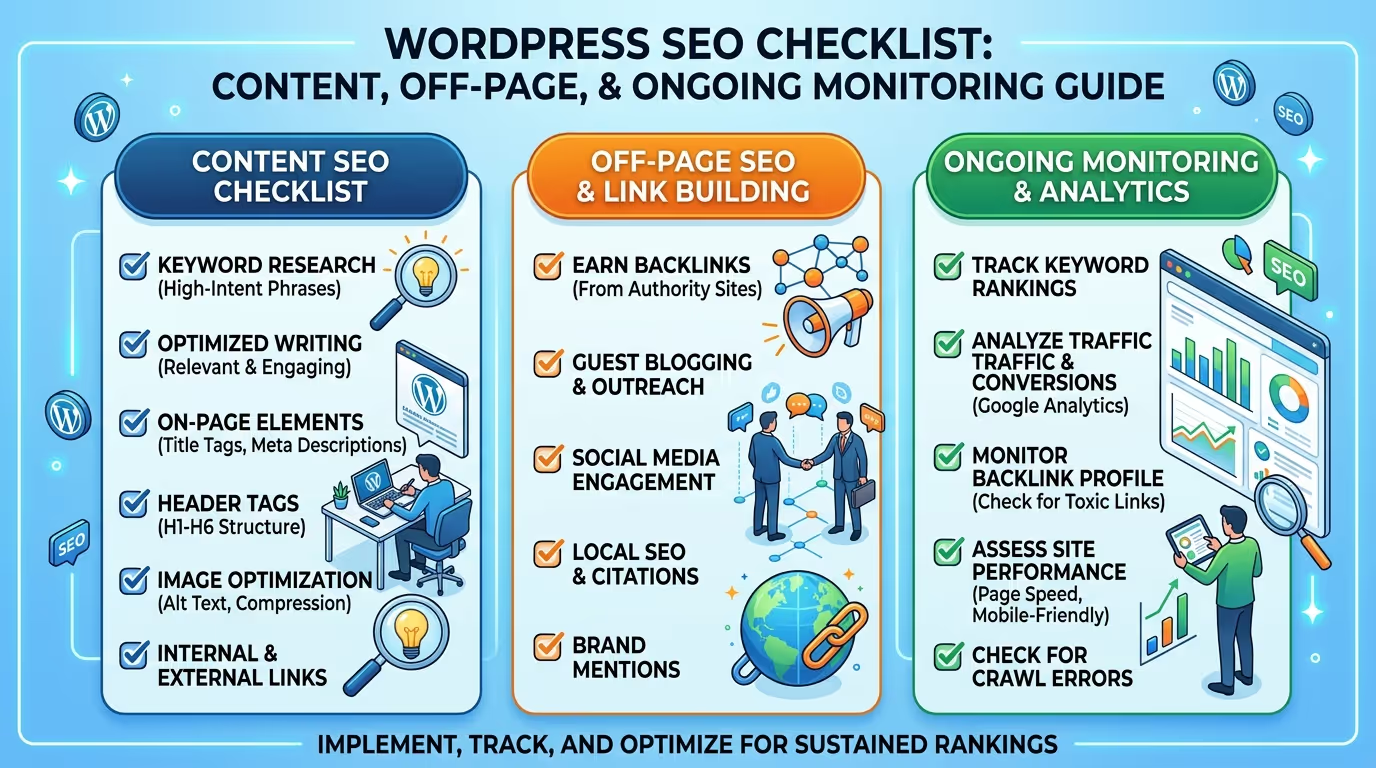
Working through a complete WordPress SEO checklist across setup, on-page, technical, content, off-page, and ongoing monitoring is a significant investment of time and expertise — and getting any one section wrong can limit the results of everything else.
At TecHippo our SEO & Growth Optimization, Website Speed Optimization, Custom WordPress Website Development, and Monthly Website Management Plans cover every item on a comprehensive WordPress SEO checklist — so your WordPress website is fully optimized, properly indexed, and consistently growing its organic traffic and search rankings.
Book a free consultation with TecHippo today and let’s build the SEO foundation your WordPress website needs to rank higher and grow faster.
Conclusion
A comprehensive WordPress SEO checklist is the most structured and effective way to ensure your WordPress website is fully optimized for search engines across every dimension that matters — from foundational setup and on-page optimization to technical performance, content strategy, off-page authority, and ongoing monitoring.
SEO is not a sprint — it is a consistent ongoing practice of implementation, measurement, and improvement. The WordPress websites that rank highest and grow their organic traffic most consistently are those whose owners treat their WordPress SEO checklist as a living document rather than a one-time task.
By working through every section of this WordPress SEO checklist and committing to the ongoing monitoring and improvement practices in the final section, you give your WordPress website the strongest possible foundation for long-term search visibility, organic traffic growth, and business results.

 Reach us on WhatsApp